


- 1. Key Takeaways
- 2. AI Agent vs AI Assistant: Head-to-Head Comparison
- 3. What Is an AI Assistant?
- 4. What Is an AI Agent?
- 5. The Autonomy Spectrum: Chatbots, Assistants, Copilots, and Agents
- 6. AI Agent vs AI Assistant Examples by Business Function
- 7. How to Spot "Agent Washing" Before You Buy or Build
- 8. What It Takes to Build Each One
- 9. AI Agent vs AI Assistant for Business: Which One Do You Need?
- 10. How Boomdevs Solves the Agent-or-Assistant Decision
- 11. Frequently Asked Questions
Summarize with
You want AI to take work off your team’s plate. One proposal pitches an AI assistant. Another pitches an autonomous agent, and both sound like the answer.
Deciding on AI agent vs AI assistant for business isn’t about which is smarter. It comes down to two things: how many steps the work takes, and how much it costs you when the AI gets one wrong. Here’s how to work out which side your use case falls on.
Key Takeaways
- An AI assistant waits for your prompt, does one task, and hands the result back for you to review. An AI agent takes a goal, plans the steps, uses your tools, and keeps going until the job is done.
- Pick an assistant when a person should approve every output, or when the work is a single step like drafting, summarizing, or answering.
- Pick an agent when the work spans several steps and systems, repeats often, and has clear rules for what the AI may and may not touch.
- Agents cost more to build and run. Gartner expects over 40% of agentic AI projects to be canceled by the end of 2027, mostly over cost, unclear value, and weak risk controls.
- In the AI agent vs AI assistant decision, most businesses get the best result by starting with an assistant, then handing the repeatable parts to an agent.
AI Agent vs AI Assistant: Head-to-Head Comparison
An AI assistant responds, while an AI agent acts. Ask an assistant to draft a renewal email and you get a draft. Give an agent the goal “renew every contract expiring this quarter” and it finds the accounts, writes the emails, sends them, and logs the replies.
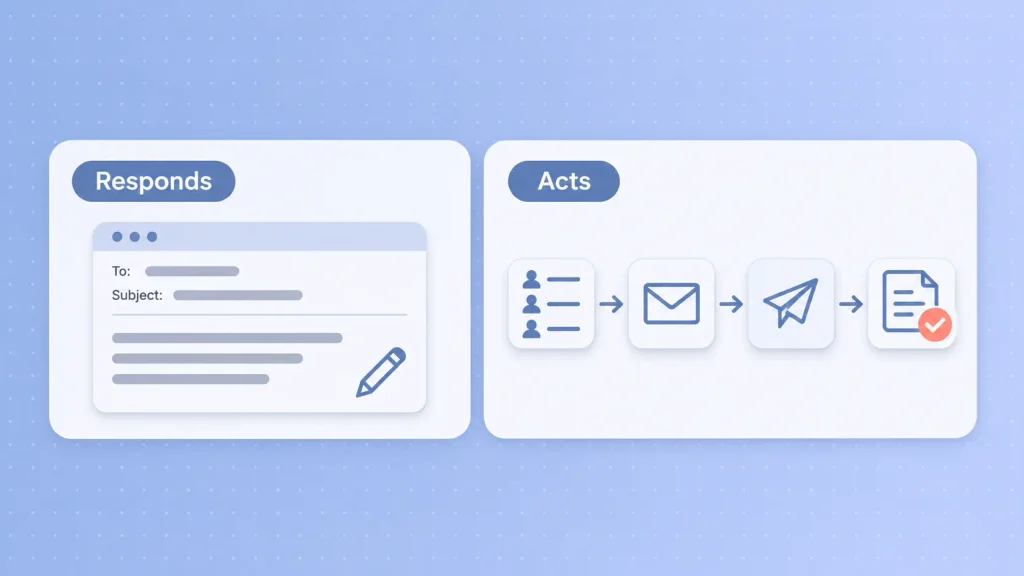
That single difference is the core of the AI agent vs AI assistant debate. It changes how you build, govern, and pay for each one. It’s also why a request for custom AI agent development usually starts with a harder question than “which model should we use?” Here’s how AI agents vs AI assistants compare on the points that matter for a business decision:
| Dimension | AI assistant | AI agent |
| What starts it | Your prompt | A goal or a trigger |
| Who drives each step | You | The agent |
| Tool use | Optional, on request | Core to the job |
| Memory | Mostly within a session | Across steps and tasks |
| When it fails | You fix the output | It retries, escalates, or stops |
| Setup effort | Low to moderate | High: permissions, approvals, monitoring |
| Cost to run | Lower, one call per request | Higher, many calls per goal |
| Best for | Drafting, answering, summarizing | Multi-step workflows across systems |
Read the table top to bottom and one pattern shows up. Every row where the agent wins is also a row where it needs more engineering and more trust from you.
Who Drives the Workflow
The simplest difference between AI agent and AI assistant tools comes down to one question: after you give it a task, who decides what happens next? With an assistant, you do. It answers, then waits for your next message.
With an agent, the system decides. It reads the result of its last step and picks the next one on its own. You set the goal at the start and review the outcome at the end.
Same Models, Different Wrapper
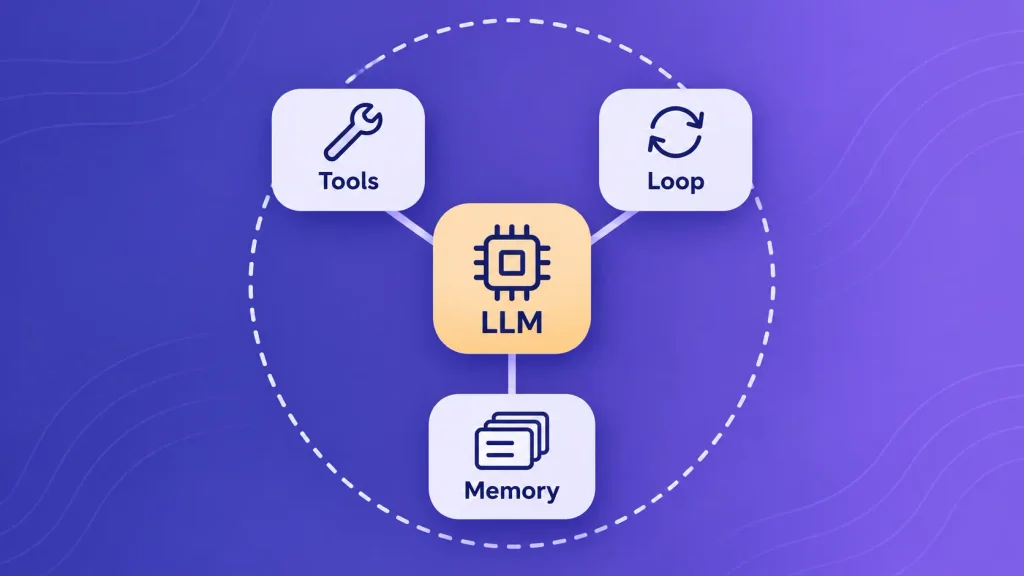
Under the hood, both usually run on the same large language models (LLMs). The model itself isn’t the difference between AI agent and AI assistant products. What changes is everything wrapped around it.
An agent adds three things on top of the model:
- Tool access: the ability to call APIs, query databases, update your CRM, or send messages, not just write text about them.
- A control loop: plan, act, check the result, adjust, repeat until the goal is met or a stop rule kicks in.
- Working memory: a record of what it has already done, so step five builds on steps one through four.
Strip those away and you’re back to an assistant. That’s why “agent” can’t just be a label on a box. It’s an architecture, and you can check whether it’s actually there.
What Is an AI Assistant?
An AI assistant is the helper you talk to. ChatGPT in its default chat mode, Microsoft Copilot, Google Gemini, and Siri all work this way. You ask, it answers, and nothing happens until you ask again.
That reactive design is a feature, not a flaw. A person stays in charge of every decision, which keeps the risk low and the setup simple.
How AI Assistants Work
Every assistant runs the same basic loop, no matter how polished the interface looks. It goes like this:
- You type or say a request in plain language.
- The assistant works out what you mean, often pulling context from your documents or past messages.
- It returns an answer, a draft, a summary, or a suggested action.
- You review it, edit it, or ask a follow-up.
- It waits for your next instruction.
Step five is the defining one. The assistant never moves the work forward on its own, so you always see the output before anything leaves the building.
Where AI Assistants Shine
Assistants earn their keep on work where a quick first draft saves real time and a human check is cheap. Typical wins look like this:
- Writing support: first drafts of emails, proposals, job posts, and support replies.
- Knowledge lookup: answering staff questions from your policies, docs, or product specs.
- Summaries: turning long threads, call notes, or reports into a few lines you can act on.
- Analysis help: explaining a spreadsheet, spotting trends, or suggesting the next question to ask.
Most of these need little integration work. If your data is in decent shape, you can have a useful internal assistant running in weeks, not quarters.
Where AI Assistants Fall Short
The same design that keeps assistants safe also caps what they can do. They need a prompt for every step, so a 10-step process still needs 10 nudges from a person.
They also tend to forget. Unless you build memory in, each conversation starts close to scratch, and your team ends up re-explaining context. When the bottleneck is the handoffs between tasks rather than the tasks themselves, an assistant won’t clear it.
What Is an AI Agent?
An AI agent is software that takes a goal and works toward it with little step-by-step direction. It decides which tools to use, in what order, and what to do when a step fails. If you want the full mechanics, here’s how an AI agent works under the hood.
The key word is “goal,” and it’s where the AI agent vs AI assistant split really starts. You don’t tell an agent how to reconcile last month’s invoices. You tell it to get them reconciled, and it figures out the steps within the limits you’ve set.
How AI Agents Work
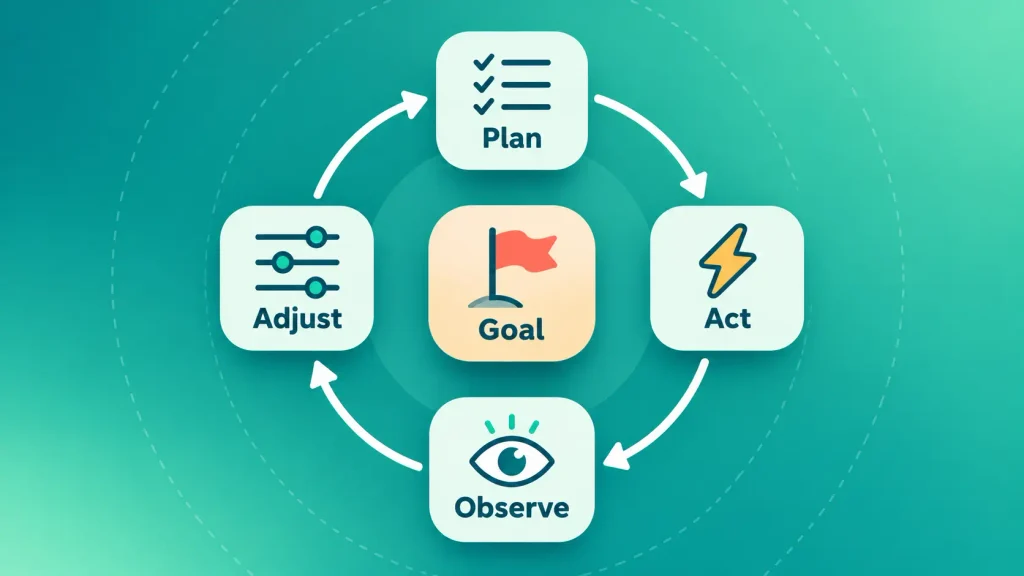
Agents run a loop that keeps turning until the job is done or a rule stops it. The common pattern looks like this:
- Receive a goal, either from a person or from a trigger like a new ticket or a failed payment.
- Plan by breaking the goal into smaller steps.
- Act by calling a tool: a database query, an API request, a message.
- Observe the result and check it against the goal.
- Adjust the plan, retry a failed step, or escalate to a human.
- Repeat until the goal is met or a stop condition is reached.
Not every agent is built the same way. Some follow simple rules, while others plan across many steps or coordinate with other agents, and the different types of AI agents suit different jobs.
Where AI Agents Shine
Agents pay off where the work is repetitive, spans several systems, and follows rules you can write down. A few examples:
- Order and refund handling: checking the order, confirming eligibility, issuing the refund, and updating the record.
- Lead follow-up: enriching new leads, scoring them, and sending the right sequence.
- Monitoring: watching inventory, contracts, or uptime and acting before a problem lands on your desk.
- Back-office reconciliation: matching invoices, payments, and purchase orders across tools.
In each case, the value isn’t one clever answer. It’s dozens of small, correct actions taken without anyone babysitting the process.
Where AI Agents Fall Short
Autonomy cuts both ways, and it’s the riskiest side of the AI agent vs AI assistant trade-off. An agent that misreads one step can carry that mistake through every step after it, and at scale the damage spreads fast.
Agents can also get stuck, retrying the same failed approach in a loop. Every extra step is another model call, so costs climb with complexity. And because agents touch live systems, you need clear ethical guardrails for agent design before one goes anywhere near customer data.
The Autonomy Spectrum: Chatbots, Assistants, Copilots, and Agents
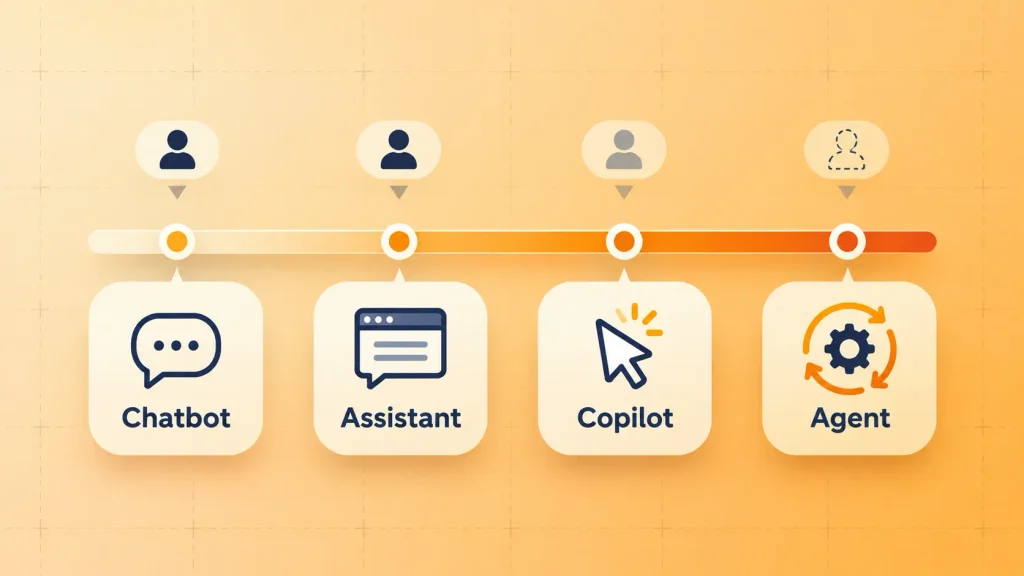
“Assistant” and “agent” aren’t the only two options. Most AI products sit somewhere on a spectrum of autonomy, and knowing where a tool sits tells you how much oversight it needs.
Put an AI agent vs chatbot vs copilot vs assistant side by side, and here’s how they line up, from least to most independent:
| Type | Typical example | Who picks the next step | Your role |
| Chatbot | FAQ bot on a website | A script or knowledge base | Write the answers |
| AI assistant | ChatGPT, Gemini | You, every time | Prompt and review |
| AI copilot | Coding or writing copilot inside an app | You, with suggestions | Accept or reject |
| AI agent | Refund or reconciliation agent | The agent | Set goals and limits |
The jump from copilot to agent is the big one. Everything to its left keeps a person in the loop by default, and everything to its right has to be designed to bring one back in.
Where Chatbots Fit
A chatbot answers questions from a fixed script or knowledge base. It’s cheap and fast for high-volume, predictable queries like store hours or return policies. We’ve covered how agents differ from chatbots in detail, so the short version of the AI agent vs chatbot vs copilot question: a chatbot answers, a copilot suggests, and an agent resolves.
Where Copilots Fit
A copilot is an assistant embedded inside the software your team already uses. It sees what you’re working on and suggests the next move, but you still press the button.
That makes copilots a strong middle ground in any AI agent vs chatbot vs copilot comparison. You get context-aware help without handing over control, which is why many teams build an AI copilot for internal tools before they trust a full agent with live actions.
AI Agent vs AI Assistant Examples by Business Function
The clearest way to compare AI agents vs AI assistants is to put both on the same job. In each case below, the assistant makes one person faster, while the agent runs the whole workflow:
| Function | What an AI assistant does | What an AI agent does |
| Customer support | Drafts a reply for the rep to send | Verifies the order, issues the refund, closes the ticket |
| Sales | Writes a follow-up email on request | Scores new leads and runs the follow-up sequence |
| Finance ops | Explains a variance in a report | Matches invoices to payments and flags exceptions |
| HR | Answers policy questions for staff | Collects documents and schedules onboarding steps |
| IT | Suggests a fix for an error message | Detects the incident, restarts the service, logs it |
| Front desk | Suggests replies to booking requests | Takes calls, books appointments, and sends reminders |
Notice that the agent column always involves writing to a system, not just reading from one. That write access is the practical difference between AI agent and AI assistant setups, and it’s where your risk changes.
Support is usually where businesses try agents first, so check where agents help and where they don’t in customer service before you commit. Phone-heavy teams often go one step further with an AI voice agent that answers and acts on calls. Sales teams, meanwhile, have a growing set of AI agents built for sales workflows to compare.
How to Spot “Agent Washing” Before You Buy or Build
Plenty of products called “agents” are assistants or chatbots with a new label. Gartner calls this agent washing, and it estimates that only about 130 of the thousands of companies selling agentic AI offer the real thing.
You don’t need to read the code to check which side of the AI agent vs AI assistant line a product falls on. Four questions will tell you most of what you need to know:
- The walk-away test: if you give it a goal and leave, does it keep working, or does it stop and wait for your next prompt?
- The path test: does it decide its own steps, or does it follow a fixed script that breaks on anything unexpected?
- The failure test: when a step fails, does it retry, try another route, or escalate? Or does it just return an error?
- The action test: can it actually change something in your systems, like updating a record or sending a message, with permissions you control?
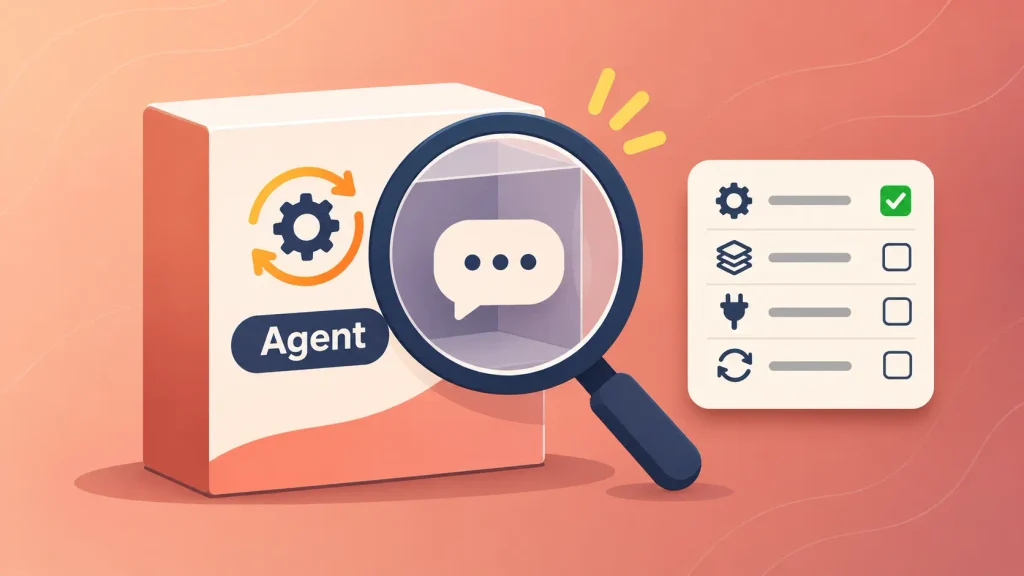
A “no” on all four means you’re looking at an assistant. That’s not a bad thing, as long as you’re paying assistant prices for it.
What It Takes to Build Each One
An assistant is mostly a data and interface project. An agent is a systems integration project with an AI model in the middle. That AI agent vs AI assistant difference shows up in your budget, your timeline, and how much can go wrong.
Here’s what each build typically needs:
| Requirement | AI assistant | AI agent |
| Clean, searchable data | Yes | Yes |
| Read access to your systems | Often | Always |
| Write access to your systems | Rarely | Usually |
| Permission rules and approval gates | Light | Essential |
| Step-by-step logging and monitoring | Nice to have | Required |
| Testing against failure cases | Basic | Extensive |
The bottom four rows are where most of an agent’s extra cost lives. They’re also the rows teams are most tempted to skip.
Building an AI Assistant
Most of the work in an assistant goes into giving it the right knowledge. That usually means connecting it to your documents and data, then deciding between RAG or fine-tuning to ground its answers.
The interface matters too. If your team lives inside one product, adding AI features to your existing SaaS often beats launching a separate chat tool nobody opens.
Building an AI Agent
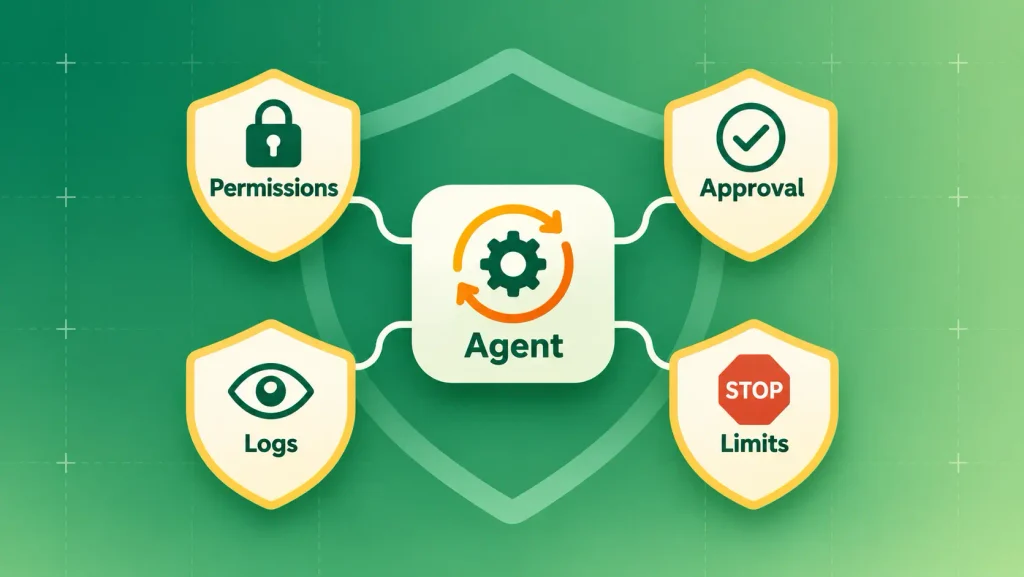
An agent needs everything an assistant needs, plus the plumbing to act safely. Before it touches production, you’ll want these in place:
- Scoped permissions: the agent can only touch the systems and records its job requires.
- Approval gates: a human signs off on high-stakes actions like refunds above a threshold or outbound emails to key accounts.
- Observability: a trace of every plan, tool call, and result, so you can see why it did what it did.
- Stop rules: limits on retries, spend, and run time, so a stuck agent fails quietly instead of expensively.
Older systems make this harder. If your core tools lack modern APIs, modernizing your legacy apps may need to come first, or the agent will spend its life fighting brittle connections.
Why So Many Agent Projects Get Canceled
The failure rate is the part sales decks leave out. Gartner predicts over 40% of agentic AI projects will be canceled by the end of 2027, citing rising costs, unclear business value, and weak risk controls.
Running costs widen the AI agent vs AI assistant gap too. In McKinsey’s 2026 State of AI survey, about 20% of respondents said AI operating costs, including token costs, held back their AI use. Before you commit, it’s worth knowing what an AI agent costs to build and run, then testing the idea with a scoped AI proof of concept instead of a full rollout.
AI Agent vs AI Assistant for Business: Which One Do You Need?
The right pick depends on the shape of the work, not the hype around the technology. If a mistake is cheap and a human checks everything anyway, an assistant is enough. If the work is repetitive, multi-step, and rule-bound, an agent starts to pay for itself.
Adoption data backs up that caution. McKinsey’s 2026 survey found 40% of respondents at companies with more than $1 billion in revenue are scaling AI agents, while smaller companies held flat at 22%. Chatbots remain the most widely scaled AI tool, at 47%. In other words, most companies haven’t skipped the assistant stage yet, even when they can afford agents. That’s the real difference between AI agent and AI assistant adoption today: big firms experiment, while smaller teams wait for proof.
Choose an AI Assistant When
On the AI agent vs AI assistant question, an assistant is usually the better call in situations like these:
- Every output needs a human review before it goes out, for legal, brand, or accuracy reasons.
- The task is one step: draft, summarize, answer, or explain.
- Your data is spread out and your systems lack clean APIs.
- You need results this quarter on a modest budget.
Choose an AI Agent When
An agent earns its higher cost when most of these are true:
- The workflow has several steps across two or more systems.
- It runs often, so the time saved adds up every week.
- You can write clear rules for what the agent may and may not do.
- Mistakes are recoverable, or you can put an approval gate in front of the risky ones.
- You have someone who will own the agent’s performance after launch.
If you tick three or fewer, start smaller. An agent without an owner and clear rules is exactly the kind of project that ends up in Gartner’s 40%.
Use Both Together
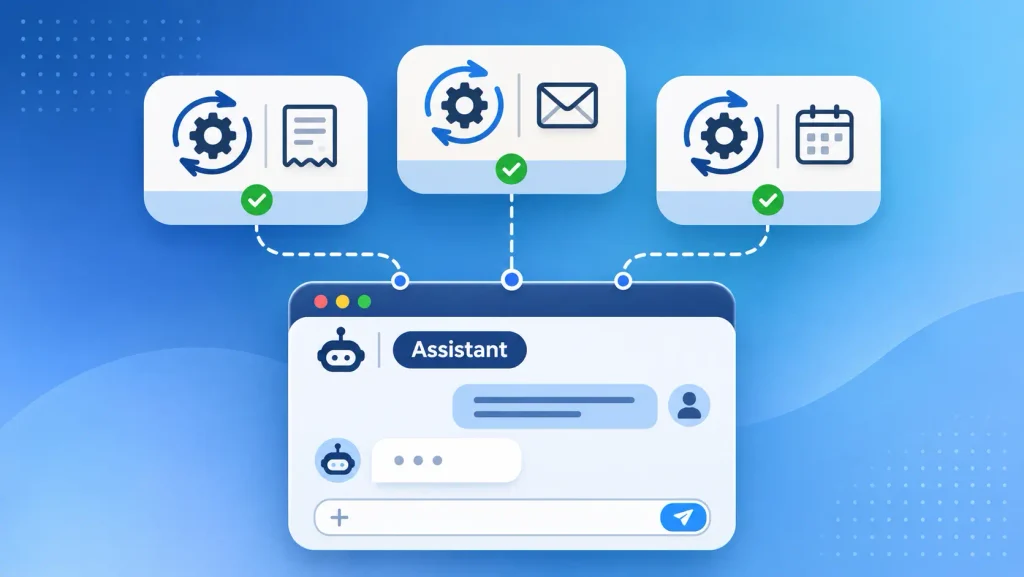
The AI agents vs AI assistants choice isn’t always either-or. Many of the best setups put an assistant in front and agents behind it.
Your team talks to the assistant in plain language. When a request turns into a multi-step job, the assistant hands it to an agent, which does the work and reports back. People get one simple interface, and the heavy lifting happens out of sight.
Start With an Assistant, Then Graduate
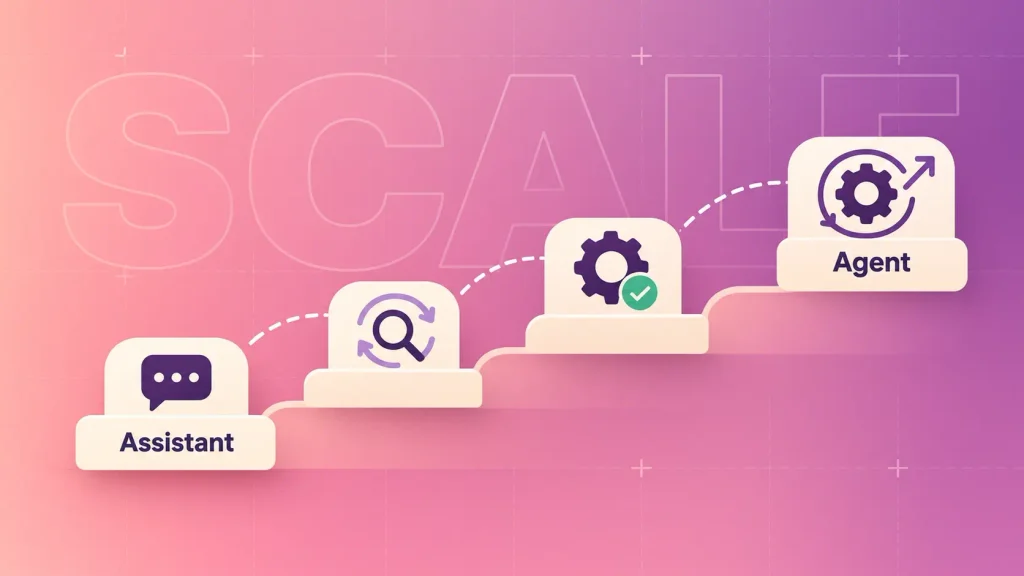
If you’re weighing AI agent vs AI assistant for business use, the safest path is usually a staged one. Each stage builds the data, trust, and controls the next one needs:
- Deploy an assistant on a real workflow and watch where people still copy, paste, and switch tabs.
- Find the repeatable handoffs, the steps people do the same way every time.
- Hand one of those steps to an agent, with tight permissions and an approval gate.
- Widen the agent’s scope only after its logs show it behaves the way you expect.
This path also tells you whether to build in-house or outsource your AI development. The assistant stage shows you how much of the work your team can realistically own.
How Boomdevs Solves the Agent-or-Assistant Decision
Most failed AI projects settle the AI agent vs AI assistant question before they map the workflow. Boomdevs starts the other way around: we map your process step by step, mark where a person must stay in the loop, and only then decide what should be an assistant and what should be an agent.
From there, our team handles the full build, from data preparation and model choice to permissions, approval gates, and monitoring. With 3.5K+ projects delivered and recognition as a Clutch Champion, we’ve seen which AI ideas survive contact with real operations and which ones don’t.
If you’re weighing an agent for your business, our AI agent development services cover scoping, building, and running it safely. Need something broader, like an internal assistant plus a few agents behind it? Our AI development team can plan the whole stack with you.
Get a free scoping call and find out whether your workflow needs an assistant, an agent, or both.
Frequently Asked Questions
Is ChatGPT an AI Agent or an AI Assistant?
In its default chat mode, ChatGPT is an AI assistant. It answers your prompt and waits for the next one. Its agent features, which can browse and use tools across several steps, push it toward agent behavior, but in the AI agent vs AI assistant sense, the everyday product is still an assistant.
Can an AI Assistant Become an AI Agent?
Yes. The AI agent vs AI assistant gap is just a few missing pieces. An assistant becomes an agent once it can plan multiple steps, call tools that change things in your systems, and track its progress without a new prompt each time. Most of that work is integration and safety engineering, not a new AI model.
Are AI Agents Smarter Than AI Assistants?
Not necessarily. In most AI agents vs AI assistants comparisons, both run on the same underlying models. The agent isn’t smarter; it’s wired to act, with tool access, a control loop, and memory that the assistant lacks.
Is Siri an AI Agent?
Siri is an AI assistant. It responds to voice commands and completes single tasks, like setting a reminder or sending a text you dictate. It doesn’t take a broader goal and work through the steps on its own.
What Is the Difference Between Agentic AI and AI Agents?
Agentic AI is the broader category: AI systems designed to act with some autonomy toward a goal. An AI agent is a specific piece of software built that way. For how agentic systems relate to content-generating models, see our agentic AI vs generative AI breakdown.
Are AI Agents More Expensive Than AI Assistants?
Usually, yes, both to build and to run. Agents need integrations, permissions, monitoring, and failure testing, and each goal can take many model calls instead of one. The extra cost makes sense only when the workflow saves enough time or money to cover it.