


- 1. Key Takeaways
- 2. What Is an AI Agent?
- 3. How Do AI Agents Work?
- 4. The Core Components of an AI Agent
- 5. One AI Agent Run, Traced from Request to Result
- 6. AI Agent vs Chatbot vs Workflow Automation
- 7. Types of AI Agents at a Glance
- 8. Where AI Agents Earn Their Keep: Business Examples
- 9. When You Should (and Shouldn't) Use an AI Agent
- 10. Risks of AI Agents and the Guardrails That Contain Them
- 11. Build, Buy, or Configure: How Businesses Get an AI Agent
- 12. How Boomdevs Builds AI Agents That Hold Up in Production
- 13. Frequently Asked Questions
Summarize with
You got charged $49 twice for the same order. A chatbot sends you the refund policy, while an AI agent checks your payments, confirms the duplicate, and refunds $49 before your coffee cools.
So, what is an AI agent and how does it work? It’s software that takes a goal, plans its own steps, and uses real tools to finish the job. The chatbot answers; the agent acts. This guide walks you through it, from the loop to the risks.
Key Takeaways
- What is an AI agent? Software that pursues your goal. It picks its own next step instead of following a fixed script.
- How do AI agents work? One loop: get a goal, gather context, plan, act through tools, check the result, repeat.
- The AI agent vs chatbot difference is ownership. A chatbot waits for your next prompt; an agent manages the work until the goal is met.
- Agents pay off on messy, multi-step work that changes case by case. Stable, repeatable processes are still cheaper and safer with plain automation.
- The biggest risk is not the model. It’s an agent acting without limits, logs, or a human sign-off on high-stakes steps.
What Is an AI Agent?
What is an AI agent? A program that works toward an outcome, not a single answer. You hand it something like “resolve duplicate-charge complaints,” and it decides which records to check, which policy applies, and what to do next.
That AI agent vs chatbot shift outweighs any feature list. With a chatbot, you drive every step. With an agent, you set the destination and the boundaries, and the software handles the route.
A Definition You Can Use in Your Next Meeting
If your leadership team asks, What is an AI agent? try this: it’s software that uses a language model to decide what to do next, then acts on that decision through your business systems. It repeats that cycle until the job is done or it hits a limit you set.
Notice what the definition leaves out. Nothing in it says “fully autonomous” or “replaces staff.” Most agents in production today work inside tight guardrails, and that’s by design.
Five Traits That Make Software Agentic
Plenty of products now carry the “agent” label. So what is an AI agent, and what’s just a label? Check these traits:
- A goal, not a script: you describe the outcome, and the agent works out the steps.
- Autonomy within limits: it moves from step to step without a prompt from you each time.
- Tool use: it can call APIs, query a database, update a CRM, or send a message.
- Memory: it carries context across steps, so it doesn’t start cold after every action.
- Adaptation: when a step fails or new information appears, it changes its plan.
If a product is missing tool use or the ability to adjust its plan, it fails the AI agent vs chatbot test. Gartner calls this relabeling “agent washing,” and it’s worth keeping in mind when you compare products.
How Do AI Agents Work?
An AI agent works by running a loop: it takes in a goal, gathers what it needs, plans a step, acts, then checks the result before deciding what comes next. The loop repeats until the goal is met, a limit is reached, or a human steps in.
Here’s that loop broken into its five stages:
- Receive a goal.
- Gather context.
- Plan and reason.
- Act through tools.
- Check results and adjust.
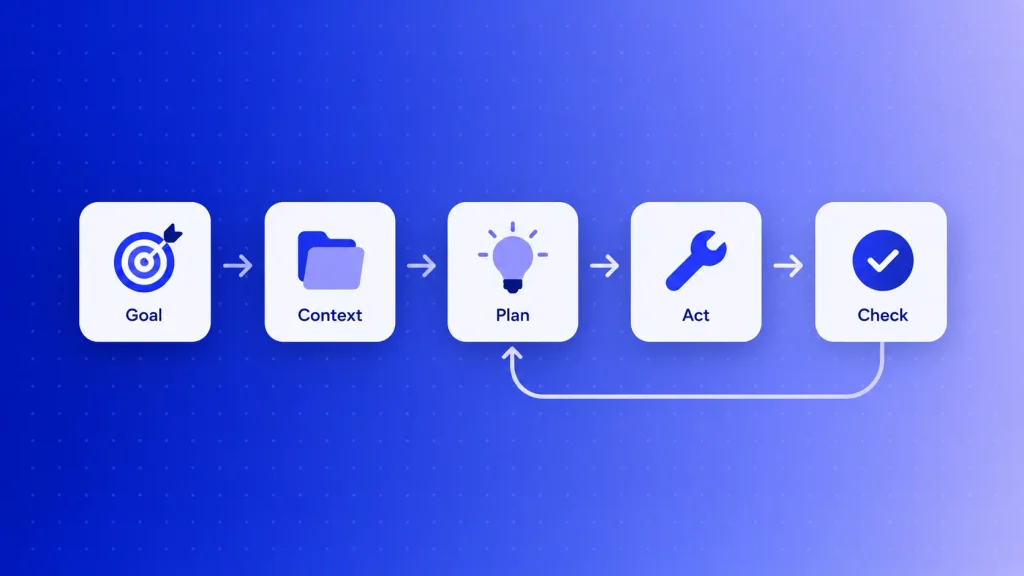
Each stage depends on the one before it. What is an AI agent and how does it work at each stage? See below.
Step 1: It Receives a Goal
Everything starts with an objective, set by a person or triggered by an event. “Qualify every inbound demo request” is a goal. “Reply to this email” is a task.
The quality of that goal shapes everything downstream. A vague goal gives you a wandering agent, so the best teams write goals the way they’d brief a new hire: outcome, scope, and what counts as done.
Step 2: It Gathers Context
Next, the agent pulls the information it needs to understand the situation. That might be the customer’s message, their order history, a policy document, or yesterday’s notes stored in memory.
Good agents fetch context at the moment they need it rather than loading everything up front. That keeps answers current and costs lower.
Step 3: It Plans and Reasons
The language model now acts as the agent’s decision-maker. It breaks the goal into smaller steps and picks the first one. It also decides whether it has enough information to act or needs to look something up first.
A common pattern here is called ReAct, short for “reason and act.” The agent thinks, takes one action, observes what came back, and thinks again. Planning isn’t a one-time event; the agent revisits its plan after every step.
Step 4: It Acts Through Tools
Tools are the components of an AI agent that turn reasoning into results. Depending on how it’s built, an agent can search a knowledge base, read a spreadsheet, call a payment API, update a ticket, or hand work to another agent.
Without tools, a model can only suggest what should happen. With them, it can make it happen. That’s also why tool access is where most of the risk sits.
Step 5: It Checks Results and Adjusts
After each action, the agent compares the outcome with the goal. Did the refund go through? Did the lookup return the right account? If not, it tries a different path, asks a person, or stops.
Some agents also store what they learned for next time. Feedback from users, reviewers, or other agents gradually sharpens how the agent handles similar cases.
The Core Components of an AI Agent
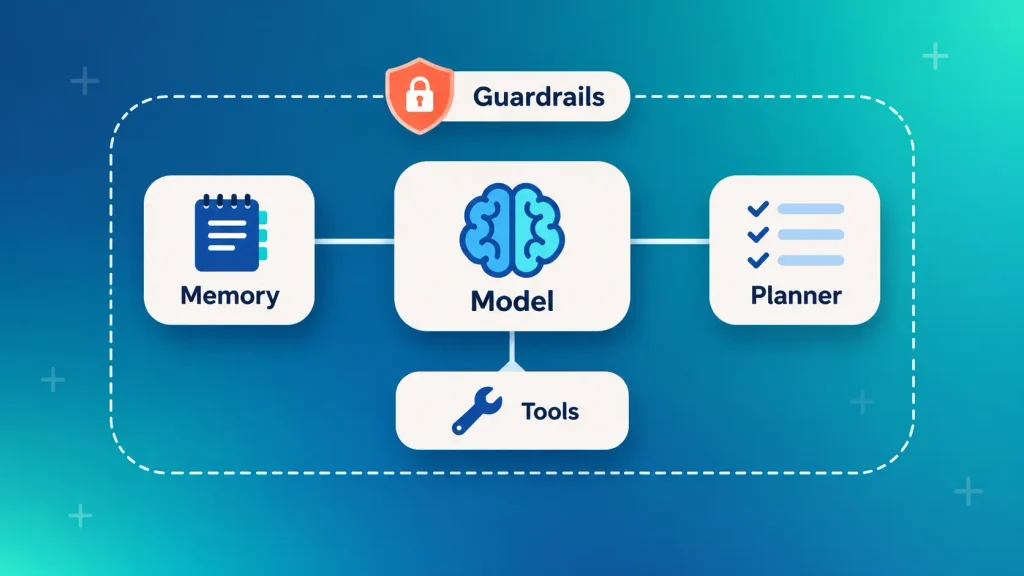
How do AI agents work inside? With the same handful of parts: a model that reasons, memory that holds context, tools that take action, and a planner that sequences the work. How well the components of an AI agent fit together decides if it’s reliable or just impressive in a demo.
The Model, Memory, Tools, and Planner
Picture a new team member, and each of the components of an AI agent maps to something familiar:
| Component | What it does | Business analogy |
| Model (LLM) | Reads requests, reasons, picks the next step | The employee’s judgment |
| Memory | Holds task context and past interactions | Notes and case history |
| Tools | Calls APIs, databases, and apps to act | System logins and permissions |
| Planner | Splits the goal into ordered steps | The to-do list they write |
| Guardrails | Limits actions and triggers approvals | Company policy and sign-off rules |
Among the components of an AI agent, the model draws the most attention yet rarely breaks. In practice, weak tools and missing guardrails cause more production failures than the model itself.
The model is also where generative AI and agents overlap. If you’re unclear on that line, the difference between agentic AI and generative AI comes down to this: generative AI produces content, while an agent uses that same capability to decide and act.
How Agents Plug into Your Systems (MCP and A2A)
How do AI agents work with your stack? Only through the systems they can reach. Two open standards now handle much of that plumbing, and you’ll hear both in any serious build conversation:
- Model Context Protocol (MCP): a standard way for an agent to connect to tools, files, and data sources without a custom integration for each one.
- Agent-to-Agent (A2A): a shared language that lets agents built by different teams pass work to each other.
For you, the practical upshot is speed and portability. An agent built on open standards is easier to extend later, and you’re less locked in to one platform.
One AI Agent Run, Traced from Request to Result
How do AI agents work on a real request? Watch one handle it. Say a customer emails: “I was charged twice for my March order.” Your support agent’s goal is to resolve billing complaints within your refund policy.
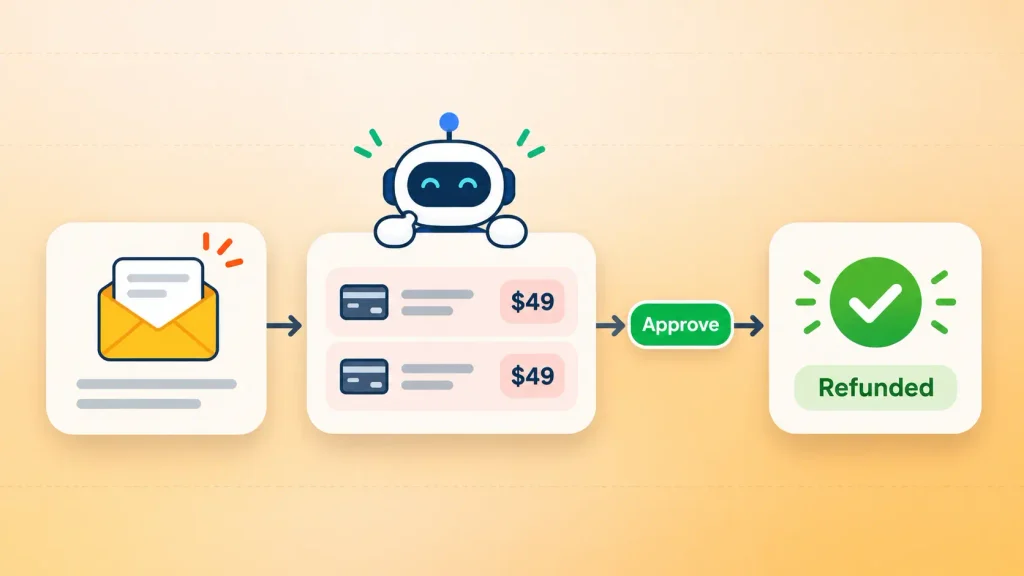
Here’s that run step by step, with the components of an AI agent it uses:
| Step | What the agent does | Component used | Human role |
| 1 | Reads the email, tags it as a duplicate charge | Model | None |
| 2 | Pulls the customer’s orders and payments | Tools | None |
| 3 | Checks the refund policy document | Memory and retrieval | None |
| 4 | Confirms two identical charges, plans a refund | Planner | None |
| 5 | Flags the refund for approval if above your limit | Guardrails | Approves or rejects |
| 6 | Issues the refund and updates the CRM | Tools | None |
| 7 | Replies to the customer and logs the case | Model and memory | Reviews logs weekly |
Notice that the agent didn’t follow a hardcoded path. If step 2 had shown only one charge, it would have switched to explaining a pending authorization instead.
That branching is the whole point. It’s also why step 5 exists: you decide which actions the agent can take alone and which need a person. Teams that build AI agents for business workflows usually spend more time on that approval map than on the model.
AI Agent vs Chatbot vs Workflow Automation
An AI agent decides its own next step, a chatbot waits for yours, and workflow automation follows steps someone wrote in advance. All three have a place, and mixing them up is how teams overspend on the wrong one.
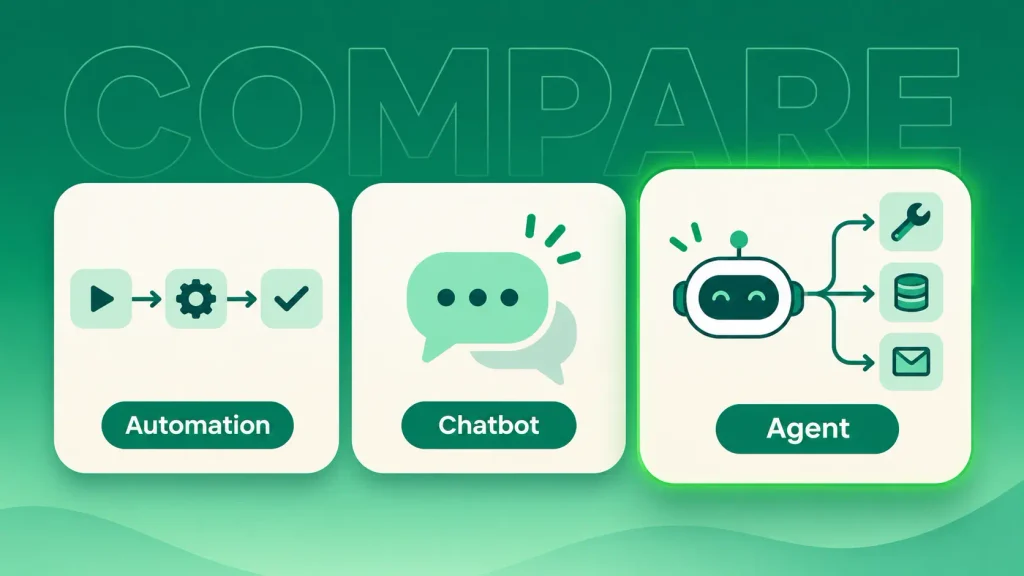
Here’s AI agent vs chatbot vs automation on the points that matter:
| System | Who picks the next step | Tool use | Best for |
| Workflow automation | Fixed rules | Preset actions only | Stable, repeatable processes |
| AI workflow | A preset path, with AI inside some steps | Preset actions only | Sorting, drafting, classifying |
| Chatbot or assistant | You, one prompt at a time | Limited | Answering questions |
| AI agent | The agent, within guardrails | Chooses which tools to call | Multi-step work that varies |
The real AI agent vs chatbot gap is ownership of the work, not answer quality. A chatbot can write a brilliant reply and still leave you to do every follow-up.
That said, many teams don’t need an agent at all. If a scripted assistant covers your use case, off-the-shelf chatbot builders get you live faster and cost less to run.
Types of AI Agents at a Glance
AI agents are usually grouped by how much they know about their environment and how they decide. The classic model has five types, ranging from simple rule-followers to systems that improve with experience:
- Simple reflex agents: react to a trigger with a fixed rule, like a thermostat.
- Model-based reflex agents: keep an internal picture of their surroundings, like a robot vacuum mapping a room.
- Goal-based agents: plan a sequence of actions to reach an objective, like route planning.
- Utility-based agents: weigh trade-offs such as cost, speed, and risk to pick the best option.
- Learning agents: refine their behavior based on feedback over time.
Most business agents today blend goal-based and learning behavior on top of a language model. When several specialized agents coordinate under a supervisor, you get a multi-agent system. Each of these AI agent types suits a different level of complexity, so the right one depends on how much judgment your task demands.
Where AI Agents Earn Their Keep: Business Examples
AI agents create the most value where new information keeps changing what should happen next. The examples below share that pattern. Each one involves several systems, a judgment call, and work that would otherwise bounce between people.
Customer Support
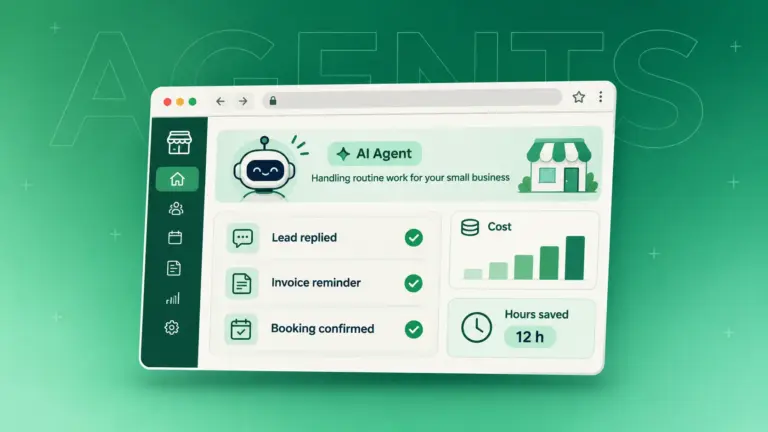
Support is the most common starting point, and for good reason. An agent can read a ticket, look up the account, apply policy, resolve routine issues, and escalate the rest with context attached.
The strongest setups pair a text agent with voice agents that answer phone calls, so customers get the same handling on every channel. Most AI agents for customer service start with triage and routine fixes, then take on refunds and account changes once the logs prove they’re reliable.
For smaller teams, a narrower version works well too. An AI receptionist for a small business handles bookings and routine calls without a full support stack behind it.
Sales and Lead Qualification
A sales agent can research an inbound lead, check fit against your criteria, enrich the CRM record, and route strong prospects to the right rep. Weak fits get a polite reply instead of a sales call.
The win is speed to lead without burning rep hours on research. Teams using AI agents for sales typically start with qualification before letting an agent touch outreach.
Operations and Back Office
Invoice checks, order exceptions, and partner requests all fit the agent pattern. The agent compares documents, spots mismatches, fixes what policy allows, and flags the rest.
These jobs rarely make headlines, but they’re often where your team loses the most hours to copy-paste work.
Software Development
How do AI agents work at their clearest? Watch coding agents. They write code, run tests, read the error, fix the problem, and test again.
Each step depends directly on the last result, which is why software teams adopted agents early. The same feedback loop powers the newer AI development tools your engineers may already use.
Research and Data Analysis
Give a data agent a question like “why did trial conversions drop last month?” and it can pull the numbers, segment them, spot where the drop sits, and check recent product changes.
You didn’t tell it which cuts to make. It followed the evidence, the same way a sharp analyst would, and handed you a briefing instead of a raw export.
When You Should (and Shouldn’t) Use an AI Agent
Use an AI agent when the work is multi-step, changes from case to case, and spans several systems. Skip it when the steps never change, because plain automation will be cheaper, faster, and easier to trust.
That distinction matters more than the hype suggests. Gartner predicts over 40% of agentic AI projects will be canceled by the end of 2027, citing rising costs, unclear business value, and weak risk controls. The same forecast expects 15% of day-to-day work decisions to be made by agents by 2028, up from zero in 2024.
So the technology isn’t the problem. Picking the wrong job for it is. An agent is likely worth it when most of these are true:
- The task happens often enough to justify building a system around it.
- Each case needs a judgment call, not just a rule.
- The work touches several tools or data sources.
- New information mid-task changes what should happen next.
- You can define what “done” looks like and measure it.
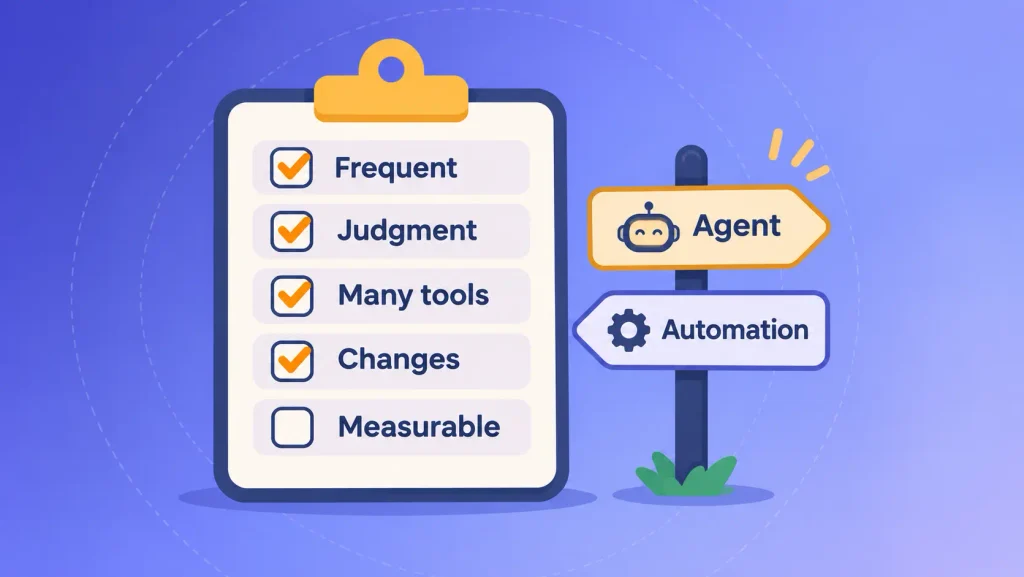
If only one or two apply, start with a simpler workflow. Most companies are still at this testing stage anyway: McKinsey’s State of AI 2025 survey found 62% of organizations experimenting with agents, but only 23% scaling one anywhere in the business.
The smart move is a contained test before a full build. A focused AI proof of concept tells you whether an agent beats your current process on real data before you commit a budget.
Not sure which side of that line your process sits on? Boomdevs can walk through it with you in a free consult and give you a straight answer, even if that answer is “automate it the simple way.”
Risks of AI Agents and the Guardrails That Contain Them
The main risk with AI agents is that they act, not just answer. A wrong sentence from a chatbot is embarrassing; a wrong action from an agent can refund the wrong customer or expose data. Each risk below has a known guardrail.
Confident Wrong Answers
Language models can state something false with total confidence. In an agent, that error can trigger a real action.
The fix is grounding: make the agent answer from retrieved company data, not from the model’s memory. If the data doesn’t support an answer, it should say so instead of guessing. The same problem shows up across most generative AI challenges, so the playbook is well tested.
Runaway Loops and Rising Costs
An agent that can’t reach its goal may keep calling the same tool over and over. Every call costs money and time.
Step limits, timeouts, and a clear stop condition prevent this. You’ll want to see those settings in any build plan before launch.
Data Access and Security
An agent with broad permissions can reach data it shouldn’t. Give each agent the least access it needs for its job and nothing more.
That rule matters most with customer data, payments, and anything regulated.
Accountability When an Agent Acts
When an agent makes a call, someone still owns the outcome. Decide up front who reviews its work, who handles escalations, and who can switch it off.
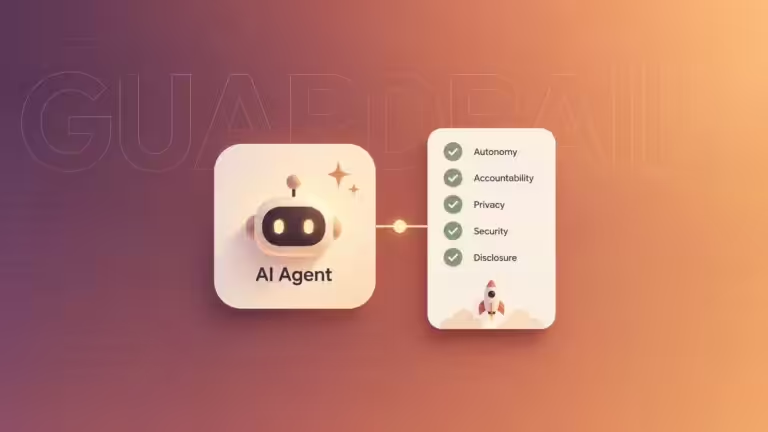
Here are the guardrails worth asking for in every agent project:
- Human approval before irreversible or high-value actions, such as refunds, payments, or bulk emails.
- Activity logs that record every tool call and decision for audit.
- An interrupt switch so an operator can stop a run mid-task.
- Least-privilege access scoped to the agent’s actual job.
- Testing on messy, real inputs before launch, not just clean demo cases.
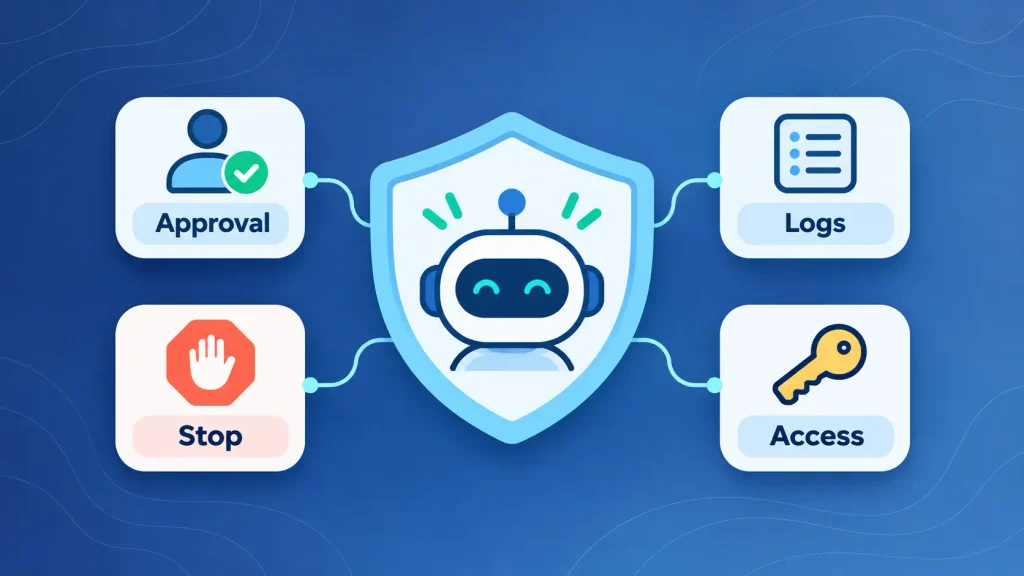
Guardrails also cover fairness and transparency, not only security. The questions around ethical AI agent design, like bias and explainability, deserve the same attention as permissions.
Build, Buy, or Configure: How Businesses Get an AI Agent
You can get an AI agent in three ways: buy one built into software you already use, configure one on an agent platform, or build a custom agent around your own systems. The right path depends on how unique your process is and how sensitive your data is.
Here’s how the three paths compare:
| Path | Best for | Control | Effort |
| Buy (built into existing software) | Standard tasks inside one tool | Low | Lowest |
| Configure (no-code or low-code platform) | Internal workflows and pilots | Medium | Moderate |
| Build (custom agent) | Core processes, sensitive data, many systems | High | Highest |
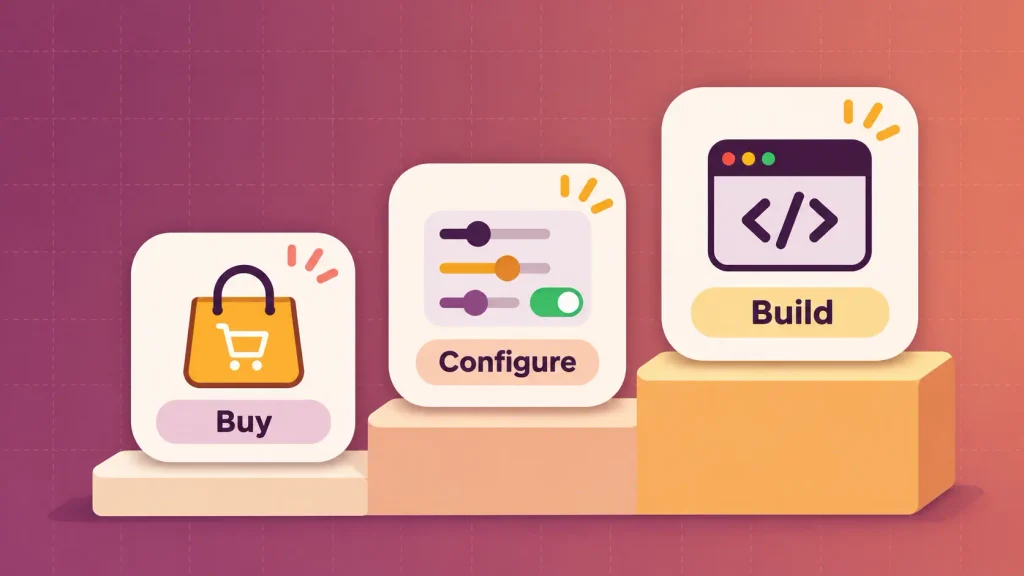
Buying is fastest, but the agent only sees what that one product sees. Configuring on a platform covers more ground, and comparing the leading platforms for building AI agents will show you which ones handle your integrations.
Custom builds make sense when the agent touches your core operations or competitive edge. They give you full control over data, logic, and guardrails, and they plug into your broader AI development roadmap instead of sitting in a silo.
Budget follows the same curve. What drives AI agent development cost is mostly integration depth, data readiness, and how many decisions need guardrails, not the model itself.
Who builds it is a separate question. Weighing in-house vs outsourced AI development comes down to whether you have engineers with agent experience today, or need them for one project.
How Boomdevs Builds AI Agents That Hold Up in Production
A demo agent and a production agent are different products. The demo only has to work once. The production version has to work on the 10,000th messy ticket, with logs, limits, and a person in the loop where it counts.
That’s the gap Boomdevs focuses on. Our custom AI agent development work starts with one contained use case, measured against a baseline, before anything scales. From there, we wire the agent into your real systems with the guardrails above built in from day one.
With 10+ years of delivery behind us, we’ve learned that the hard part is rarely the model. It’s the integrations, the edge cases, and deciding exactly where a human signs off. If the agent you have in mind is part of a larger product, our AI product development team can scope both together.
If you’re weighing an agent for support, sales, or operations, map your first use case with Boomdevs. You’ll walk away knowing whether an agent, a workflow, or neither fits your process, and roughly what it would take to build.
Frequently Asked Questions
Is ChatGPT an AI Agent?
Standard ChatGPT chat is an assistant: it answers when you prompt it and stops. In July 2025, OpenAI added an agent mode that can browse, use tools, and complete multi-step tasks, and that mode does behave like an agent. That’s the AI agent vs chatbot line: acting toward a goal versus only replying.
What Is the Difference Between Agentic AI and an AI Agent?
Agentic AI is the broad category of AI systems that act with some autonomy. What is an AI agent, then? One specific system doing that work. In practice, people use the terms loosely, so focus on what a product actually does rather than its label.
Do AI Agents Learn on Their Own?
Some do, within limits. Many agents store feedback and past outcomes in memory to handle similar cases better, but they don’t rewrite their own rules without review. In business settings, you usually want learning to happen under human oversight.
Do You Need to Know How to Code to Build an AI Agent?
Not for simple ones. You can build your first AI agent on a no-code platform by connecting a model to a few tools and writing clear instructions. Agents that touch payments, customer data, or several systems still need engineering for integrations, security, and testing.
How Much Does It Cost to Build an AI Agent?
Cost depends on how many systems the agent connects to, how clean your data is, and how many guardrails it needs. A configured agent on an existing platform costs far less than a custom build. A short scoping exercise is the fastest way to get a reliable number for your use case.
Are AI Agents Safe to Use with Customer Data?
They can be, if you build them that way. Limit each agent to the data its job requires, log every action, and require human approval for sensitive steps. Treat an agent’s access the same way you’d treat a new employee’s system permissions.