- 1. Key Takeaways
- 2. What Are the Most Common AI Voice Agent Use Cases?
- 3. AI Voice Agent Use Cases by Industry
- 4. Voice Agents Inside Your Own Product
- 5. What Makes These Use Cases Work: How a Voice Agent Handles a Call
- 6. Where AI Voice Agents Fall Short (and Where You Keep a Human)
- 7. How to Choose Your First AI Voice Agent Use Case
- 8. Compliance Checks Before You Launch
- 9. Platform or Custom Build: Which Fits Your Use Case?
- 10. How Boomdevs Builds AI Voice Agents Around Your Workflow
- 11. Frequently Asked Questions
Summarize with
You’ve probably seen lists of 40 AI voice agent use cases. Every item sounds possible. Few of them tell you which one fits your own phone lines.
Fair enough, the demos are impressive. But your real question is narrower. Which calls can you hand off first without frustrating a single customer?
This guide sorts every use case by business function, by industry, and inside your own product. Then it gives you a simple way to score them.
Key Takeaways
- The proven AI voice agent use cases are support FAQs, appointment booking, lead qualification, call routing, payment reminders, after-hours coverage, and internal help desks.
- A good fit has three traits: high call volume, a predictable script, and a clear “done” state the agent can reach on its own.
- Keep a human for disputes, distress, negotiations, and anything that needs judgment or legal consent.
- Outbound calls carry legal weight. In the US, AI-generated voices need prior consent under the TCPA.
- Start with one narrow call type, score it honestly, and expand only after one number improves.
What Are the Most Common AI Voice Agent Use Cases?
The most common AI voice agent use cases are the calls your team answers the same way every day. Think order status, booking, rescheduling, qualifying a lead, or reminding someone a payment is due. Each of these is a call a custom AI voice agent can take off your team’s plate, because the path from “hello” to “done” barely changes.
Voice isn’t fading as a channel either. Gartner’s 2025 customer service predictions carried the title “Voice-Based Customer Service Isn’t Going Anywhere,” and the firm expects 70% of customer service journeys to begin and be resolved in conversational assistants by 2028.
If you’ve been tracking broader generative AI use cases across the business, voice is where many of them meet your customers directly.
Here’s how the seven core functions compare at a glance:
| Use case | What the agent does | KPI to track |
| Support and FAQs | Answers routine questions, looks up orders | Containment rate |
| Scheduling | Books, moves, and confirms appointments | No-show rate |
| Lead qualification | Calls new leads, asks fit questions, books meetings | Lead-to-meeting rate |
| Triage and routing | Identifies intent, transfers with context | Transfer rate |
| Payments and renewals | Reminds, takes commitments, sends pay links | Recovery rate |
| After-hours coverage | Answers when the office is closed | Missed-call rate |
| Internal help desk | Resets passwords, answers HR policy questions | Ticket volume |
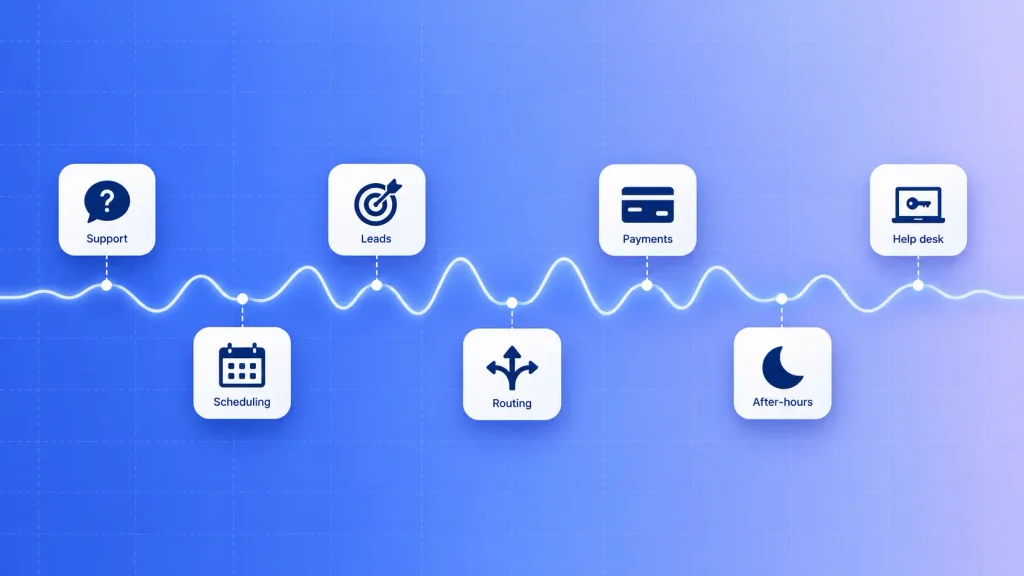
Pick your use case by the KPI you’d be proud to report in 90 days. That single number keeps a pilot honest.
Inbound Customer Support and FAQ Resolution
Most support lines hear the same ten questions on repeat. Where’s my order? What are your hours? How do I reset my login? An AI voice agent can answer these in natural speech, pull live data, and close the call without a queue.
The win here isn’t just cost. Your human agents stop repeating themselves and start handling the calls that actually need them. This is where most contact center automation starts.
Appointment Scheduling, Reminders, and No-Show Recovery
Scheduling is the cleanest fit you’ll find. The caller wants a slot, the agent checks the calendar, and the booking either happens or it doesn’t.
Reminder calls are where you’ll usually see results fastest. A short outbound call two days before an appointment gives the person an easy way to confirm, reschedule, or cancel. Each of those beats a silent no-show.
Lead Qualification and Speed-to-Lead Calls
A lead who fills out your form at 9 p.m. has already moved on by 10 a.m. the next day. A voice agent can call within minutes, ask your qualifying questions, and book a meeting with the right rep.
You decide the questions. Budget, timeline, location, and decision authority are common ones. Your sales team then only spends time on leads that already passed the bar.
Call Triage, Routing, and Warm Handoffs
Some calls will always need a person. The agent’s job on those calls is to find out why the caller is there, verify who they are, and pass them along.
What makes this work is the warm handoff. The human picks up with a short summary on screen, so the caller never repeats their account number twice. That one detail changes how the whole phone experience feels.
Payment Reminders, Collections, and Renewals
Payment reminders are unglamorous and steady. The agent calls, explains the balance, offers a payment link by text, and logs the outcome.
Renewals follow the same pattern. A friendly call a few weeks before a contract ends catches churn early, while there’s still time to fix the reason behind it.
After-Hours and Overflow Coverage
Your phone doesn’t stop ringing at 6 p.m. An AI receptionist, sometimes called an AI phone agent, can answer after hours, during lunch, or when every human line is busy.
It won’t solve every problem at midnight. It will capture the lead, book the slot, or log the issue so nothing waits in a voicemail box until morning.
Internal IT Help Desk and HR Support
Not every use case faces customers. Your own staff calls IT for password resets and HR for leave balances, and those calls are just as repetitive.
Voice is only one interface here. The same logic powers an AI agent that completes multi-step tasks across your internal tools, whether the request comes in by phone, chat, or Slack.
AI Voice Agent Use Cases by Industry
The functions above show up everywhere. Your industry decides which ones matter most, which systems the agent connects to, and which rules it has to follow.
This table gives you the quick view before the detail:
| Industry | Top use cases | Watch-out |
| Healthcare | Scheduling, intake, refill requests | HIPAA and BAAs |
| Banking and insurance | Balance checks, claims intake, renewals | Identity checks, PCI DSS |
| Retail and e-commerce | Order status, returns, delivery updates | Peak-season spikes |
| Real estate | Instant lead response, showing bookings | Outbound consent |
| Logistics and home services | Driver check-ins, dispatch intake | Scheduling system sync |
| Hospitality and restaurants | Reservations, orders, guest requests | Latency during rush hours |
| Education and EdTech | Enrollment follow-up, payment recovery | Student data privacy |
| SaaS and software | Account support, renewal calls | CRM write-back |
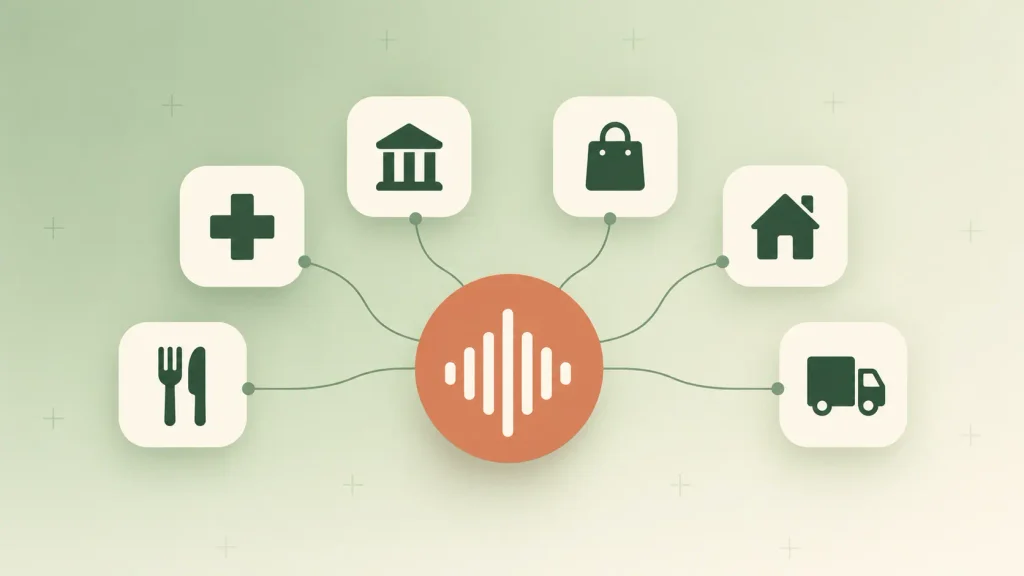
Read the watch-out column first. It usually tells you more about project scope than the use case column does.
Healthcare
Clinics lose a lot of front-desk time to calls that follow a fixed script. A voice agent can book and move appointments, collect intake details before a visit, and pass refill requests to the right provider.
The line is clear, though. The agent handles administration, never diagnosis. Any answer that hints at a real medical concern should go straight to clinical staff.
Banking, Fintech, and Insurance
Balance questions, card activation, and claim status calls all run on structured data. That makes them a strong fit once identity verification is solid.
Insurers often start with first notice of loss intake. The agent collects the date, location, and description, opens the claim, and routes anything unusual to an adjuster.
Retail and E-commerce
“Where’s my order?” is the classic retail call, and it spikes every holiday season. A voice agent absorbs that spike without you hiring temporary staff for six weeks.
Returns and delivery changes follow close behind. Once the agent reads from your order management system, it can resolve most of these in a couple of minutes.
Real Estate
Speed decides real estate leads. The agent that calls back within minutes, asks about budget and timeline, and books a showing usually wins the client.
Property managers also use voice agents for tenant maintenance requests. The agent logs the issue, creates the ticket, and gives the tenant a reference number on the spot.
Logistics and Home Services
A dispatcher managing 30 drivers can’t call each one during a busy window. An agent can, logging ETAs and flagging only the drivers who report a delay.
Plumbing, HVAC, and electrical companies use the same idea for intake. The agent asks what’s broken, where, and how urgent it is, then books the job before the office opens.
Hospitality and Restaurants
Restaurants miss calls during the dinner rush, and every missed call is a lost table or order. A voice agent takes reservations and phone orders while your staff serves the people already inside.
Hotels use agents for booking changes, guest requests, and pre-arrival questions. Response speed matters a lot here, since a pause of even a second feels long during a phone order.
Education and EdTech
Enrollment teams chase stalled applications and lapsed payments all month. A short outbound call often gets a response where three emails didn’t.
The agent can confirm whether the student wants to continue, send a payment link, and update the record. Your admissions team then follows up only with students who asked for a person.
SaaS and Software Companies
If you run a SaaS product, your support line probably hears password resets and billing questions all day. Those calls are also a good moment to check the account’s renewal date.
This is where AI voice agent use cases start to overlap with your product strategy. If you’re still mapping what AI SaaS actually means for your product, voice support is one of the easiest places to begin.
Voice Agents Inside Your Own Product
Most guides treat voice as a phone line feature. For founders and product leads, the bigger opportunity is often voice AI built into the product you sell.
That’s a product decision more than a support decision. It sits inside your roadmap, alongside the rest of your AI product development work, not in your contact center budget.
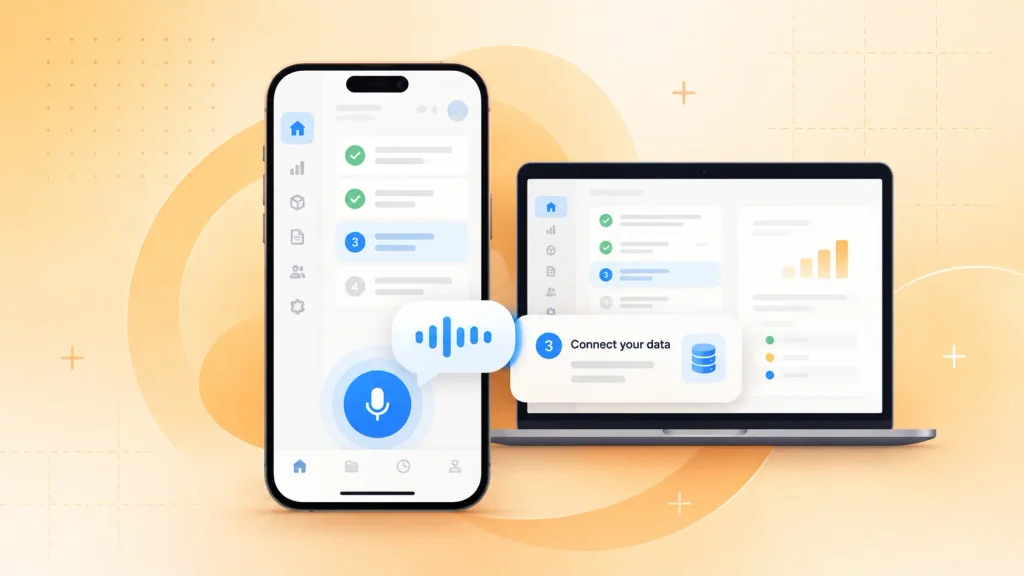
In-App Voice Onboarding and Support
Picture a new user stuck on setup inside your app. Instead of opening a help center, they tap a button and ask out loud how to connect their data.
The agent answers in context because it knows which screen the user is on for complex B2B tools, which can shorten time to value without adding another support hire.
If you’re adding this to a subscription product, it usually lives inside your broader AI SaaS development plan, sharing data and permissions with the rest of the platform.
Hands-Free Voice for Field and Frontline Workers
Technicians, drivers, and warehouse staff often have their hands full. Typing into an app on a ladder isn’t realistic.
A voice assistant lets them log a job, check a part number, or pull up a checklist by speaking. Built well, it works as an AI copilot for frontline teams, suggesting the next step rather than just recording what was said.
Voice Ordering and Booking Inside Your App
Some customers would rather say “reorder last week’s groceries” than tap through four screens. Voice ordering inside your app turns that into a single request.
It works best when voice sits on top of a solid app experience, not in place of one. That’s why it’s usually scoped as part of mobile app development rather than as a standalone feature.
What Makes These Use Cases Work: How a Voice Agent Handles a Call
Every voice agent runs the same conversational AI loop, whether it books dental cleanings or qualifies software leads. Understanding it helps you see why some use cases work and others stall.
Here’s what happens on each turn of the conversation:
- Listen. Speech-to-text turns the caller’s words into text in real time.
- Understand. A large language model works out what the caller wants and what to say next.
- Act. The agent reads from or writes to your systems, such as your CRM, calendar, or order database.
- Speak. Text-to-speech turns the reply into a natural voice.
- Hand off. If the call goes beyond its scope, the agent transfers it with a summary attached.
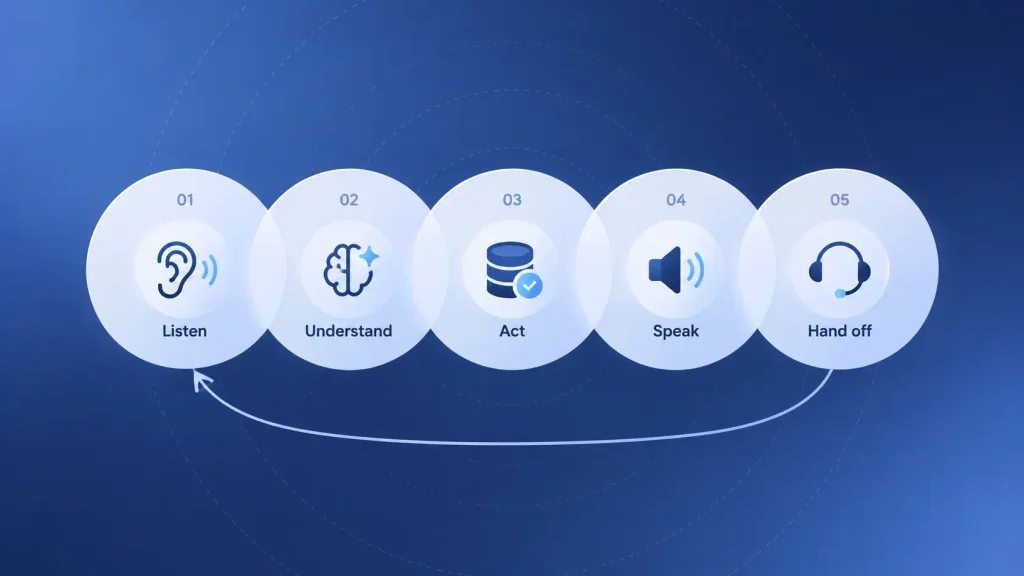
Step three is where most projects succeed or fail. Without a solid CRM integration, the agent can talk but can’t do anything, which is why connecting it to your real systems is an AI integration project as much as a voice project.
It also helps to see how a voice agent differs from the tools you may already use:
| Option | How callers interact | Can complete tasks | Best for |
| IVR | Keypad menus, fixed prompts | Rarely | Simple routing |
| Chatbot | Typed messages | Sometimes | Website and app chat |
| AI voice agent | Natural speech | Yes, with integrations | Repetitive phone workflows |
| Live agent | Natural speech | Yes | Judgment, empathy, exceptions |
Voice and text aren’t rivals. Many teams start with a chat channel, see the benefits AI chatbots bring to a business, and then extend the same logic to the phone.
If chat is still your priority, AI chatbot development can share a knowledge base with your voice agent later.
Where AI Voice Agents Fall Short (and Where You Keep a Human)
Can an AI voice agent replace your call center team? No, and planning as if it could is the fastest way to a bad pilot. Gartner predicts agentic AI will resolve 80% of common customer service issues without human intervention by 2029. The key word is “common.” The rest still needs people.
These calls are poor fits for voice automation today:
- Disputes and complaints: an angry caller with a tangled billing issue needs someone who can bend a rule.
- Emotional or high-stakes moments: a patient in distress or a customer reporting fraud deserves a person.
- Negotiations: pricing exceptions and contract terms need judgment the agent shouldn’t have.
- Legal consent and advice: anything binding, or anything that sounds like medical or financial advice.
- Low-volume, high-variety lines: if every call is different, there’s no script to automate.
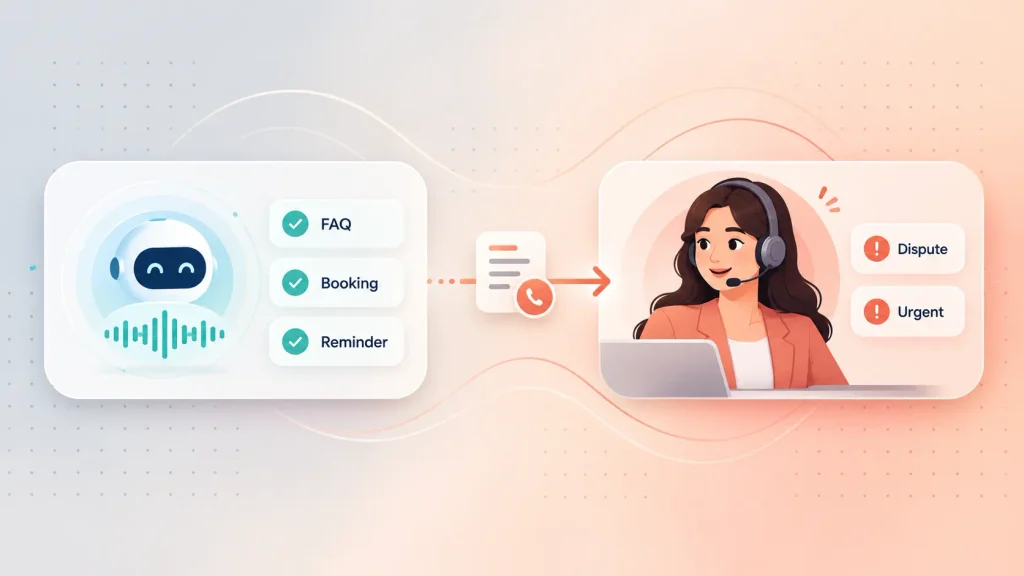
Accuracy is the other limit. Voice agents can still mishear a name or confidently give a wrong answer, which is one of the common generative AI challenges you’ll want guardrails for. Tight scope, approved answers, and a fast path to a person cover most of the risk.
How to Choose Your First AI Voice Agent Use Case
Your first use case matters more than your choice of tools. A good first win builds trust inside your company. A bad one can shut the whole idea down for a year.
Score Each Candidate Use Case
I’d suggest listing three or four call types you’re considering, then scoring each one from one to five on these criteria:
| Criterion | What to check | Scores high when |
| Call volume | How often this call happens weekly | It’s one of your top call reasons |
| Call structure | How predictable the conversation is | It follows the same few paths |
| Integration readiness | Whether the data the agent needs is reachable | Your system has a usable API |
| Cost of an error | What happens if the agent gets it wrong | A mistake is easy to undo |
| Compliance load | Which rules apply to the call | Little sensitive data involved |
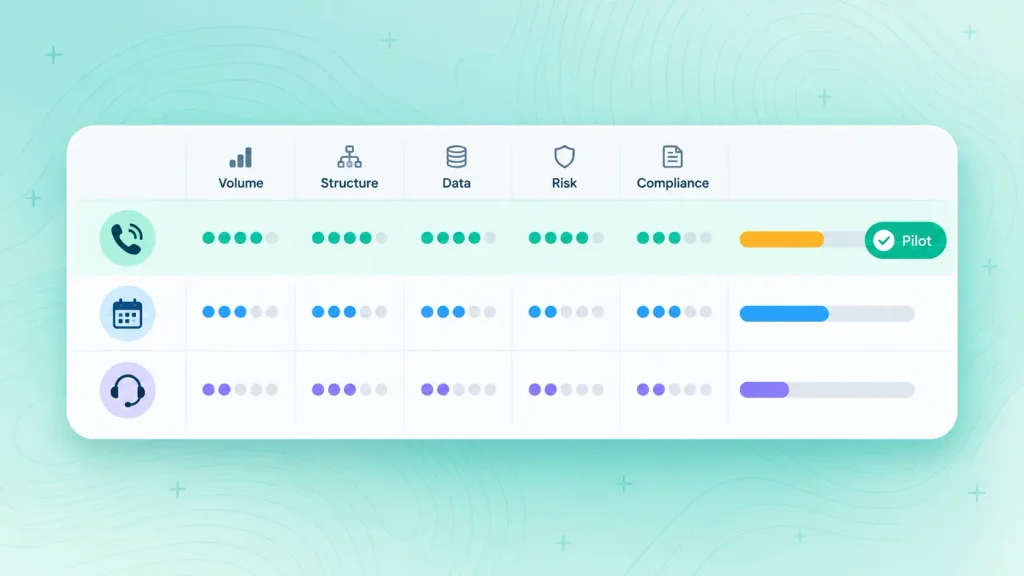
The highest total is usually your pilot. If two use cases tie, pick the one where a mistake is cheaper to fix.
If you’re stuck between options or unsure your data is ready, a short AI consulting engagement can pressure-test the scores before you spend on a build.
Run a Narrow Pilot
A pilot should be small enough to finish and clear enough to judge. Here’s a sequence that works:
- Pick one call type. “Appointment reminders for bookings two days out” beats “all scheduling calls.”
- Map the conversation. Write out every question, likely answer, and branch before you build anything.
- Set one KPI. Measure it for 30 days before launch, so you have a real baseline.
- Design the handoff. Decide exactly when the agent transfers, and to whom.
- Review transcripts weekly. Fix the prompts and branches where calls go sideways.
Step two is mostly a writing exercise. The principles behind conversation design for AI chatbots apply almost line for line to voice, with one difference: spoken answers need to be shorter.
Step five gets easier once your transcripts flow into a dashboard. Using AI analytics to spot patterns in your data, you can see which intents fail most often and fix those first. Track containment rate and average handle time side by side, so you don’t celebrate cheap transfers that annoy callers.
Compliance Checks Before You Launch
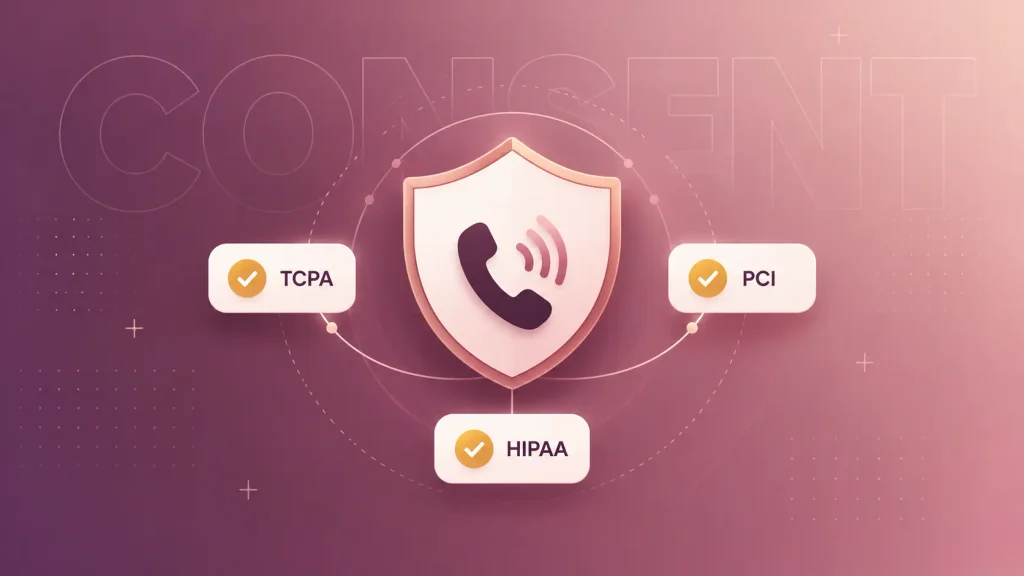
Compliance shapes which use cases you can launch, so it belongs in your scoring, not in a checklist after go-live. Three areas come up on almost every project.
Outbound Calls and the FCC AI-Voice Ruling
If your use case involves outbound calling in the US, this is the rule to know. In February 2024, the FCC ruled that AI-generated voices count as “artificial” voices under the Telephone Consumer Protection Act.
In practice, that means:
- Consent first: you need the person’s prior express consent before an AI-voiced call, unless an exemption applies.
- Identify yourself: the message has to name the business responsible for the call.
- No live-agent loophole: an AI agent that sounds human is still treated as an artificial voice.
Inbound calls are simpler, since the customer called you. Outbound lead calls and reminder campaigns need consent built into your forms and CRM before the agent dials anyone.
Health and Payment Data
If a call touches patient information, HIPAA applies. That means encrypted audio, strict access controls, and a business associate agreement with every provider in the voice stack.
Card payments bring PCI DSS into scope. The safest pattern is keeping card numbers away from the language model entirely, for example by sending a secure payment link by text instead of reading digits aloud.
Disclosure and Call Recording Consent
Callers should know they’re talking to an AI. Telling them upfront builds trust, and it’s one of the core ethical considerations in AI agent design worth settling before launch.
Recording rules differ by location. Some US states require every party to agree to recording, so a short notice at the start of each call keeps you covered.
Platform or Custom Build: Which Fits Your Use Case?
You have two broad paths. You can configure an off-the-shelf voice platform, or you can build a custom agent around your own systems.
Neither is always right. Here’s how they compare on the factors that usually decide it:
| Factor | Off-the-shelf platform | Custom voice agent |
| Time to first call | Faster, mostly configuration | Longer, scoped per project |
| Integration depth | Prebuilt connectors | Any system, any workflow |
| Data and compliance control | Set by the platform | Set by you |
| Cost pattern | Ongoing per-minute fees | Upfront build, lower run cost at scale |
| Best for | Standard, single-use pilots | Core workflows and in-product voice |
A platform makes sense when your use case is standard, and your call volume is modest. Comparing AI chatbot builders is a good way to get a feel for what no-code tools can and can’t do, and the same trade-offs show up on the voice side.
Custom starts to win when the agent has to work deep inside your own systems or ship as part of your product.
Reviewing the tools developers use to build AI agents shows you what a build actually involves, and this guide to building your first AI agent walks through the basic architecture.
The last question is who builds it. Weighing in-house vs outsourced AI development usually comes down to whether you have voice and telephony experience on your team today.
If you decide to bring in a partner, it’s worth knowing how to choose an AI consultancy before you sign anything.
How Boomdevs Builds AI Voice Agents Around Your Workflow
If your use case needs deep integrations, strict compliance, or voice inside your own product, a platform template won’t get you far. That’s the kind of work the Boomdevs AI voice agent development team takes on.
Here’s how a typical engagement runs:
- Use-case scoring: we score your call types with you before writing any code.
- Conversation design: we map each call’s paths, handoffs, and approved answers.
- Integration build: we connect the agent to your CRM, calendar, EHR, or order system.
- Pilot and tuning: we launch one call type, review transcripts, and tune weekly.
Boomdevs brings 10+ years of experience and 3.5K+ delivered projects, and was named a Clutch Champion in Fall 2024. If you’re also planning your budget, the drivers behind AI product development cost apply to voice agents too.
Ready to find out which of your calls should go first? Book a free voice agent scoping call and leave with a scored shortlist of your best use cases.
Frequently Asked Questions
What Are the Most Common AI Voice Agent Use Cases?
The most common ones are customer support FAQs, appointment scheduling, lead qualification, call routing, payment reminders, and after-hours coverage. They share high call volume and a predictable script. Internal IT and HR help desks are catching up fast.
Can an AI Voice Agent Replace Your Call Center Team?
No. A voice agent handles routine, repeatable calls so your team can focus on disputes, complex issues, and emotional conversations. The best setups pair the agent with a fast warm handoff to a person.
How Is an AI Voice Agent Different From an IVR?
An IVR makes callers press numbers through a fixed menu. An AI voice agent understands natural speech, asks follow-up questions, and can complete tasks like booking or updating a record. In short, an IVR routes calls while a voice agent resolves them.
Is an AI Voice Agent Worth It for a Small Business?
It can be, if you miss calls regularly or spend hours on booking and reminders. After-hours coverage and appointment scheduling usually pay off first. If your call volume is low and every call is different, a part-time receptionist may serve you better.
How Long Does It Take to Launch an AI Voice Agent?
A single, standard use case on a platform can go live fairly quickly. A custom agent with deep integrations or compliance needs takes longer, since most of the effort goes into connecting systems and testing real calls. Starting with one narrow pilot shortens the path either way.