- 1. Key Takeaways
- 2. UI vs UX Design: The Head-to-Head Comparison
- 3. What Is UX Design?
- 4. What Is UI Design?
- 5. How UI and UX Work Together (and Which Comes First)
- 6. Is Your Product's Problem a UI Problem or a UX Problem?
- 7. UI vs UX Examples From Everyday Products
- 8. Do You Need a UI Designer, a UX Designer, or Both?
- 9. UI vs UX in AI and Conversational Products
- 10. How to Measure Good UI and Good UX
- 11. How Boomdevs Fixes UI and UX Problems Together
- 12. Frequently Asked Questions
Summarize with
You’re planning a product, and every proposal you read mentions UI vs UX design like you already know the difference between UI and UX. Some partners pitch research first. Others show you polished screens on day one.
The honest answer depends on your situation, not on which label sounds better. It comes down to where your product is stuck and what stage you’re at. Here’s a simple UI vs UX design framework for deciding which one you need first, and when you need both.
Key Takeaways
- UX design decides how your product works: the journey, the structure, and the flows. UI design decides how each screen looks and responds.
- UX usually comes first. UI turns tested wireframes into finished, on-brand screens.
- If users can’t finish a task, you likely have a UX problem. If they finish it but the product feels hard to read or untrustworthy, look at UI.
- In UI UX design for startups, put most of the budget into UX before your MVP. Add UI depth once the core flows are proven.
- On the UX vs UI designer question, most products need both skill sets, often from one product designer early on and from specialists as you scale.
UI vs UX Design: The Head-to-Head Comparison
UX design shapes the path a user takes through your product. UI design shapes what they see and touch at every step of that path.
When you hire for UI/UX design services, you’re usually buying both layers at once. Still, UI design vs UX design are different jobs, with different skills, outputs, and ways of failing.
The Difference Between UI and UX in One Sentence
Here’s the version you can repeat in a meeting: UX decides whether a task makes sense, and UI decides whether the screen makes it easy to see and do.
Think of UI vs UX design like a train network. UX plans the lines, stops, and transfers. UI designs the station signs, ticket machines, and wall maps. Great signs can’t fix a line that goes to the wrong city.
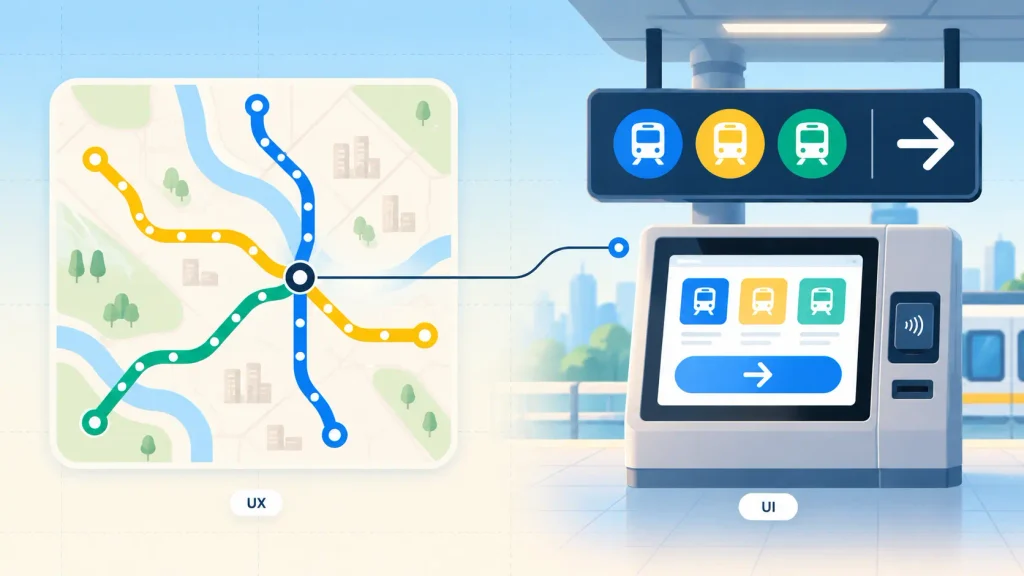
Here’s how UI design vs UX design compare across the factors that matter when you’re planning a build:
| Factor | UI Design | UX Design |
| Core question | How does this screen look and respond? | Does this journey make sense? |
| Scope | Screens, components, visual states | The whole journey, on and off screen |
| Main outputs | High-fidelity mockups, design system | Research, user flows, wireframes, prototypes |
| Success signal | Readable, consistent, on-brand screens | Users finish tasks without help |
| When it happens | After the structure is agreed | First, then throughout the project |
| What failure looks like | Cluttered, dated, hard-to-read screens | Drop-offs, confusion, support tickets |
The pattern behind UI vs UX design is simple. UX owns the “what” and “why,” and UI owns the “how it looks.” Neither one rescues the other for long.
What Is UX Design?
UX design is the work of deciding what your product should do for a user, and in what order. It covers research, structure, flows, and testing, long before anyone picks a font.
A UX designer’s real output is fewer wrong turns. Every confused tap they remove is one less support ticket, one less abandoned signup.
What UX Designers Actually Do
They start by learning who your users are and what those people are trying to get done. Interviews, analytics, and competitor walkthroughs all feed that picture.
Then they turn it into structure: which features exist, how they’re grouped, and what path each user takes. Finally, they test that structure with real people and fix what breaks.
Testing doesn’t need a big budget. Nielsen Norman Group’s research shows a single test user already surfaces almost a third of a design’s usability problems. Their advice is to run many small tests instead of one large one.
UX Deliverables You Should Expect
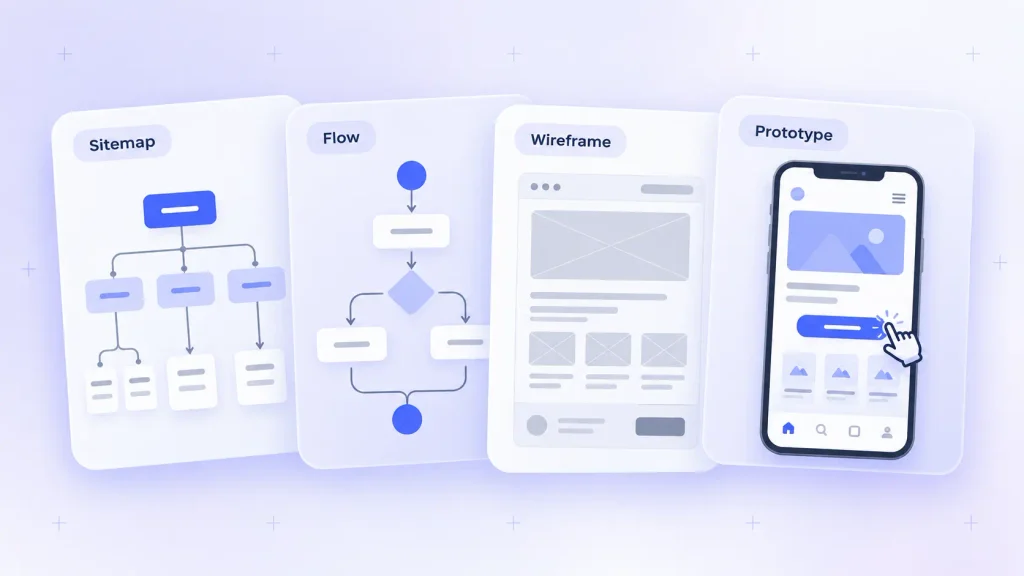
If you’re paying for UX work, you should be able to see it. A solid UX phase usually hands you:
- Research summary: who your users are, what they need, and where they get stuck today.
- Information architecture: how content and features are grouped and labeled, often shown as a sitemap.
- User flows: the step-by-step paths for your core tasks, like signing up or placing an order.
- Wireframes: grey-box layouts that focus on structure, not color or style.
- Tested prototype: a clickable version real users have tried, with notes on what changed.
A partner who jumps straight to colorful screens hasn’t skipped UX. They’ve just made those decisions silently, without evidence, which is riskier.
What Is UI Design?
UI design is everything a user sees, taps, and reads on a screen. That means layout, typography, color, icons, buttons, and how each element reacts when someone touches it.
This is where the difference between UI and UX gets practical: UI takes the structure UX agreed on and makes it clear, consistent, and on-brand. On phones, it also covers thumb reach, gestures, and platform patterns, since designing a mobile app means working inside a small screen and a one-handed grip.
What UI Designers Actually Do
They set the visual hierarchy, so your most important action is the most obvious one. They build the components your whole product reuses, from buttons to form fields to cards.
Readability sits squarely in their lane. The 2026 WebAIM Million report found low-contrast text on 83.9% of the top one million home pages, the most common accessibility failure it detected. That’s a UI decision, and it’s fixable.
UI Deliverables You Should Expect
A finished UI phase should leave your developers with almost no guesswork. Expect these four outputs:
- High-fidelity screens: final layouts for every key screen, at the device sizes you’ll ship.
- Design system or UI kit: reusable components, color tokens, type scales, and spacing rules.
- Interaction states: default, hover, pressed, disabled, loading, empty, and error versions of key elements.
- Developer handoff specs: measurements, exported assets, and component names your engineers can build from.
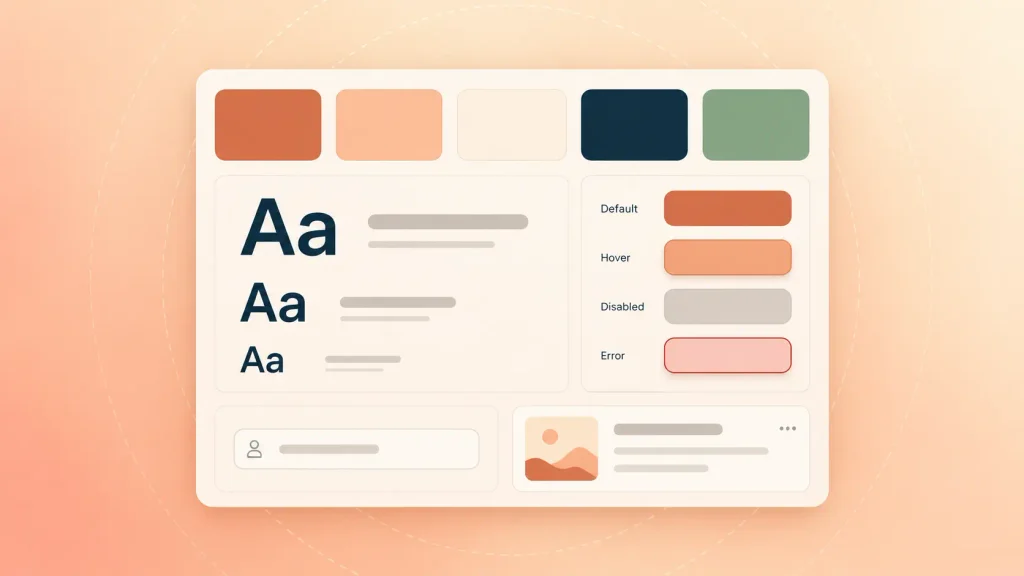
I’d suggest asking for the empty and error states early. They’re where rushed UI work shows up first, and where users feel it most.
How UI and UX Work Together (and Which Comes First)
In UI vs UX design, UX comes first, and UI follows, but the handoff isn’t one clean moment.. The two layers loop back on each other until launch, and then the loop keeps going.
Is UI part of UX? In one sense, yes. The interface is one piece of the overall experience, so UI sits inside UX. In practice, though, they’re separate skills, and the work moves through them in a fairly predictable order:
- Research: UX learns who your users are and what they need to get done.
- Structure: UX maps the information architecture and the core user flows.
- Wireframes: UX lays out each screen in low fidelity while UI explores visual direction.
- Visual design: UI turns the approved wireframes into high-fidelity screens and components.
- Testing: both layers review a clickable prototype with real users and fix what breaks.
- Iteration: after launch, analytics and feedback start the next round of changes.
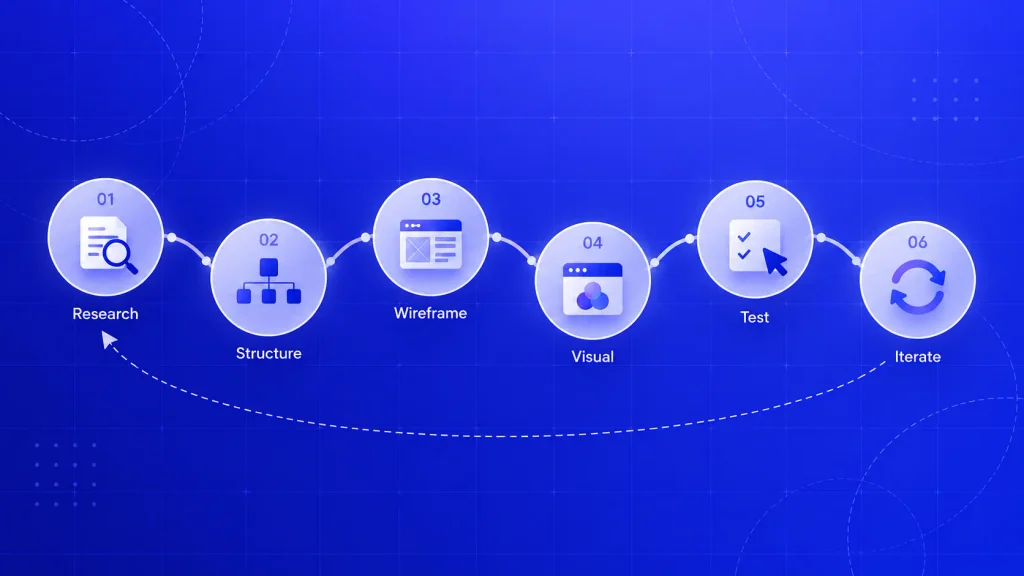
At a startup, a UI/UX design process built for startups squeezes those six steps into weeks, with lighter research and faster prototype rounds.
On a website, this runs alongside development rather than strictly before it. A good custom web design process overlaps design and build the same way, so you’re not waiting months for a hand-off.
Is Your Product’s Problem a UI Problem or a UX Problem?
To settle UI vs UX design for your own product, look at where users fail, not at how it looks. If people can’t finish a task, the cause is usually UX. If they finish it but don’t trust it, enjoy it, or read it easily, the cause is usually UI.
Here’s a quick way to match what you’re seeing to the layer that’s likely broken:
| Symptom You’re Seeing | Likely Layer | First Fix |
| Users drop off during signup | UX | Cut steps, retest the flow |
| “Where do I find X?” support tickets | UX | Rework navigation and labels |
| Features exist, but nobody uses them | UX | Revisit onboarding and discovery |
| Users miss the main button | UI and UX | Fix hierarchy, then check the flow |
| Screens look inconsistent across the app | UI | Build a shared design system |
| Text is hard to read on mobile | UI | Fix type size and contrast |
| Product looks dated next to rivals | UI | Refresh the visual system |
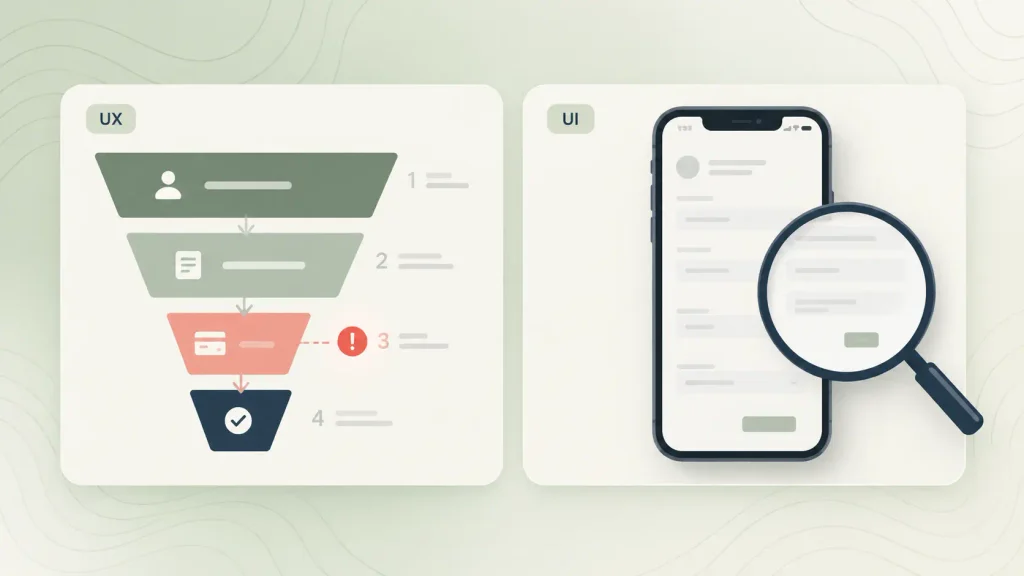
Notice how many symptoms point to UX. When you weigh UI design vs UX design problems, the flow usually breaks before the paint does. Founders often ask for a “redesign” when the real issue is a broken flow under a perfectly fine coat of paint.
The cost of a misread is real. Baymard Institute puts the average cart abandonment rate at 70.19% and estimates a large e-commerce site could lift conversion by 35% through checkout design changes alone. Those are design fixes, not new features.
Apps show the same split, since many of the reasons mobile apps fail trace back to confusing flows rather than weak visuals. And if you genuinely can’t tell which layer is broken, a short UI/UX consulting engagement is usually cheaper than guessing with a full redesign.
UI vs UX Examples From Everyday Products
The easiest way to see UI vs UX design in action is to pick one moment in a product and ask two questions. How does this look? And does this make sense?
Here’s what that looks like in products you probably used this week:
| Product Moment | UI Decision | UX Decision |
| Food delivery checkout | Button style, food photos, layout | Saved address, one-tap reorder |
| Banking app transfer | Icons, number formatting, confirm screen | Number of steps, what happens on error |
| SaaS onboarding | Illustrations, progress bar style | Which setup steps are required, in what order |
| Marketplace search | Card design, filter chips | Which filters exist, default sort order |
You’ve likely met both extremes. A gorgeous app where you can’t find the settings is strong UI sitting on weak UX.
A plain, dated marketplace that still lets you post a listing in two minutes is the reverse. And it often wins, because people forgive ugly far faster than they forgive confusing.
Do You Need a UI Designer, a UX Designer, or Both?
The UX vs UI designer question rarely has a single answer. You almost always need both skill sets, but not in equal amounts at every stage. The right split depends on how proven your product already is.
By Product Stage
Early on, the biggest risk is building the wrong thing. Later, it’s building the right thing inconsistently. Your design spend should follow that shift, and your stage is one of the biggest drivers of what UI/UX design costs:
| Stage | Design Priority | Who to Bring In |
| Idea / pre-MVP | Research, flows, clickable prototype | UX-led product designer |
| MVP build | Proven core flow, clean basic UI | Product designer with a UI kit |
| Growth | Consistency, design system | Add a UI specialist |
| Redesign | Diagnose before repainting | UX audit first, then UI |
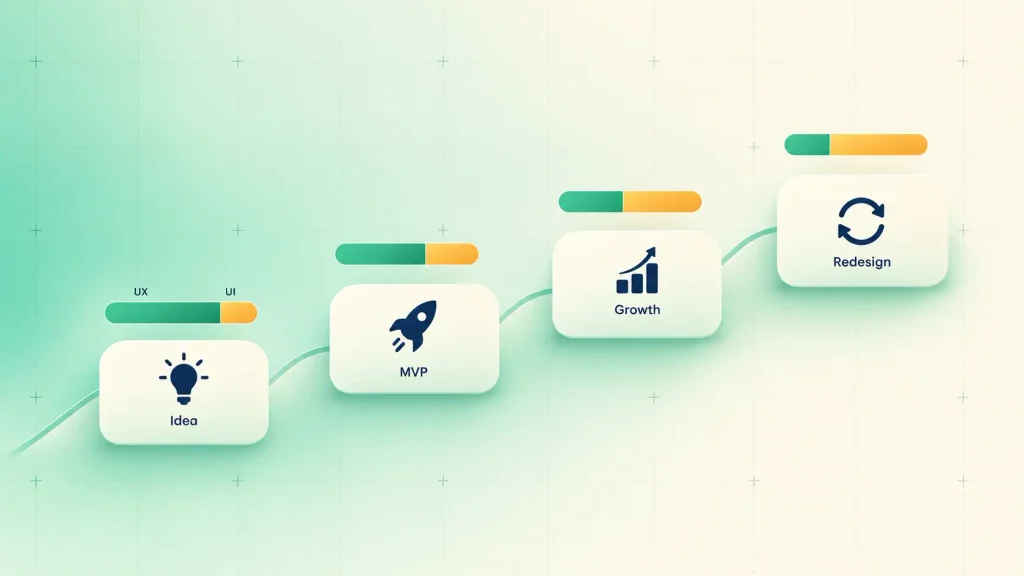
If you’re at the MVP stage, UI UX design for startups has one goal: proving a core flow works. That’s why SaaS MVP development leans hard on UX and keeps the UI lean until users confirm the value.
Native apps shift the balance a little. Platform rules make UI matter from the first screen, so mobile app UI/UX design has to respect iOS and Android conventions from day one.
One Hybrid Product Designer vs Two Specialists
A single product designer who covers both layers is often the smartest early hire. You get speed, one point of view, and no hand-off gaps.
The catch is attention. One person will naturally lean toward research or toward visuals, and the other layer gets less care. Here’s how the trade-off usually plays out:
- One hybrid designer: fast, consistent, affordable, and ideal before product-market fit.
- Two specialists: deeper research and sharper visuals, worth it once several teams ship features at once.
- Hybrid plus a design system: a middle path, where one designer moves faster because components are already defined.
I’d suggest starting hybrid and splitting the roles once maintaining your design system becomes a job of its own.
The split gets harder when outside designers join, because unclear ownership and slow feedback loops are among the most common UI/UX consulting challenges you’ll run into.
In-House, Agency, or Augmented Team
Who does the work matters as much as which layer they focus on. You have three realistic options:
- In-house: best when design is core to your product for years, and you can hire and keep senior people.
- Design studio or agency: best for a defined project with a clear end, like an MVP or a redesign, as long as you choose a UI/UX design agency by its process and past user flows, not just its portfolio shots.
- Augmented designers: best when you already have a product team but need extra capacity, which is exactly what UI/UX staff augmentation covers.
None of these is “right” by default. The best fit is the one that matches how long you’ll need the work and who will own it after launch.
UI vs UX in AI and Conversational Products
In a chat or voice product, the interface shrinks to a text box. So UX carries most of the weight, because the conversation itself becomes the screen.

That changes what each layer owns. In AI products, the split usually looks like this:
- UX decides what the assistant can do, how it asks clarifying questions, how it recovers from a wrong answer, and when it hands off to a human.
- UI decides message layout, how streaming text appears, how sources and citations show up, and which suggested-reply buttons appear.
- Both own trust: clear loading states, honest error messages, and making it obvious what the AI can’t do.
A beautiful chat bubble won’t save an assistant that misunderstands people. Good conversation design for AI chatbots maps intents, fallbacks, and hand-offs before anyone styles a single message.
How to Measure Good UI and Good UX
Measure UX by whether people succeed. Measure UI by whether they can clearly see and use what’s in front of them.
Here are practical checks you can run without a research department:
| Layer | What to Measure | How to Check |
| UX | Task success rate | Small moderated tests with real users |
| UX | Drop-off by step | Funnel reports in your analytics |
| UX | Time to first value | Onboarding events in product analytics |
| UI | Text contrast | Contrast checker against WCAG |
| UI | Component consistency | Design system audit |
| UI | Build matches design | Side-by-side visual QA before release |
Contrast is the easiest win on that list. WCAG’s contrast minimum asks for at least 4.5:1 between normal text and its background, and you can check it in seconds.
For web apps, you can run these checks alongside web app design best practices like consistent navigation, clear form validation, and responsive layouts, so issues surface before release.
How Boomdevs Fixes UI and UX Problems Together
Most product problems ignore the line between UI and UX. A signup drop-off might need a shorter flow and a clearer button, so Boomdevs treats both layers as one piece of work.
The process starts with the user flow, gets validated with a clickable prototype, and only then moves into a full design system your developers can build from. After 3.5K+ projects and recognition as a Clutch Champion, that order is what keeps redesigns from becoming expensive repaints.
If you want both layers handled by one team, our end-to-end UI and UX design team can take you from research to developer-ready screens.
Not sure where your product is stuck yet? You can book a free UI/UX review and get a straight answer on which layer to fix first.
Frequently Asked Questions
Which Comes First, UI or UX?
UX comes first. Research, user flows, and wireframes define what each screen needs to do. UI then turns that agreed structure into finished visual design, and both layers keep refining each other through testing.
Is UI Part of UX?
Yes, UI is one part of the overall user experience. UX covers the full journey, including steps that happen off-screen, while UI covers the visual and interactive layer on each screen. They overlap, but they’re separate skills.
Can One Person Do Both UI and UX Design?
Yes. A product designer often covers both, especially at early-stage startups. The trade-off is depth: one layer usually gets less attention, so many teams add specialists once the product and design system grow.
Does UI/UX Design Require Coding?
Coding isn’t required for most UI or UX roles. Designers work mainly in tools like Figma. Basic HTML and CSS knowledge does help UI designers hand off realistic designs and talk clearly with developers.
Is Figma a UI or UX Tool?
Figma supports both. You can use it for wireframes, user flows, and clickable prototypes (UX work), and for high-fidelity screens and design systems (UI work). The tool doesn’t decide the discipline; the task does.
Which Is More Important, UI or UX?
Neither wins on its own. UX decides whether users can get their job done, and UI decides whether they trust and enjoy doing it. If you have to prioritize early, fix UX first, because a polished screen can’t rescue a broken flow.