


- 1. Key Takeaways
- 2. What SaaS Security Best Practices Mean When You Build the Product
- 3. Make Identity and Access Your First Line of Defense
- 4. Build Tenant Isolation Into the Architecture
- 5. Secure Your APIs and Third-Party Integrations
- 6. Protect Customer Data Across Its Full Lifecycle
- 7. Put Security Into Your Delivery Pipeline
- 8. Log, Monitor, and Rehearse Incident Response
- 9. Turn Compliance Into a Sales Asset
- 10. Secure the AI Features You Add
- 11. Which SaaS Security Best Practices to Prioritize at Each Stage
- 12. How Boomdevs Builds Security Into SaaS Products
- 13. Frequently Asked Questions
Summarize with
You’ve picked a solid cloud provider and put a login page in front of your app. That feels like security, and partly it is.
But your provider stops at the infrastructure. Your tenant boundaries, your APIs, and your admin tools are yours to defend. That’s where the expensive mistakes hide.
This guide covers the SaaS security best practices that close those gaps. It also shows which ones to tackle first at your stage.
Key Takeaways
- Your cloud provider secures servers and networks. SaaS application security (identity, tenant isolation, APIs, and customer data) is your job.
- Broken access control is the top application risk on the OWASP Top 10, and in a multi-tenant product it turns one bug into a cross-customer breach.
- Derive the tenant from the authenticated session on the server, never from the request, and test cross-tenant access on every release.
- Treat integrations, secrets, and your own support tools as part of the attack surface, not side projects.
- You don’t need everything on day one. Get identity and isolation right first, then add compliance when enterprise deals start asking for it.
What SaaS Security Best Practices Mean When You Build the Product
For a team shipping its own product, SaaS security best practices are the architecture, access, and delivery decisions that stop one customer’s data from reaching anyone else. They’re less about buying tools. They’re about how you design tenants, permissions, and releases.
That’s a different job from securing the SaaS apps your company uses. Much of what ranks for this topic covers that side. If you’re building the product, the questions that matter start one layer down.
The Shared Responsibility Split
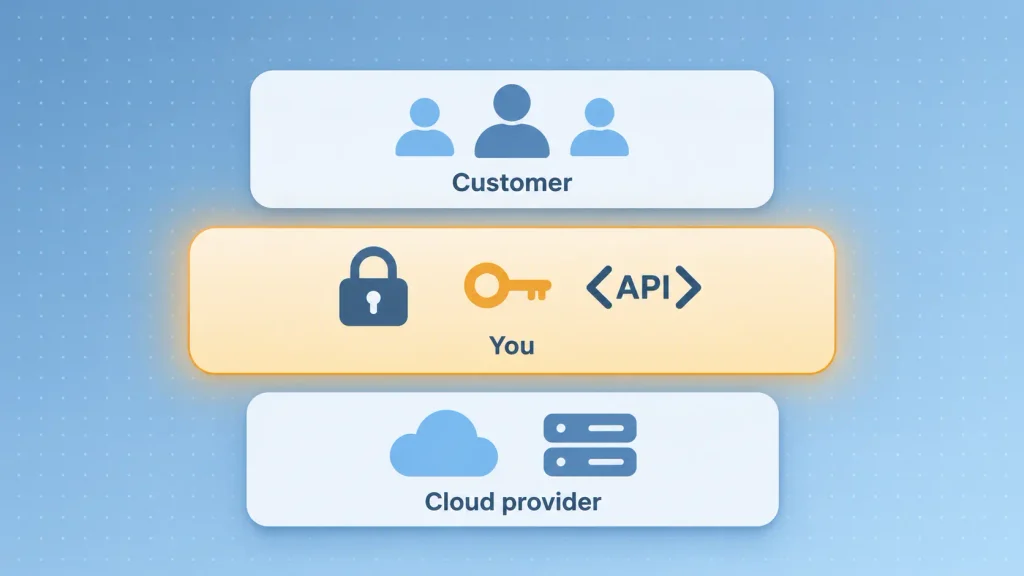
Your cloud provider handles the physical data center, the network, and the managed services you run on. Everything your code decides is yours, and that’s the part SaaS security best practices are really about. Here’s how the split usually falls:
| Security area | Cloud provider | You (SaaS builder) | Your customer |
| Data centers and hardware | Owns it | None | None |
| Network and managed services | Owns it | Configures it | None |
| Tenant isolation | None | Owns it | None |
| App authentication and roles | None | Builds it | Assigns users |
| API and integration security | None | Owns it | Approves connections |
| Customer data classification | None | Shared | Shared |
The middle column is the one that surprises people. If a customer sees another customer’s invoice, no cloud provider caused that. It came from your authorization logic, and getting the infrastructure side right won’t cover it.
Why Feeling Secure Isn’t the Same as Being Secure
Confidence is cheap, and the numbers show it. In AppOmni’s 2025 State of SaaS Security report, 91% of organizations said they felt confident in their SaaS security posture. Yet 75% had a SaaS security incident in the prior 12 months.
The bill for being wrong is real too. IBM’s 2025 Cost of a Data Breach report put the global average breach at $4.44 million, and the U.S. average at $10.22 million.
For a startup, the cost that hurts first is often churn and stalled deals, not the fine. That’s why the SaaS security best practices in the rest of this guide focus on controls you can actually prove.
Make Identity and Access Your First Line of Defense
Identity is the boundary every other control in SaaS application security leans on. If you can’t say for certain who is behind a request, encryption and logging only help you explain the breach afterward.
Stolen credentials are still the most common way in. The Verizon 2025 Data Breach Investigations Report found credential abuse was the leading initial access vector, at 22% of breaches.
Offer SSO and MFA to Your Customers’ Users
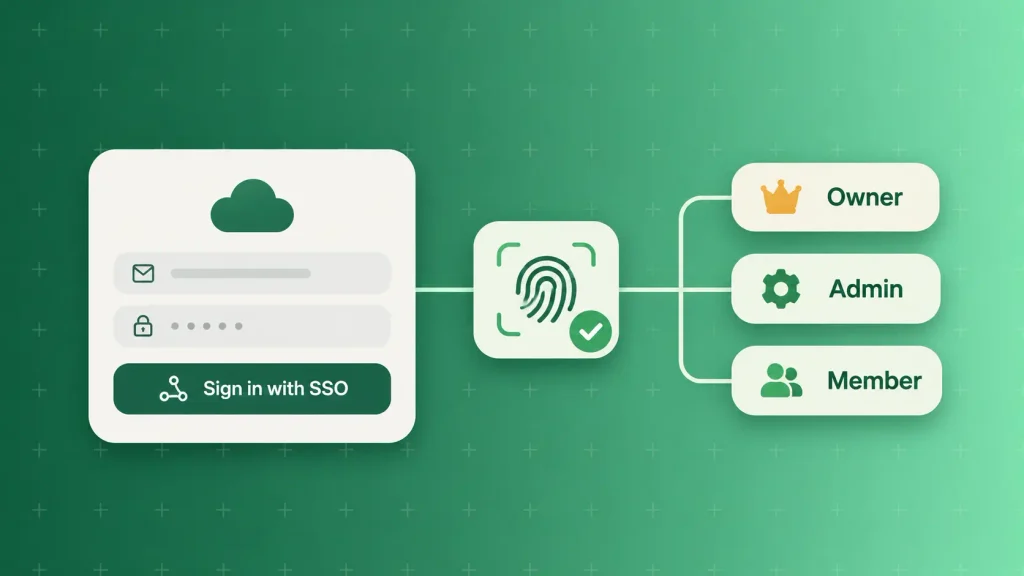
Your enterprise buyers will ask whether their staff can sign in through their own identity provider. Supporting SAML or OpenID Connect single sign-on early saves you a painful retrofit later.
Multi-factor authentication matters just as much for your own users. Passkeys and hardware keys resist phishing far better than SMS codes. I’d make MFA mandatory for every admin role, at minimum.
Build Roles That Match Real Jobs
Role-based access control works when roles mirror how your customers actually work. Least privilege means each person gets what their job needs, and nothing that only “might be useful.” A sensible starting set looks like this:
- Tenant owner: manages billing, SSO settings, and who can invite users.
- Admin: manages users and configuration, but can’t change billing or delete the account.
- Member: uses the product’s core features on their own team’s data.
- Read-only or auditor: sees records and logs, changes nothing.
Keep the set small at first. Every extra role is another rule to test, so add roles when customers ask for them, not before.
Lock Down Your Own Admin and Support Tools
Your internal admin panel is the most powerful interface in your product. It can usually see every tenant, yet it often gets less review than the customer-facing app.
Okta learned this the hard way. In 2023, an attacker used a stolen service account to get into its customer support case system. The attacker reached files tied to 134 customers, and session tokens inside those files were used to hijack five customers’ sessions.
The fix isn’t exotic. It’s discipline around the tools you built for yourself:
- Put staff access behind SSO and phishing-resistant MFA, with no shared logins.
- Make “log in as customer” time-limited, approved, and visible to the customer.
- Strip tokens and cookies from any diagnostic files customers upload.
- Log every staff action against tenant data, separately from customer activity logs.
A support ticket can become an access path. Treat it like one.
Build Tenant Isolation Into the Architecture
SaaS tenant isolation is the control that makes the whole model work. Every request has to stay inside one customer’s boundary, at every layer it touches. If isolation fails, a single bug can expose every customer at once.
Pool, Bridge, or Silo: Choosing an Isolation Model
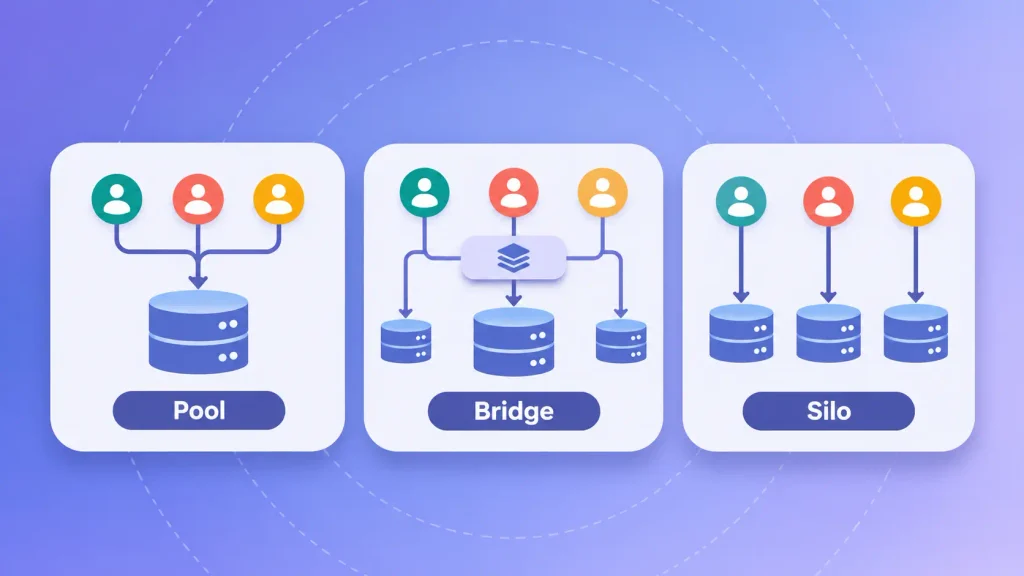
AWS’s SaaS Lens describes three patterns. Most products end up mixing them, and the right choice often varies by customer tier:
| Model | How it works | Isolation strength | Best fit |
| Pool | Tenants share compute and storage | Logical, enforced in code | Self-serve and SMB tiers |
| Bridge | Some layers shared, some dedicated | Mixed by component | Mixed customer base |
| Silo | Each tenant gets dedicated resources | Strongest separation | Regulated or enterprise tiers |
AWS frames the bridge model as the realistic middle ground, since some services need silo isolation while others pool happily. A shared database is perfectly safe with a pool model. What isn’t safe is assuming the database alone enforces the boundary.
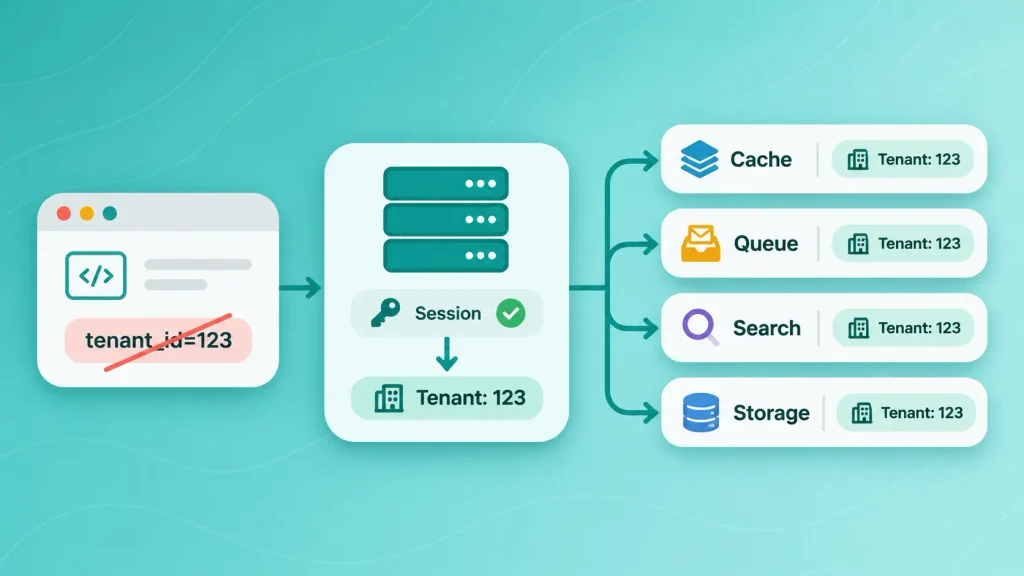
Never Trust a Tenant ID From the Client
This is where multi-tenant products break most often. If your API reads the tenant from a header, URL, or request body, someone will change it and see what comes back.
Your server should derive tenant context from the authenticated session, then enforce it again at each data layer. Teams often secure the main database and forget the rest:
- Caches: prefix each key with the tenant, or one customer reads another’s cached result.
- Queues and background jobs: carry tenant context into the job, and check it again when it runs.
- Search and vector indexes: filter by tenant inside the query, not after results come back.
- File storage: scope paths and signed URLs per tenant.
- Logs and exports: keep one customer’s data out of another’s reports.
Row-level security in your database is a strong backstop. Pair it with tenant checks in your application code, so a single missed filter doesn’t become an incident.
Test Cross-Tenant Access in Every Release
SaaS tenant isolation degrades quietly as features ship. A new endpoint, a new cache, a rushed hotfix, and the boundary has a gap nobody noticed. The answer is to test it like an attacker would, automatically, on every build:
- Sign in as a user in Tenant A and request an object that belongs to Tenant B.
- Change or increment an object ID in a valid request and confirm it fails.
- Replay an authorized request with a different tenant’s session.
- Run a search or export as Tenant A and check that no Tenant B records appear.
- Call admin-only endpoints with a member role and confirm they’re denied.
These belong in your regression suite, not a once-a-year pentest. If you’d rather have a team own this, dedicated software testing can build the suite alongside your releases.
Planning a multi-tenant build? Boomdevs can review your tenant model and access design before you write the code that’s hardest to change. Talk through your SaaS architecture.
Secure Your APIs and Third-Party Integrations
Your API is where your product’s rules actually get enforced. Every screen in your app is just a friendly front end for it, which means attackers skip the screens and go straight to the endpoints. That’s why SaaS API security deserves the same attention as your login page.
Check Object-Level Authorization on Every Endpoint
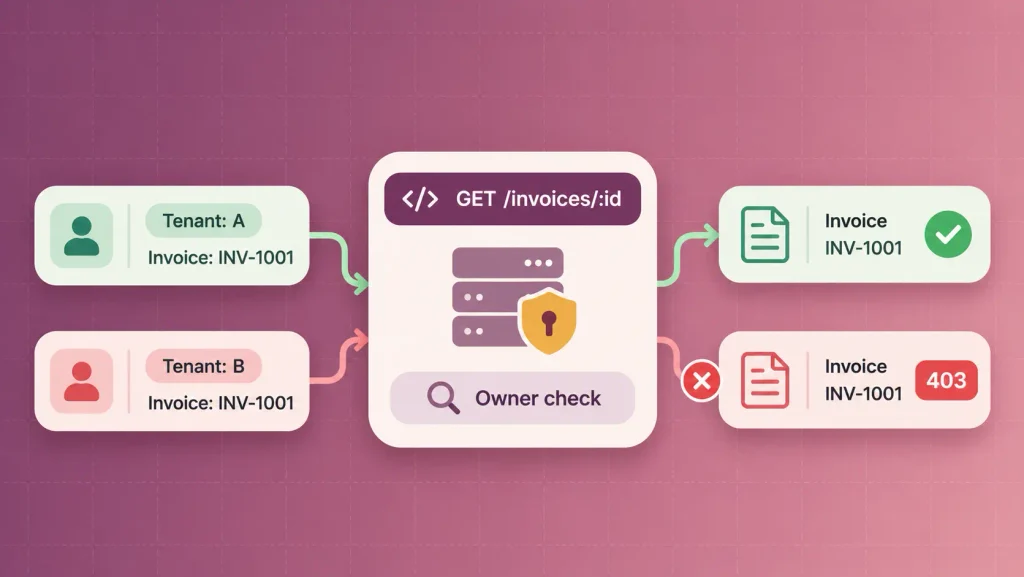
Authentication tells you who someone is. Authorization tells you whether they can touch this specific record. Mixing those up is the single most common failure in SaaS API security.
The OWASP Top 10:2025 keeps Broken Access Control at number one, and moves Security Misconfiguration up to number two. The OWASP API Security Top 10 puts Broken Object Level Authorization first. That’s an endpoint confirming you’re logged in, then handing over any record whose ID you ask for.
In a multi-tenant product, that one gap turns a predictable URL into a list of every customer’s data. The fix is simple to state: your server checks ownership on each object, on each request.
Scope OAuth Tokens, Webhooks, and Rate Limits
Integrations are how your product earns its place in a customer’s stack. They also widen your attack surface every time you add one. A few habits keep that manageable:
- Short-lived, narrowly scoped tokens: a token that can only read one tenant’s data limits the damage if it leaks.
- Signed webhooks: verify the signature and timestamp on each inbound payload, and reject replays.
- Targeted rate limits: login, password reset, invitations, and bulk export are the flows attackers automate first.
- Untrusted responses: treat data coming back from a third-party API like user input.
General gateway limits rarely protect those specific flows. Set them per endpoint as part of your SaaS API security baseline.
Treat Secrets Like Production Data
API keys, database passwords, and signing keys are production access in text form. The same Verizon report found third-party involvement in breaches doubled to 30%. It also found the median time to fix leaked secrets in GitHub repositories was 94 days.
Ninety-four days is a long time for a working key to sit in public. You’ll want secrets in a vault, never in code or committed environment files.
From there, rotate them automatically and scan each commit for them. Every service account should also have a named owner, so nothing quietly outlives the person who created it.
Protect Customer Data Across Its Full Lifecycle
In SaaS application security, data protection covers more than encryption. A compromised account with legitimate access reads decrypted data just as easily as a real user does. So the goal is to limit what any one identity can reach, and to know where every piece of data lives and when it dies.
Encrypt Everywhere and Decide Who Holds the Keys
Use TLS for everything in transit, including traffic between your own services. Encrypt data at rest in databases, backups, and object storage. Most cloud platforms make both close to free.
The harder question is key ownership. Enterprise and regulated customers may ask to manage their own keys. You don’t need that on day one, but it’s worth designing so you can offer it later without a rewrite.
Set Retention and Deletion Rules Early
Data you no longer hold can’t leak. Regulations like GDPR also expect you to delete personal data once you no longer need it. Decide these rules before your first big customer asks:
- How long each data type is kept, and why.
- What happens to a tenant’s data when they cancel.
- How deletion reaches backups, replicas, and analytics copies.
- How customers can export their data before it goes.
Write these into your terms, not just your code. Buyers will ask to see them.
Back Up Per Tenant and Test the Restore
Uptime and backups are not the same promise. Your provider can keep servers running while a customer’s admin deletes half their records, or ransomware encrypts files your app had write access to.
Back up in a way that lets you restore one tenant, or one record, without rolling back everyone. Then test the restore on a schedule. A backup you’ve never restored is a hope, not a control.
Pick one tenant each month, restore their data into a staging copy, and time how long it takes. That number is what you’ll quote when a customer asks how fast you can recover. If it takes longer than you expected, fix the process before an outage forces you to.
Put Security Into Your Delivery Pipeline
Security that lives outside your pipeline gets skipped the week a deadline lands. Building SaaS application security checks into how you ship means they run whether anyone remembers them or not.
NIST’s Secure Software Development Framework is a good reference for the full lifecycle. You don’t need all of it at once.
Threat-Model Features Before You Build Them
Thirty minutes on a whiteboard can save weeks of rework. Before a feature touches tenant data, authentication, or an integration, it’s worth asking three questions.
Who could misuse this? What data could cross a boundary? What happens if this component is compromised?
Folding that into your SaaS development process at the design stage costs far less than fixing it after launch.
Automate the Checks in CI/CD
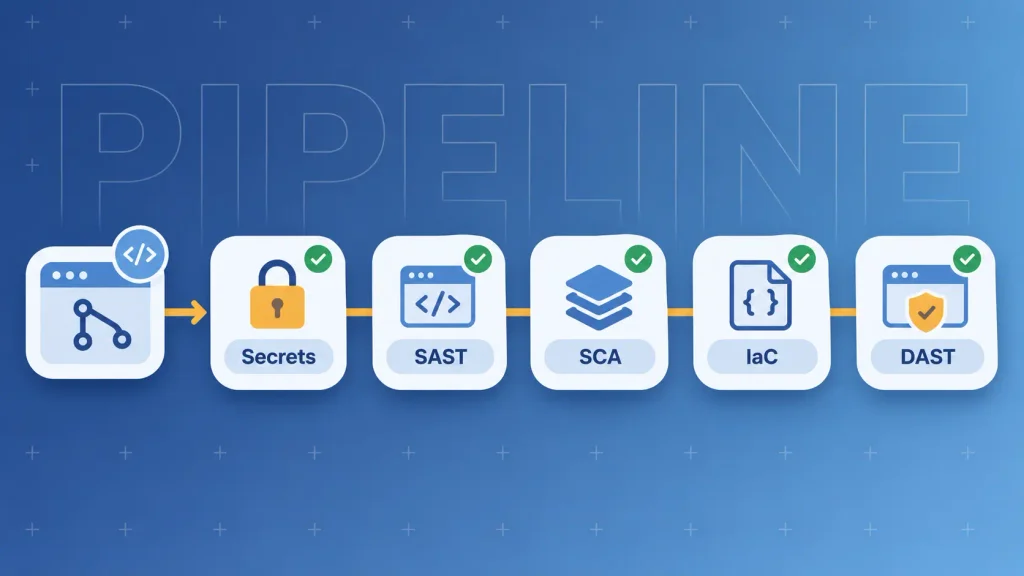
A practical pipeline runs these checks on every merge, roughly in this order:
- Secret scanning to block keys and passwords before they’re committed.
- Static analysis (SAST) to catch insecure code patterns early.
- Dependency scanning (SCA) to flag libraries with known vulnerabilities.
- Infrastructure-as-code scanning to catch open storage buckets and over-broad permissions.
- Dynamic testing (DAST) against a staging build to probe the running app.
Generic web risks like injection and cross-site scripting still apply to SaaS. We cover those in our guide to web application security, so this section stays focused on multi-tenant SaaS security.
Patch by Exploitability, Not by Age
Scanners will flag more issues than you can fix. Treating every alert as urgent burns out your team and hides the ones that matter.
I’d prioritize what’s internet-facing, actively exploited, and reachable without special privileges. An internal-only library flaw with no known exploit can usually wait for the next release.
Log, Monitor, and Rehearse Incident Response
Good incident response depends on visibility you set up before anything goes wrong. When something breaks at 2 a.m., you’ll only have the logs you chose to keep.
Log the Events You’ll Need on the Worst Day
Store these in a log your customers and your own staff can’t quietly edit:
- Sign-ins, failed logins, and MFA changes.
- Role and permission changes, especially admin grants.
- New API tokens, OAuth grants, and integrations.
- Bulk exports and unusual data access.
- Every staff action taken inside a customer’s tenant.
Enterprise customers will often ask for their own audit log too. Building it once serves both needs.
Audit logs are also where SaaS application security gets tested in real life. When a customer asks who touched their data last Tuesday, you should be able to answer in minutes, not days. That kind of answer is what turns SaaS security best practices from a slide into proof.
Write a Playbook for Account and Token Compromise
Most serious SaaS incidents start with a stolen session or credential, not a dramatic exploit. A short, rehearsed playbook beats a long one nobody has read. When you suspect a compromise:
- Suspend the affected user or service account.
- Revoke active sessions and tokens tied to it.
- Revoke connected OAuth grants and rotate related secrets.
- Preserve logs before anything gets overwritten.
- Tell affected customers what happened and what they should do.
It’s worth running through it once a quarter with a made-up scenario. The gaps show up fast.
Turn Compliance Into a Sales Asset
Compliance isn’t the same as security, but your buyers use it as proof that you follow SaaS security best practices. Once you sell to larger companies, a security questionnaire lands in almost every deal. Your answers decide how long that deal stalls.
Which Frameworks Your Buyers Will Ask For
Which framework matters depends on who you sell to and what data you hold:
| Framework | Who usually asks | What it proves |
| SOC 2 Type II | U.S. B2B buyers | Controls exist and work over time |
| ISO/IEC 27001 | European and global enterprises | A managed security program |
| GDPR | Anyone with EU users | Lawful handling of personal data |
| HIPAA | U.S. healthcare customers | Protection of patient data |
| PCI DSS | Anyone storing card data | Card data handled securely |
A payment processor that holds the card details can take PCI DSS mostly off your plate. That’s usually the smarter path for an early product.
When SOC 2 Starts Blocking Deals
A useful rule: start SOC 2 when an enterprise prospect asks for it and the deal is worth more than the audit. Before then, a clear security page and honest questionnaire answers usually carry smaller deals.
The good news is that the SaaS security best practices above are most of the work. Identity, access reviews, logging, change control, and incident response are what an auditor checks. If you’ve built them in, the audit is mostly about collecting evidence.
Secure the AI Features You Add
AI features open a new trust boundary inside your product. A model that reads tenant data, calls tools, or takes actions needs the same access discipline as a human user. Often it needs more.
The gap is already visible. In IBM’s 2025 report, 97% of organizations that reported an AI-related security incident lacked proper AI access controls.
A few controls go a long way:
- Treat prompts and retrieved content as untrusted input. A malicious document can carry instructions, just like a malicious form field.
- Give each agent its own scoped identity, never a shared admin account.
- Separate read, propose, and execute permissions, with human approval for actions like sending email or moving money.
- Keep retrieval inside the tenant boundary, so one customer’s documents never answer another customer’s question. It’s SaaS tenant isolation applied to your AI layer.
OWASP’s Top 10 for LLM Applications is the closest thing to a shared baseline here. If you’re planning this work, our guide to adding AI features to an existing SaaS covers the build side, and our AI SaaS development team designs these permissions in from the start.
Which SaaS Security Best Practices to Prioritize at Each Stage
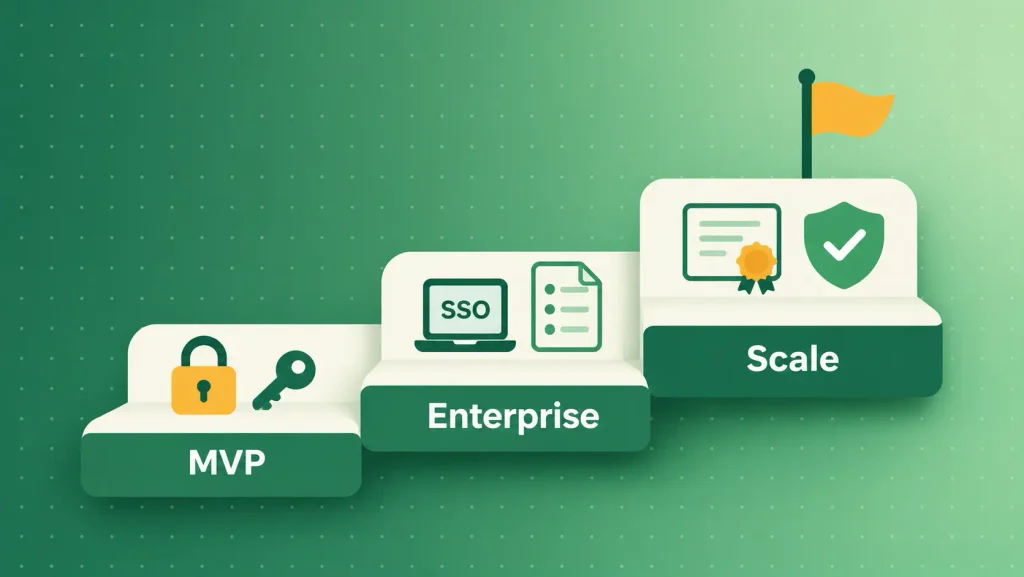
You can’t do everything at once, and you shouldn’t try. The right order depends on who your customers are and what they’ll ask you to prove. This is how I’d sequence SaaS security best practices:
| Stage | Must-haves now | Can wait |
| MVP, first users | MFA, server-side tenant checks, secrets vault, encryption, backups | SOC 2, customer-managed keys |
| First enterprise deals | SSO, audit logs, cross-tenant tests, incident playbook, security page | Silo tier, full pentest program |
| Scaling | SOC 2 Type II, regular pentests, per-tenant restores, AI access controls | Almost nothing |
The MVP row matters most because it’s the hardest to retrofit. Adding SaaS tenant isolation after launch means touching every query you’ve written.
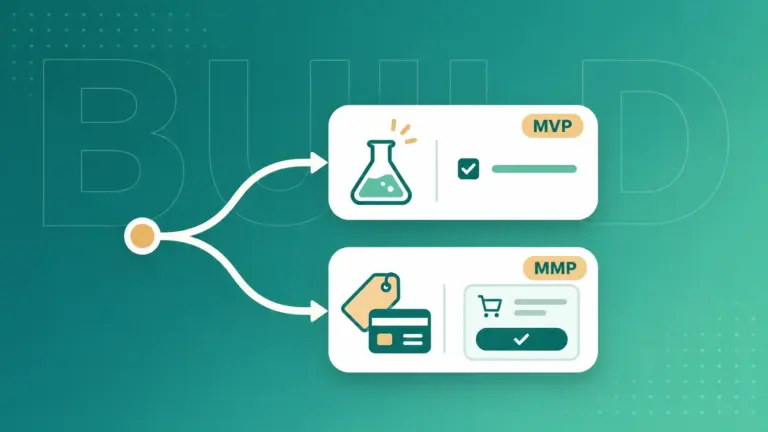
If you’re budgeting an early build, this breakdown of SaaS MVP development cost shows where the work fits. With SaaS MVP development, Boomdevs builds it in from the first sprint.
How Boomdevs Builds Security Into SaaS Products
Most security problems we’re asked to fix started as architecture decisions nobody revisited. A tenant ID trusted from the browser. An admin panel with one shared login. A webhook nobody verified.
That’s why Boomdevs treats SaaS security best practices like tenant isolation, access design, and pipeline checks as part of the build, not a phase after it. Across 3.5K+ delivered projects, the pattern holds. Security decisions are cheapest in week one and most expensive after your first enterprise customer.
If you’re building a new SaaS product or hardening one that’s already live, let’s scope a SaaS build that passes your first security review.
Frequently Asked Questions
What are the most important SaaS security best practices?
For a team building SaaS, start with strong identity (SSO and MFA), server-side tenant isolation, and object-level authorization on every API endpoint. Add secrets management, encryption, and tested backups next. These controls prevent the cross-customer breaches that do the most damage.
Who is responsible for security in a SaaS application?
Responsibility is shared. The cloud provider secures the physical infrastructure and core services. The SaaS company secures its application, tenant isolation, APIs, and the data it processes. Customers manage their own users, roles, and connected integrations.
Is a shared database safe for multi-tenant SaaS?
Yes, if isolation is enforced properly, which is the core of multi-tenant SaaS security.
Derive the tenant from the authenticated session on the server, filter every query by tenant, and add database row-level security as a backstop. Regulated or high-value customers may still justify dedicated databases.
When should a SaaS startup get SOC 2?
Start when enterprise prospects ask for it and the deals at stake outweigh the audit effort. Before that, clear security documentation and honest questionnaire answers usually carry smaller deals. Following SaaS security best practices early makes the eventual audit faster.
How do you secure the SaaS apps your company uses?
Route every app through single sign-on with MFA, and remove access automatically when people leave. Review which third-party apps hold OAuth access to your data. SaaS Security Posture Management (SSPM) tools can watch those settings for drift.