- 1. Key Takeaways
- 2. The Cloud Development Best Practices Baseline (What Every Team Should Already Have)
- 3. The Real Divide: What Separates Expert Teams From Everyone Else
- 4. Cost Discipline: The Best Practice Most Teams Skip
- 5. Security Practices That Actually Hold Up in Production
- 6. Mistakes Experts Have Already Learned to Avoid
- 7. How Boomdevs Solves Cloud Development Gaps for Growing Teams
- 8. Frequently Asked Questions
Summarize with
You’ve ticked all the boxes: you have containers, continuous integration and continuous delivery, and a security scan before each release, so your team already follows standard cloud development best practices.
But the division doesn’t happen there. Two teams can follow the same checklist and end up in very different places a year later. That gap is exactly what separates checklist compliance from real cloud development best practices.
The real difference lies in a small number of habits that most best-practice checklists omit. The article identifies these habits and supports its claims with data on what distinguishes expert teams from the rest.
Key Takeaways
- Adhering to the standard checklist covering containers, CI/CD, and basic security is merely the baseline, not a competitive advantage.
- Experts measure delivery performance directly, and DORA metrics show that top teams deploy many times each day, while underperforming teams ship once a month or less.
- Cloud waste is once again on the rise: according to Flexera’s 2026 data, wasted spending has reached 29 per cent of total cloud budgets, the first increase in five years.
- Security must be maintained continuously throughout the pipeline, not act as a single checkpoint before release.
- The most expensive errors (those involving unmodified lift-and-shift migrations and unowned ‘zombie’ resources) are well recorded and can be avoided.
The Cloud Development Best Practices Baseline (What Every Team Should Already Have)
It’s worth identifying what already counts as a basic requirement of cloud development best practices before discussing what sets expert teams apart. If your team is engaging in cloud-native development in 2026 and none of the following measures are in place, then that is the gap you should address first, not the differentiators that come later.
Architecture Patterns That Hold Up Under Real Load
A few design patterns keep coming up in production cloud systems, and for good reason: each addresses a particular failure mode you encounter when operating at scale. You don’t need to implement all of them on day one, but you should know which problem is solved by each one:
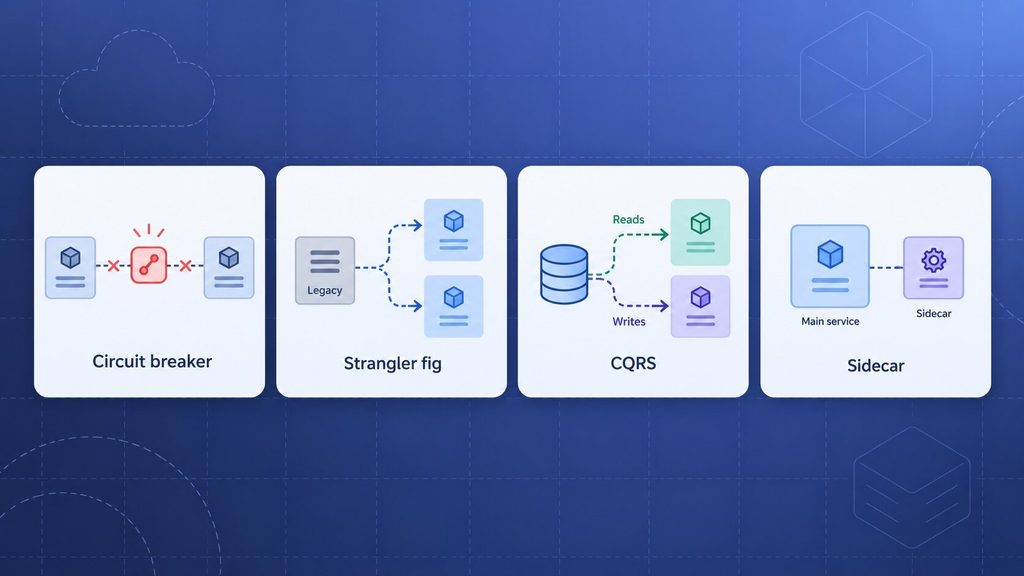
- Circuit breaker: A circuit breaker prevents your application from continuously sending requests to a failing downstream service, ensuring a single outage doesn’t cause a complete system failure.
- Strangler fig: The strangler fig technique lets you migrate a legacy system one piece at a time, gradually redirecting traffic rather than doing a risky big-bang cutover.
- CQRS (command query responsibility segregation): CQRS separates the method used to write data from the method used to read it, which matters when read and write volumes move in different directions.
- The Sidecar runs supporting functions (such as logging, monitoring, and service mesh proxies) alongside your main service rather than inside it, keeping the core application focused on its primary purpose.
They’re not exotic; they separate an application that behaves smoothly under pressure from one that crashes.
Automating the Pipeline
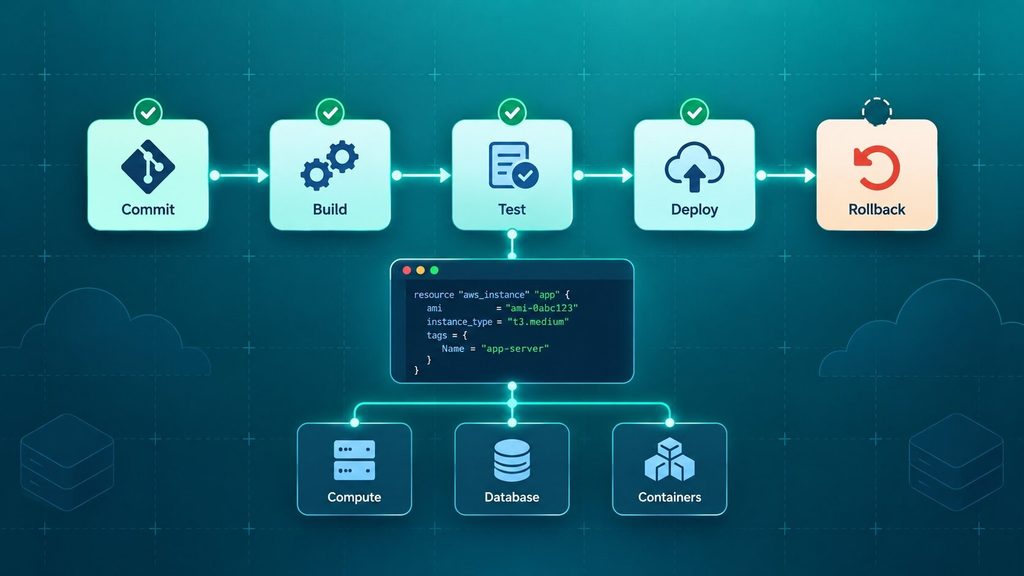
CI/CD and infrastructure as code (IaC) are no longer optional; they form the foundation on which everything else on this list depends. Without them, the other best practices become manual, error-prone tasks that happen only when someone remembers to do them.
With a working pipeline, you get automated testing with each commit, the ability to provision your infrastructure through code rather than console clicks, and a rollback option that doesn’t require a phone call at 2 a.m. Tools such as Terraform, Pulumi, and cloud-native options like AWS CloudFormation handle the infrastructure. At the same time, GitHub Actions, GitLab CI, and Azure Pipelines handle the build and release process.
Security and Observability as Day-One Requirements
The security bolt is installed after launch, and monitoring is only introduced when a failure occurs; these are two of the quickest ways to turn a small incident into a major one. Both measures must be in place before the first real user appears.
The table below shows the basic practices, what each is intended to protect against, and where teams most often go wrong.
| Practice | What It Protects Against | Where Teams Get It Wrong |
| Containerization | Environment drift between dev, staging, and production | Building images that still assume a specific host setup |
| CI/CD automation | Manual deployment errors and slow release cycles | Automating the build but leaving approvals or testing manual |
| Infrastructure as code | Configuration drift and undocumented changes | Treating IaC as a one-time setup instead of a living codebase |
| Baseline security scanning | Known vulnerabilities shipping to production | Running scans only before major releases, not continuously |
| Monitoring and logging | Slow detection of outages and performance issues | Collecting logs nobody actually reviews or alerts on |
Only when you get the basics right do you move from risky to competent; it still doesn’t get you to expert, and that is the gap the rest of this article addresses. If you would like more background, we have examined the development of cloud computing in greater depth.
The Real Divide: What Separates Expert Teams From Everyone Else
The section most best-practice guides omit is that although the tools mentioned above are necessary, they don’t, by themselves, create a fast and reliable team; instead, how the team measures itself and reacts when things go wrong does.
They Measure Delivery Performance, Not Just Uptime
Most teams track whether their application is running, but one of the most overlooked cloud development best practices is measuring how quickly and safely you can release changes, using a set of measures known as DORA metrics: deployment frequency, lead time for changes, change failure rate, and time to recover.
The gap between tiers is not tiny.
| Metric | Elite Performers | Low Performers |
| Deployment frequency | Multiple times a day | Once a month or less |
| Lead time for changes | Under one hour | One to six months |
| Change failure rate | 0 to 5 percent | 46 to 60 percent |
Source: the DORA State of DevOps benchmarks, as provided by Scrums.com
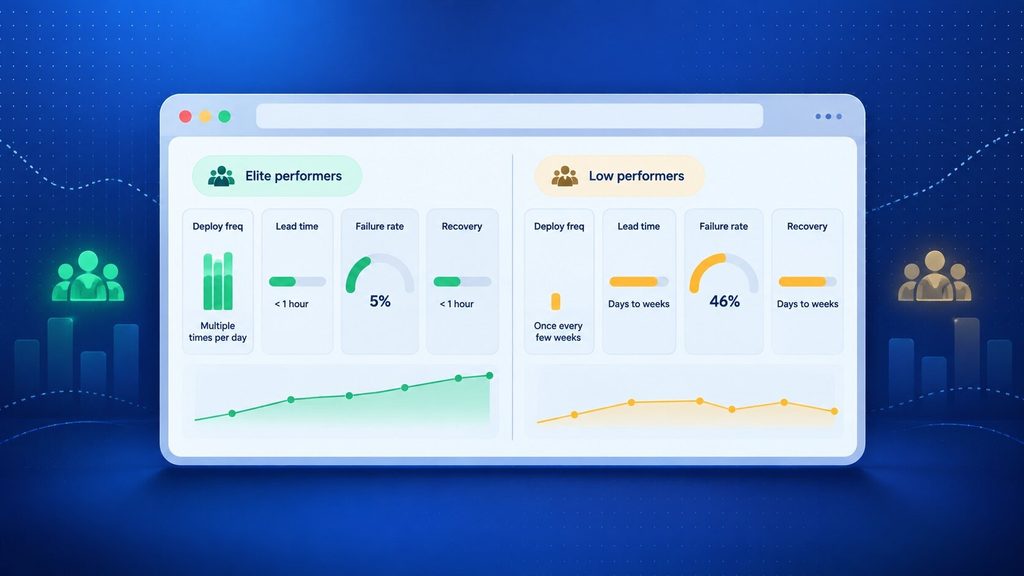
The gap does exist, although it is uncommon. A recent 2025 survey showed that only about 16 per cent of teams achieve on-demand deployment, while almost a quarter still manage fewer than one deployment a month. Most teams fall somewhere in the middle, which is why it is important to monitor these four figures rather than assuming everything is okay just because there are no emergencies.
They Treat Incidents as Data, Not Blame
When something breaks, ordinary teams tend to look for the person who caused it, whereas expert teams instinctively seek to understand what the system allowed to happen and then fix it. This is evident in several specific habits:
- Blameless postmortems: The report on the incident concentrates on the sequence of events and the gaps that came to light, rather than assigning responsibility to the person who carried out the change.
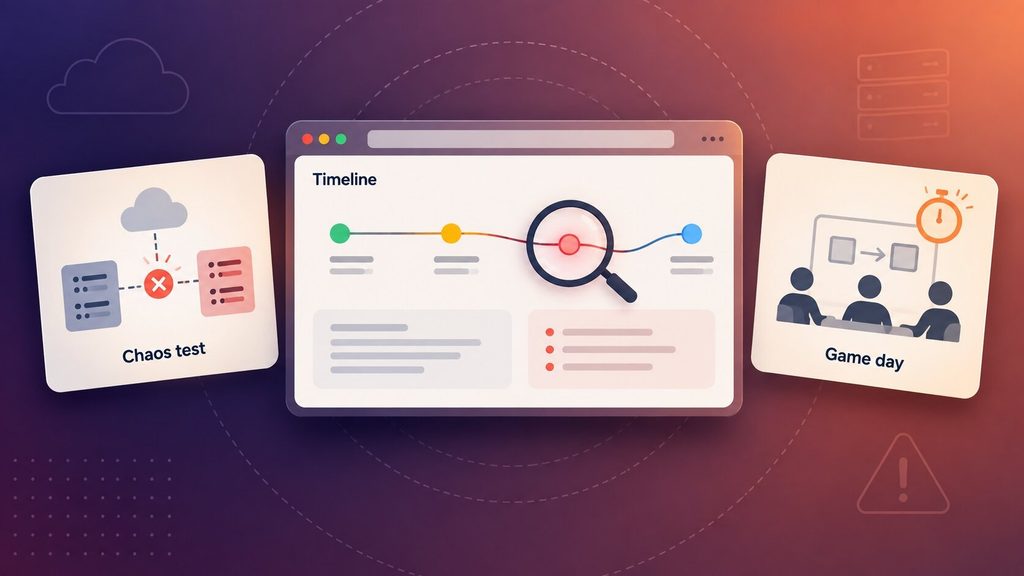
- Chaos engineering: Chaos engineering involves deliberately causing failures in a controlled setting, such as making a dependency fail or slowing a database, to identify weak points before customers do.
- Game days: Game days involve planned, low-stakes practice sessions of your incident response procedure so that when your team actually deals with a real outage, it’s not the first time they’ve carried out the process.
You don’t need a large team or a big budget for any of this; you need to decide beforehand that failures are information, not something to conceal.
Cost Discipline: The Best Practice Most Teams Skip
Cloud cost management is seldom included in a list of cloud development best practices, even though it should be; it is a clear sign of an operationally mature team and one of the most frequently overlooked aspects.
Why Cloud Waste Keeps Climbing
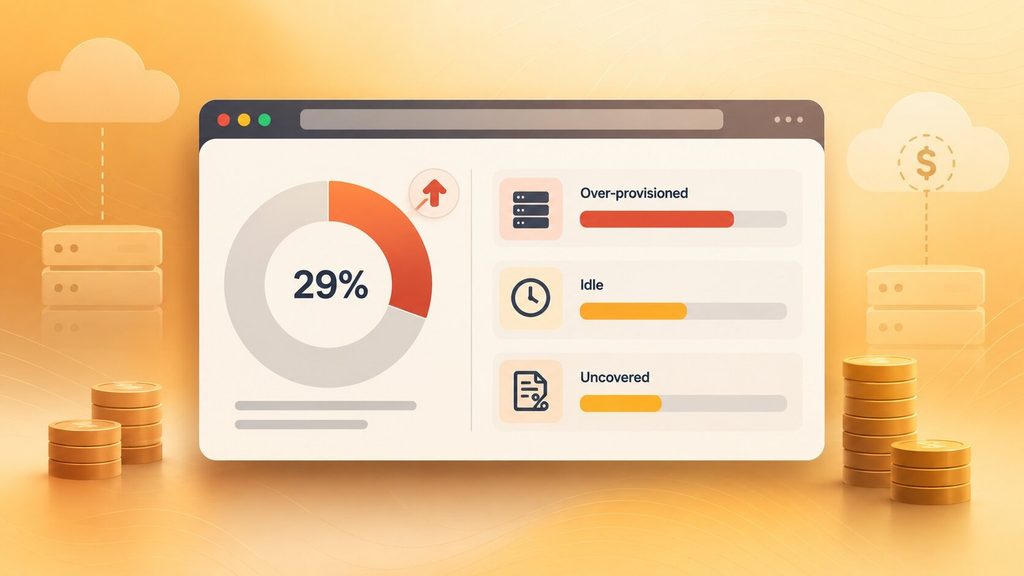
For years, the share of cloud spend going to waste had been slowly declining. That trend just reversed. Flexera’s 2026 State of the Cloud Report puts wasted spend at 29 percent of total cloud budgets, the first increase in five years, driven largely by AI workloads that got spun up quickly and never cleaned up.
Most of that waste breaks down into a few repeatable patterns:
| Waste Category | Typical Share of Spend | Common Fix |
| Over-provisioned compute | 15 to 20 percent | Rightsizing instances against actual usage, not peak assumptions |
| Idle or orphaned resources | 10 to 15 percent | Auto-shutdown schedules for non-production environments |
| Uncovered commitment discounts | 10 to 15 percent | Regular reserved-instance and savings-plan reviews |
Source: Wring cloud waste statistics, 2026
You will see a lot of this kind of waste in migrations where an application was moved directly to the cloud without first redesigning it to support elastic pricing, and in cases where people no longer own the resources because the project that created them ended months ago.
What Expert Teams Do Instead
Teams that manage to keep their waste low all have some common practices: they consistently label their resources so that every cost can be traced back to a particular team or project, they maintain a regular schedule for rightsizing rather than setting it up just once, and they appoint a specific person to be responsible for the cloud bill, not merely for the code. By treating cost as an ongoing engineering responsibility rather than an item finance reviews once a quarter, waste stays low, around 8 to 15 percent instead of over 30 percent.
If you are comparing the costs of developing in the cloud with the amount you are currently spending, we have provided a more detailed breakdown of what cloud and AI development actually cost.
Security Practices That Actually Hold Up in Production
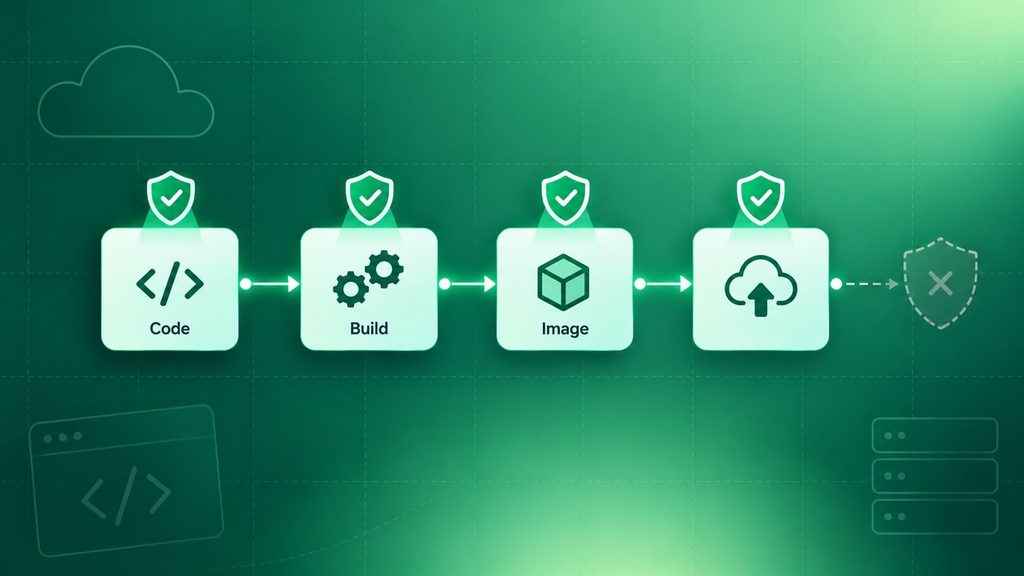
The principles behind cloud development best practices for security haven’t changed much. What has changed is the way expert teams put them into practice: they do so continuously, rather than at a single checkpoint before release.
Building Security Into the Pipeline, Not After It
Shift-left security involves testing for vulnerabilities while the code is being written and built, rather than testing after the software is already in production. In practice, this means running static analysis on each pull request, automating dependency scanning, and scanning container images before deployment, rather than doing so once every quarter.
Access and Secrets: The Habits That Prevent the Next Breach
Most cloud security incidents don’t begin with a sophisticated exploit; they begin with overly broad permissions or a secret ending up where it shouldn’t be. The following habits can help to close that gap:
- Least privilege access: Follow the principle of least privilege; each service and individual gets only the permissions necessary for their role, not broader ones “just in case.”
- Centralised secrets management: Centralise secrets management: credentials and API keys in a dedicated vault, not in code, config files, or environment variables added to a repository.
- Compliance as code: Enforce standards such as SOC 2 or HIPAA with code automation instead of running a manual audit twice a year.
If you get them right, most of the incidents that end up in the headlines won’t happen at your company.
Mistakes Experts Have Already Learned to Avoid
Some mistakes show up often enough that they’re worth naming directly, because avoiding them is itself a best practice:
- Lift-and-shift without re-architecting: moving a server-based app straight into the cloud keeps its old cost and scaling assumptions intact, which is exactly why it tends to run more expensive, not less. If you’re migrating an existing system rather than building fresh, this is where legacy application modernization work earns its keep.
- Treating security as a launch-week task: Considering security only a task for the week of launch, adding it right before release rather than incorporating it into the pipeline from day one.
- Skipping resource ownership: Omitting resource ownership- setting up cloud resources for a project without designating a clear owner, which is precisely how “zombie” spending builds up.
- Over-engineering microservices too early: splitting a small application into a dozen services before you have both the team and the traffic to justify the operational overhead.
- Ignoring DORA metrics until something breaks: Leaving the DORA metrics unattended until something goes wrong: teams that only examine their deployment frequency or change failure rate after an incident have already lost months of potential improvement.
As long as the right habits are established right from the beginning, each of these situations can be avoided, which is precisely why an experienced partner can charge a fee.
How Boomdevs Solves Cloud Development Gaps for Growing Teams
The technological issues mentioned above are not the problem; rather, they are habits which a team has or doesn’t have, and it’s much harder to develop them afterwards, during an incident or during a cost overrun, than it is to build them in from the beginning.
That is the aspect of cloud development best practices Boomdevs focuses on when working with clients: carrying out architecture reviews to pick up the patterns mentioned above before they become load-bearing, setting up CI/CD pipelines with cost visibility from the very beginning, and integrating security scanning into the pipeline rather than adding it on at the end. Boomdevs has implemented this at real scale, including for Flash.trade, a Solana perpetuals exchange that operates with over one million daily active users on infrastructure capable of handling that level of traffic without the cost increase that typically occurs in such situations.
For teams further along, modernizing an existing system rather than starting from scratch, the same discipline applies to enterprise software built for scale, where legacy constraints make cutting corners even more expensive later.
Frequently Asked Questions
What are the most important cloud development best practices?
The basic set of practices includes containerization, CI/CD automation, infrastructure as code, and continuous security scanning; however, it is only the following practices that will actually give you an advantage: tracking the DORA metrics, considering cloud cost as an ongoing responsibility of engineering, and incorporating security continuously rather than checking it once before release.
What’s the real difference between average and expert cloud development teams?
Since both groups use the same tools, the tools alone don’t tell you much. Instead, it comes down to habit: expert teams closely monitor deployment frequency and change failure rate, take responsibility for cloud costs through regular rightsizing, and hold blameless postmortems rather than assigning blame after an incident.
How much cloud spend is typically wasted?
The Flexera 2026 State of the Cloud Report shows that average wasted cloud spending is 29 per cent, the first such increase in five years. However, with consistent tagging, rightsizing, and clear cost ownership, you should reduce this figure to 8-15 per cent.
How do I choose a cloud development partner?
Seek a company with real experience delivering at the scale you need, not just a service page listing the same technologies as every other competitor. Instead of asking what they would recommend in writing, ask how they handle cost visibility, incident response, and day-to-day security scanning.
Want to see how expert cloud development practices would apply to your product? Arrange a free consultation with Boomdevs, and we’ll review how your current setup measures up against the practices mentioned above.