


- 1. Key Takeaways
- 2. AI Agent vs Chatbot: The Head-to-Head Comparison
- 3. What Is a Chatbot?
- 4. What Is an AI Agent?
- 5. The Spectrum Between Them: Chatbots That Can Take Actions
- 6. What Each One Takes to Build: Effort, Cost, and Risk
- 7. How to Spot "Agent Washing" Before You Buy
- 8. AI Agent or Chatbot: How to Choose for Your Business
- 9. How Boomdevs Solves the Chatbot-or-Agent Decision
- 10. Frequently Asked Questions
Summarize with
Someone just pitched you an AI agent. It looked a lot like the chatbot you already run. Now you’re weighing the AI agent vs chatbot question, and both sides sound convincing.
The honest answer depends on your situation, not on which one is newer. It comes down to whether you need answers or finished tasks, and how costly a wrong move would be. Here’s how to tell which side you’re on.
Key Takeaways
- The real difference between AI agent and chatbot tools: a chatbot answers, an AI agent acts. The chatbot replies and waits. The agent plans steps, uses your systems, and finishes the job.
- Chatbots win on simple, high-volume questions. They’re faster to launch, cheaper per conversation, and their worst mistake is a wrong answer.
- Agents win when work spans several steps and tools. Refunds, bookings, and back-office tasks are where they pay off.
- Agents bring a new risk: a wrong action inside a live system. Guardrails and a human approval step aren’t optional.
- Many teams run both. A chatbot handles the front door, an agent does the work behind it, and a person stays reachable.
AI Agent vs Chatbot: The Head-to-Head Comparison
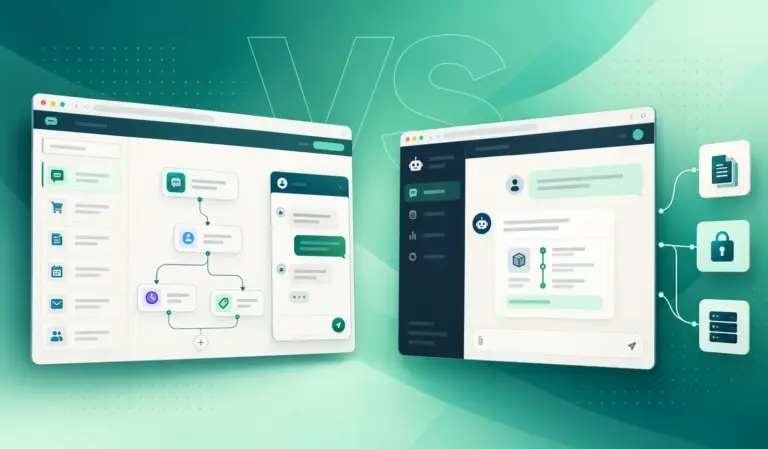
In any chatbot vs AI agent comparison, the core difference is autonomy. A chatbot turns your question into a reply, then stops. An AI agent turns a goal into a finished outcome, deciding each step and calling tools along the way.
Both often run on the same large language model (LLM). What changes is the system wrapped around it. Here’s how that plays out across the criteria that matter when you’re deciding what to build:
| Criteria | Chatbot | AI agent |
| Core job | Answers questions in conversation | Completes a task toward a goal |
| How it decides | Script or retrieval, then a reply | Plans its own steps, picks tools |
| Tools and systems | Few or none, mostly returns text | Calls APIs, CRMs, calendars, databases |
| Memory | The current conversation | Context across steps, often across sessions |
| When something fails | Waits for you to rephrase | Retries or changes its plan |
| Setup effort | Lighter, off-the-shelf options exist | Heavier: integrations, permissions, testing |
| Cost per interaction | One model call, usually low | Several model and tool calls, higher |
| Worst-case error | A wrong answer | A wrong action in a live system |
That last row deserves a second look. It shapes every AI agent vs chatbot decision in this guide, from budget to rollout plan.
The One-Line Difference: Answers vs Outcomes
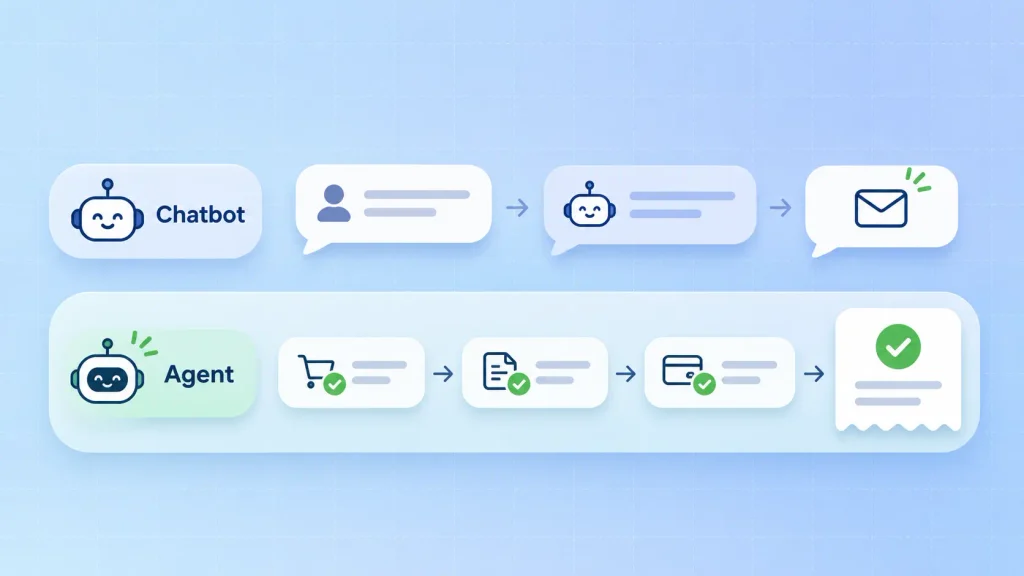
When you’re judging any tool on the AI agent vs chatbot scale, ask one thing: can it only tell you something, or can it do it for you? If it explains your refund policy, it’s a chatbot. If it checks the order, issues the refund, and emails the receipt, it’s acting as an agent.
Gartner draws the same line. It notes that earlier AI could only generate text or summarize interactions, while agentic AI acts on its own. It also predicts agentic AI will resolve 80% of common customer service issues without human help by 2029.
That forecast is about resolution, not conversation. Keep that distinction in mind whenever a sales deck says “agent.”
Same Task, Two Systems: A Refund Request Walkthrough
Picture a customer who got charged twice for one order. They message your support channel and ask for their money back. Here’s how each system handles it, step by step:
| Step | Chatbot | AI agent |
| Understand the request | Spots a billing intent | Pulls out the order ID and both charges |
| Investigate | Can’t see the order system | Queries orders and confirms the duplicate |
| Apply policy | Recites the refund policy | Checks eligibility and the right amount |
| Take action | Shares a billing email address | Issues the refund through the payment API |
| Close the loop | Asks the customer to follow up | Sends a confirmation and updates the ticket |
The chatbot handled the conversation well. The agent resolved the problem. This one ticket shows the difference between AI agent and chatbot tools. If most of your support load looks like that right column, read our breakdown of AI agents in customer service before you scope anything.
What Is a Chatbot?
A chatbot is software you talk to. You type or speak, it replies, and the exchange ends there until you send the next message. Its whole world is the conversation.
That doesn’t make chatbots simple. A well-built one understands messy phrasing, pulls answers from your own documents, and hands off to a person with context. The two types below cover nearly everything you’ll see on the market.
Rule-Based Chatbots
These follow decision trees, buttons, and keyword triggers. Someone on your team scripts every path, so the bot only knows what you’ve written down. Type something unexpected and you hit a dead end.
They still have a place. For a handful of fixed flows like store hours or order tracking links, a scripted bot is cheap, predictable, and never invents an answer.
LLM Chatbots Grounded in Your Content (RAG)
Modern chatbots pair an LLM with retrieval-augmented generation (RAG). When a question comes in, the system pulls the most relevant passages from your help center, docs, or product data. Then it writes an answer from them.
This handles open-ended questions without scripting each one. The quality depends on your content and on conversation design that keeps replies on track. By design, though, the output is still an answer, not an action.
Where a Chatbot Is Still the Smarter Buy
In a lot of AI agent vs chatbot decisions, the chatbot is the better investment, not the cheaper compromise. It tends to win in these situations:
- High-volume FAQs: shipping times, return rules, pricing tiers, and password help.
- Lead capture and qualification: asking a few questions and routing the contact to sales.
- Onboarding and product guidance: showing users where a feature lives and how it works.
- Internal help desks: HR policies and IT how-tos pulled from your own documents.
If nothing needs to happen after the reply, an agent adds cost without adding value. Our AI chatbot development work usually starts with exactly this audit.
What Is an AI Agent?
An AI agent takes a goal and works toward it on its own. You don’t hand it a question. You hand it an outcome like “resolve this ticket” or “book this patient,” and it decides what to do next.
It does that by connecting the LLM to tools: your CRM, calendar, payment system, or internal APIs. It also keeps track of what it has already done. That combination is what lets it finish a multi-step task instead of describing one.
How the Agent Loop Works
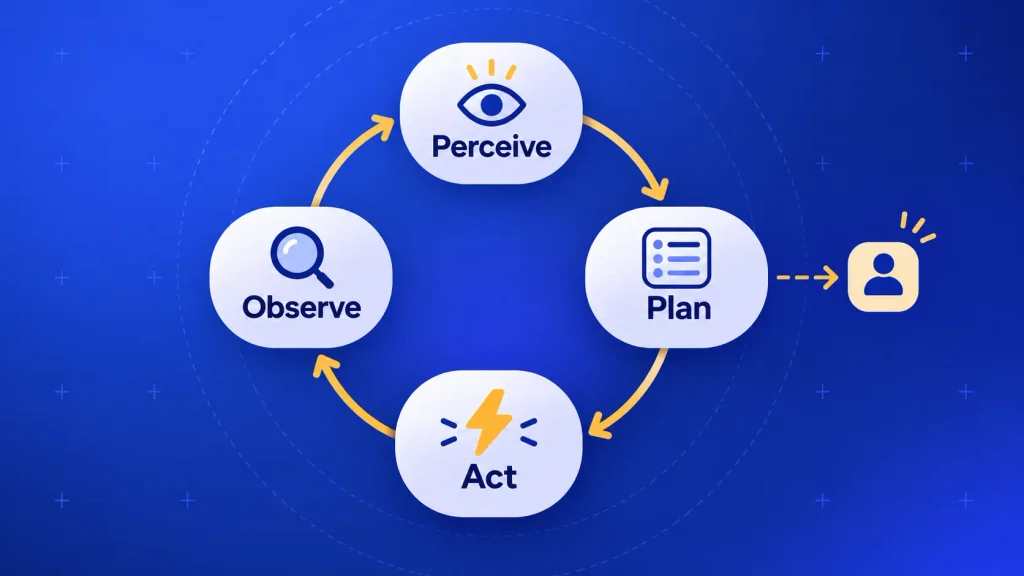
Most agents run the same cycle until the job is done or they need a human. Each turn of the loop looks like this:
- Perceive: read the request plus any relevant data, such as the customer record or open tickets.
- Plan: break the goal into steps and decide which tool to use first.
- Act: call that tool, for example by querying an order or creating a calendar event.
- Observe: check the result. Did it work, fail, or return something unexpected?
- Repeat or stop: move to the next step, change the plan, or escalate to a person.
That loop is the real difference between AI agent and chatbot designs. A chatbot runs one pass and replies. An agent keeps going, which is where both its power and its risk come from. There’s more than one way to design that loop, as our guide to the main types of AI agents explains.
Where AI Agents Earn Their Cost
Agents justify their extra build effort when a person currently jumps between several systems to finish one task. Typical examples include:
- Support resolution: refunds, plan changes, and account fixes, not just answers about them.
- Scheduling: checking real availability, booking, rescheduling, and sending reminders.
- Sales operations: enriching a lead, updating the CRM, and drafting the follow-up.
- Back-office work: matching invoices to purchase orders and flagging the exceptions.
- IT operations: triaging incidents, gathering logs, and opening the right ticket.
If you’re mapping one of these workflows, custom AI agent development is usually where the conversation starts. The workflow, not the technology, decides the scope.
The Spectrum Between Them: Chatbots That Can Take Actions
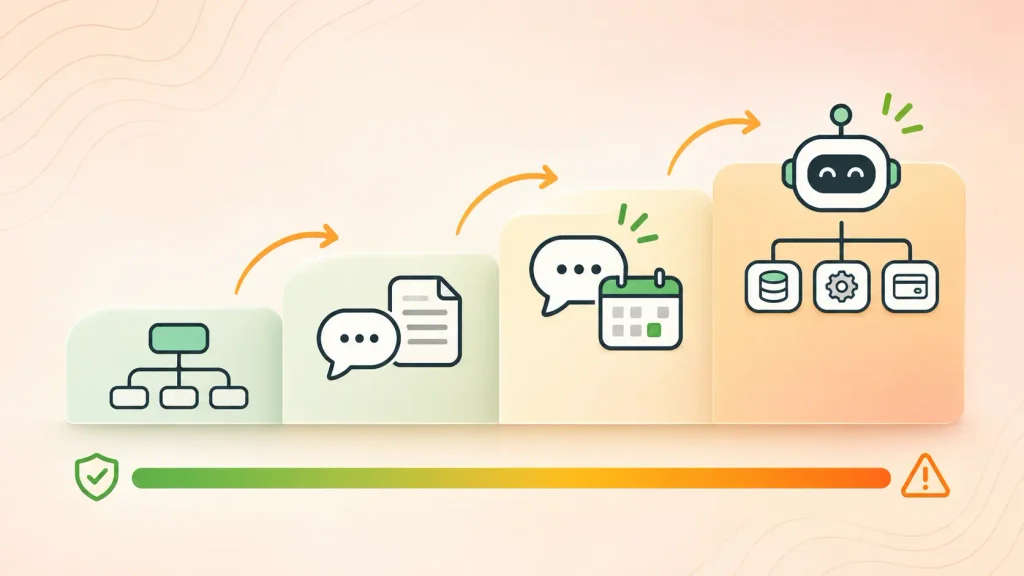
“Chatbot” and “AI agent” aren’t two boxes. The chatbot vs AI agent debate is really about two ends of one scale, and most real products sit somewhere in the middle. Here’s how the rungs break down:
| Rung | What it does | Example | Risk level |
| Rule-based bot | Follows scripted flows | Order status menu | Minimal |
| LLM chatbot | Answers from your content | Help center assistant | Low |
| Chatbot with scoped actions | Answers, plus a few safe actions | Bot that books demos | Contained |
| Full AI agent | Plans and acts across systems | Agent that resolves refunds | Real, needs guardrails |
That third rung is the chatbot vs AI agent sweet spot for many teams. You get most of the value of action with far less risk. Voice works the same way: AI voice agent development often starts with booking and rescheduling calls before it moves to anything riskier.
Is ChatGPT a Chatbot or an AI Agent?
It depends on how it’s wired. In a plain chat window, ChatGPT is a chatbot. It writes a reply and waits for your next message.
Connect it to tools, such as web browsing, file actions, or business apps, and let it run several steps toward a goal. Now it’s behaving like an agent. The model didn’t change. The system around it did. So, is ChatGPT a chatbot or an AI agent? Whichever one you’ve built around it. If you want the bigger picture, our post on agentic AI vs generative AI covers the same split at the category level.
Can a Chatbot Become an AI Agent?
Yes, but not by renaming it. Each layer you add moves it one rung up. Here’s the usual upgrade path:
- Add tool access: let it read and write to one system, like your order database.
- Add memory: keep the state of a task across steps and across sessions.
- Add planning: let it choose which tool to call and in what order.
- Add guardrails: set permissions, spending limits, and approval steps for risky actions.
- Add monitoring: log every action so your team can audit and roll back.
Skip step four and you’ve built a liability, not an upgrade. Most teams move one rung at a time and prove each step in production first.
What Each One Takes to Build: Effort, Cost, and Risk
On cost, the AI agent vs chatbot gap is real: an agent costs more to build and run, and it adds a risk a chatbot never had. That’s not a reason to avoid agents. It’s a reason to scope them carefully.
Build Effort and Integrations
A chatbot needs a model, your content, and an interface. An agent needs all of that, plus everything below:
- Integrations: secure connections to each system it touches, with error handling for every one.
- Permissions: clear rules on what it may read, write, and change, and for which users.
- State and memory: storage that tracks each task across steps and sessions.
- Testing: scenario runs covering edge cases, failed API calls, and odd user requests.
- Observability: logs and traces so you can see why it took each action.
Integrations usually eat the biggest share of the effort. If your data lives in clean, documented systems, the build moves fast. If it lives in spreadsheets and legacy tools, budget for that first.
Running Costs
A chatbot conversation is often a single model call. One agent task can involve many model calls plus tool calls, so each completed task costs more. That’s the running-cost side of AI agent vs chatbot: it only pays off when the task replaces real human time.
Your actual numbers depend on scope, volume, and integrations. We break those down in detail in what an AI agent costs to build and in our guide to chatbot development pricing.
The New Risk: Wrong Actions, Not Wrong Answers
A chatbot’s worst day is a wrong answer you can correct in the next message. An agent’s worst day is a refund to the wrong account or a deleted record. That’s a different class of risk.
It’s also why so many projects stall. Gartner expects more than 40% of agentic AI projects to be canceled by the end of 2027, pointing to escalating costs, unclear business value, and weak risk controls. Before launch, you’ll want these guardrails in place:
- Approval gates on anything irreversible: payments, deletions, and outbound emails at first.
- Least-privilege access, so the agent can only touch what its task needs.
- Hard limits on spend, volume, and retries per task.
- A fast human handoff with full context when confidence is low.
- An audit trail of every action, kept long enough to investigate issues.
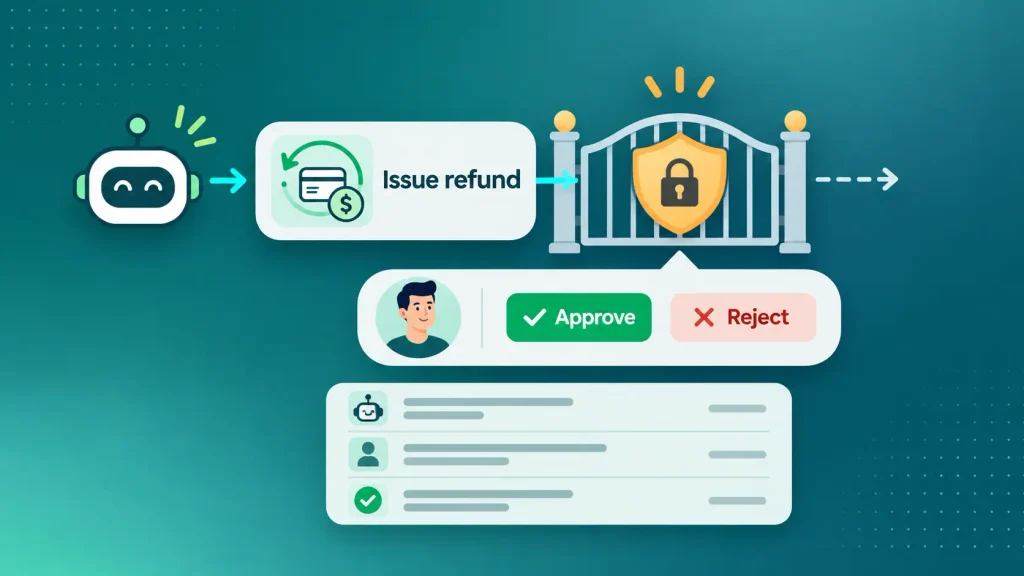
These aren’t only technical choices. They’re also ethical ones, which is why ethical guardrails for agent design belong in your scope from day one.
Still stuck on AI agent vs chatbot for your project? Book a free scoping call with the Boomdevs AI team. You’ll leave knowing whether a chatbot, a scoped-action bot, or a full agent fits your workflow and budget.
How to Spot “Agent Washing” Before You Buy
Plenty of products marketed as agents are chatbots with a new label. Gartner calls this agent washing: rebranding assistants, chatbots, or RPA tools without real agentic capabilities. It also estimated that only about 130 of the thousands of companies selling agentic AI offer the real thing. So is a chatbot an AI agent because the label says so? No.
You don’t need to read the code to test a pitch. Ask these five questions in the demo:
- “Show me an action, not an answer.” Can it update a real record, book a real slot, or issue a real refund?
- “What happens when a step fails?” A real agent retries or changes its plan. A relabeled bot just apologizes.
- “Which systems does it connect to today?” Ask for live integrations, not a roadmap slide.
- “How do approvals and permissions work?” Vague answers here mean nobody has run it in production.
- “Where’s the action log?” If you can’t see what it did and why, you can’t trust it with anything important.
If the answers keep circling back to “it can tell the customer how,” you’re looking at a chatbot. That might be exactly what you need, so pay chatbot prices for it.
AI Agent or Chatbot: How to Choose for Your Business
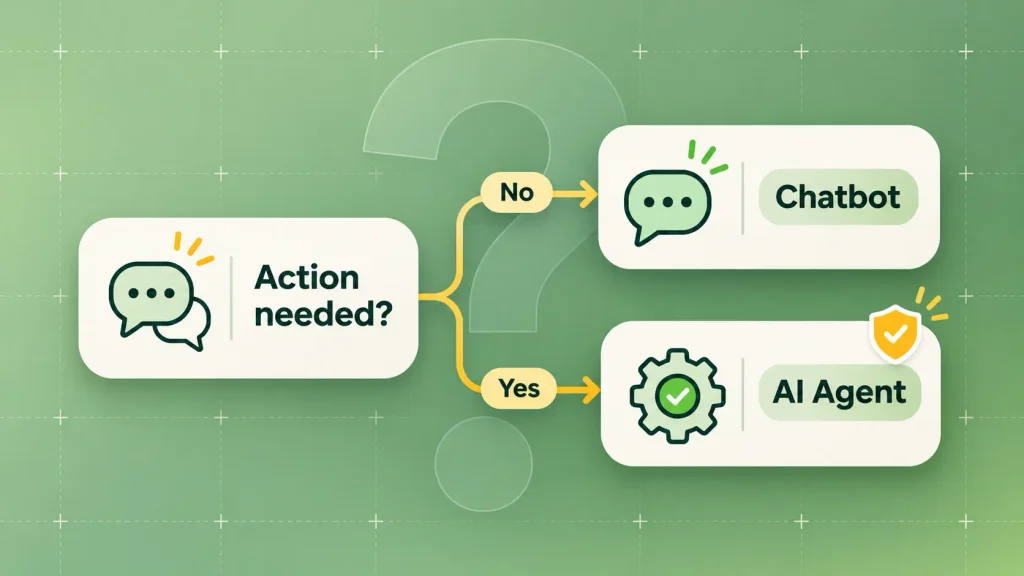
To settle AI agent vs chatbot, start with the job, not the technology. Write down the task you want automated, then ask whether anything has to happen after the reply. That single question settles most cases. Here’s how common situations map out:
| Your situation | Best pick | Why |
| Repetitive questions with fixed answers | Rule-based or LLM chatbot | Fast, cheap, low risk |
| Open questions your docs already answer | LLM chatbot with RAG | Accurate answers, no scripting |
| Answers plus lead capture or booking | Chatbot with scoped actions | Value of action, contained risk |
| Multi-step tasks across several systems | AI agent with approvals | Finishes the work end to end |
| Regulated or irreversible actions | AI agent with a human in the loop | Speed with oversight |
Notice how much ground the middle rows cover in this AI agent vs chatbot map. Plenty of teams jump straight to a full agent when a chatbot with two or three safe actions would have delivered most of the value.
Choose a Chatbot When…
A chatbot is the right call in these cases:
- Your users mostly need information, not changes to their account.
- Volume is high, and each conversation is short.
- You want to launch in weeks and keep running costs predictable.
- A wrong answer is fixable, and a wrong action would be expensive.
Choose an AI Agent When…
An agent earns its place in these cases:
- The task spans several systems, like your CRM, billing tool, and calendar.
- Each step depends on what the previous one returned.
- Someone on your team currently spends hours on this exact workflow.
- You can define clear limits on what the agent may and may not do.
Or Run Both: Chatbot Up Front, Agent Behind It
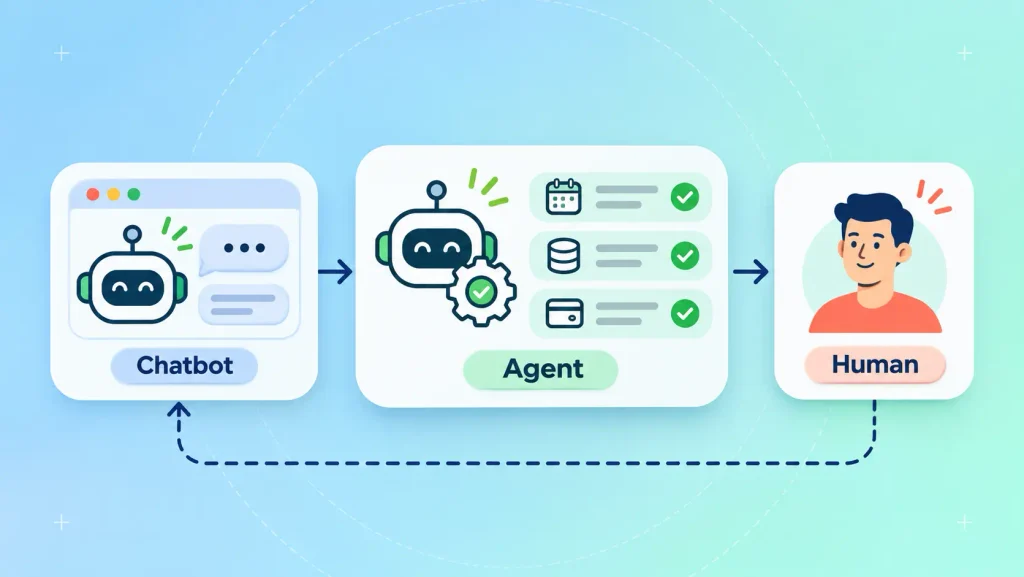
The chatbot vs AI agent choice isn’t a forever decision. A common setup puts a chatbot at the front door to answer questions and gather details. It then hands real work to an agent behind it, with a person ready when either one gets stuck.
Gartner also predicted that 40% of enterprise apps would include task-specific AI agents by 2026, up from less than 5% in 2025. Agents are arriving inside the tools you already use, so plan for them to sit alongside your chatbot rather than replace it.
Keep the human path visible, though. SurveyMonkey’s 2025 research found that 79% of Americans strongly prefer dealing with a human over an AI agent. Automation works best when your customers know they can still reach a person.
How Boomdevs Solves the Chatbot-or-Agent Decision
Most teams don’t need help choosing a model. They need help deciding how much autonomy a workflow deserves, then building it so it holds up in production.
Boomdevs treats AI agent vs chatbot as a workflow question, not a product pitch. The team maps where answers are enough and where actions are needed. Then they build the right rung: a grounded chatbot, a scoped-action bot, or a full agent with approvals and audit logs. With 3.5K+ projects delivered, that judgment call is the part we’ve learned to get right.
If your workflow points toward automation that acts, our AI agent development team can scope it with you. If it points toward great answers at scale, we can help you build a chatbot around your own content instead.
Get a clear answer for your workflow. Book a free consultation with Boomdevs, and you’ll walk away knowing what to build, what it should cost, and where the risks sit.
Frequently Asked Questions
Is a chatbot an AI agent?
Not by default. A chatbot becomes agent-like only when it can take actions beyond replying, such as updating records or booking appointments. Many modern bots sit in the middle, answering most questions and taking a few scoped actions.
Are AI agents more expensive than chatbots?
Usually, yes. Cost is where the chatbot vs AI agent gap shows fastest. Agents need integrations, permissions, testing, and monitoring, and each task can involve many model and tool calls. They pay off when they replace real human work on multi-step tasks, not when they answer simple questions.
Is Siri or Alexa an AI agent?
They’re mostly conversational assistants with a set of narrow, predefined actions, like setting timers or controlling smart devices. They don’t plan open-ended, multi-step tasks on their own. That puts them closer to a chatbot with scoped actions than to a full agent.
Will AI agents replace chatbots?
Unlikely for simple, high-volume questions, where chatbots stay faster and cheaper. AI agent vs chatbot isn’t really a replacement story. More often, the two work together. The chatbot handles the conversation, and the agent handles the tasks that need action.
What’s the difference between an AI agent and an AI assistant?
An AI assistant helps you while you stay in control of each step. It suggests, drafts, or answers, and you decide what happens next. An AI agent is given a goal and decides the steps itself, with less direct supervision.