- 1. Key Takeaways
- 2. Custom Web Design vs Template Design: The Side-by-Side Comparison
- 3. Quick Decision Snapshot: Template vs Semi-Custom vs Custom
- 4. What Actually Separates the Two
- 5. A Quick ROI Example
- 6. Custom Web Design: The High-Performance Path
- 7. Template Design: The Rapid-Response Path
- 8. The 2026 Hybrid: Semi-Custom Frameworks
- 9. Which Should You Choose? A Decision Framework
- 10. The ROI Case: Why Speed Pays for the Build
- 11. Accessibility Is Now a Legal Line, Not a Nice-to-Have
- 12. The Greener Build Is Usually the Lighter One
- 13. How Boomdevs Approaches the Custom vs Template Decision
- 14. Frequently Asked Questions
- 15. The Verdict
Summarize with
You have a budget, a launch date, and a nagging worry: build the site fast and cheap now, or build it right and pay more upfront? That is the real tension behind custom web design vs template design, and in 2026 the answer has moved. It is no longer a simple choice between cheap and expensive. It is a choice about how easily AI search engines can parse your site, how fast it loads, and whether it survives your next growth stage without a rebuild.
Custom web design means a site coded from scratch around your business, your audience, and your conversion goals. Template design means starting from a pre-built framework, a WordPress theme, a Wix or Shopify layout, and pouring your content into it. Both can ship a good website. They fail and succeed in very different places, and whether you’re weighing custom web design vs templates for a single landing page or a full platform rebuild, this guide shows you where. If you’d rather skip ahead and just see what a custom build looks like in practice, our web design and development services page walks through the process.
By the Boomdevs team.
Key Takeaways
- Templates win on speed and upfront cost. Custom tends to win on performance, ownership, and long-term ROI. Neither is “better” in the abstract; the right pick depends on your stage.
- A site loading in one second converts roughly three times better than one loading in five seconds, per Portent’s controlled analysis of B2B site data. Speed is where well-built custom sites usually pull ahead.
- Clean HTML, structured data, and clear information architecture make content easier for AI systems to interpret and cite, a factor that increasingly favors sites with less code bloat, whether custom or a lean, well-optimized template.
- Security risk on templates is mostly plugin risk: 96% of the 7,966 new WordPress vulnerabilities logged in 2024 came from plugins, per Patchstack’s annual security report.
- A semi-custom hybrid (Webflow, Framer, or a heavily customized premium theme) now gets many businesses much of the way to a custom result at a fraction of the price; the exact percentage varies by project.

Custom Web Design vs Template Design: The Side-by-Side Comparison
Here is how the two paths stack up on the factors that actually move revenue and risk.
| Factor | Template Design | Custom Web Design |
| Upfront cost | Roughly $0 to $1,000 for the theme, plus plugin and setup fees | Roughly $5,000 to $50,000+ depending on scope |
| Timeline | Days to a few weeks | Six to twelve weeks, sometimes more |
| Design and brand | Recognizable, shared layouts; harder to stand out | Unique to you; built for your brand and funnel |
| SEO and AEO ceiling | Often capped by theme code and plugin bloat, though a well-optimized, lightweight template can still perform well for simple sites | Higher ceiling; clean code and full schema control |
| Security exposure | Tied largely to third-party plugins and themes | Often a smaller attack surface, since there are fewer third-party components to maintain |
| Scalability | Fine until you outgrow it, then often a rebuild | Built to extend without tearing it down |
| Ownership | Often locked to a platform | You own the code and can move freely |
| Best for | MVPs, landing pages, early-stage sites | Scaling companies, lead-gen sites, complex commerce |
The cost ranges above reflect typical market pricing reported by agencies and studios, such as Awesomic’s 2026 breakdown; treat these as directional, since actual quotes vary by region, provider, and scope. Get a couple of quotes before you budget against them. If design is a big part of your budget, here’s a closer look at custom UI/UX design pricing.
Quick Decision Snapshot: Template vs Semi-Custom vs Custom
| Template | Semi-Custom (Webflow, Framer, heavily customized theme) | Full Custom | |
| Good fit for | Testing an idea, MVP, simple brochure site | Growing businesses that want a distinctive, fast site without a ground-up build | Sites that are a primary revenue channel or need complex logic |
| Typical cost | $0–$1,000 + plugins | $2,000–$15,000 | $5,000–$50,000+ |
| Typical timeline | Days to 2 weeks | 3–6 weeks | 6–12+ weeks |
| Ceiling | Lowest — capped by theme structure | Middle — capped by the platform’s flexibility | Highest — limited mainly by budget |

What Actually Separates the Two
The difference is not “handmade versus store-bought.” It is control.
With a template, you inherit someone else’s decisions: their code, their structure, their assumptions about what a business like yours needs. You adapt to the framework. With a custom build, the framework adapts to you. Every layout choice, database field, and page-speed tradeoff is yours to set.
That control sounds abstract until it costs you money. A template that ships in a day can cost you weeks of workarounds a year later, when you need a feature the theme was never built to hold. So the honest question in the custom web design vs templates debate is not which is cheaper today. It is which is cheaper across the next two years. You face the same trade-off for business software when choosing between a ready-made tool and something built around how your team works.
A Quick ROI Example
Say a growing services company launches on a $2,000 premium WordPress theme plus $150/month in plugins. Eighteen months in, they need a member portal and faster load times the theme can’t support. A rebuild at that point often runs $15,000–$25,000, plus the SEO dip that comes with migrating URLs and the weeks of lost traffic while the new site re-indexes. Total two-year spend: roughly $18,000–$30,000, spread across two builds and a migration.
The same company starting with a $12,000 custom build, plus $100/month hosting and maintenance, spends around $14,000–$15,000 over the same two years with no rebuild, no migration risk, and a site that was fast from day one. The numbers will differ for every business, but the pattern is common enough to plan around: paying once tends to beat paying twice.
Custom Web Design: The High-Performance Path
Custom is the right call when your website is a revenue engine, not a brochure. Four advantages carry most of the weight.
Uniqueness and Brand Credibility
A custom site does not look like ten thousand others running the same theme. That matters more than designers used to claim. The real Stanford Web Credibility Project found that 46.1% of people judged a site’s credibility on visual design alone, more than on its actual content. Nearly half of your visitors are grading your competence by how the page looks before they read a word.
Custom design lets you turn that snap judgment in your favor. Shared templates work against you here, because familiarity reads as generic, and generic reads as replaceable.
Technical SEO and AEO
This is where 2026 rewrote the rules. Search is no longer only about ranking blue links. It is about getting quoted inside AI Overviews, ChatGPT answers, and Perplexity results. That shift has a name: AEO, or answer engine optimization.
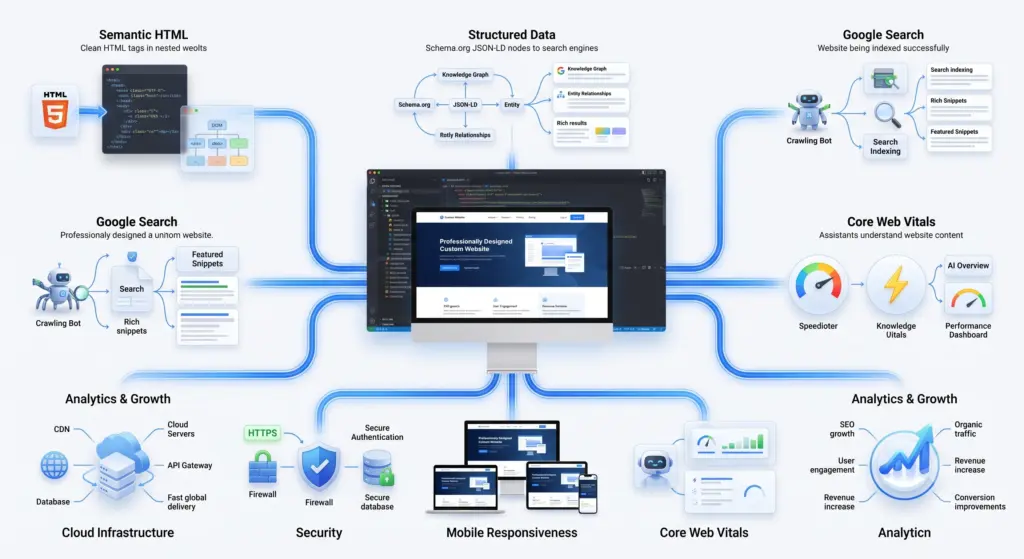
Custom code helps you win it in three concrete ways. You control the HTML, so pages stay lean and crawlable. You control Core Web Vitals, so load speed and layout stability actually pass. And you control structured data, the Schema.org markup that tells an AI engine what your entities are, how they relate, and why your page answers a given question.
Template stacks fight you on all three. Plugins inject scripts you did not ask for, themes ship markup you cannot fully edit, and the schema is often partial or duplicated. Clean structure is exactly what answer engines reward, and it is the thing bloated builds are worst at.
Scalability
Businesses change. You add a product line, enter a new market, or bolt on a member portal. A custom build absorbs that because the system was designed to extend. New sections, new integrations, and new logic slot in without disturbing what already works. This is really the same case we make for custom software development generally: a website is just one interface into a system, and it should be able to grow the same way the rest of your product does.
Templates often cannot. A big structural change can mean switching themes entirely, which breaks content and resets your SEO. Custom architecture also leaves room for what is coming next: voice interfaces, AR product views, and AI features like on-site assistants that pull from your own data.
Security
Custom sites carry a smaller attack surface, and the data backs it up hard. Of the 7,966 new WordPress vulnerabilities logged in 2024, Patchstack traced 96% to plugins and just seven to WordPress core. The weakness is rarely the platform. It is the pile of third-party add-ons a template site leans on to do basic things.
A custom codebase does not need twenty plugins to function, so there are fewer doors for an attacker to try. You also are not exposed to a vulnerability in a plugin used by two million other sites, which is precisely the kind of target automated attacks hunt for.
Template Design: The Rapid-Response Path
Templates are not a compromise. For the right job, they are the smart move.
Speed to Market
When you need to be live this week, a template gets you there. That makes it ideal for a landing page, a microsite, or an MVP you are using to test whether an idea has legs at all. Shipping fast and learning beats shipping perfect and late.
Cost Efficiency
The upfront number is small, and for an early-stage founder guarding runway, small upfront numbers matter. A premium theme plus a weekend of setup can stand in for a five-figure build until revenue justifies more.
The Hidden Cost Most People Miss
Here is the catch nobody puts on the sales page. The sticker price is not the real price.
Templates accumulate what you might call maintenance debt. You add a plugin for forms, another for speed, another for SEO, and each one is a subscription, an update, and a potential conflict. Premium plugins alone often run $50 to $300 each. Then comes the redesign wall: the day your business outgrows the theme and the only fix is to rebuild. At that point you pay for the custom site anyway, plus the migration, plus the SEO you lost in the move.
That wall is not a maybe for growing companies. It is a when.
The 2026 Hybrid: Semi-Custom Frameworks
There is a third road, and it has quietly become the popular one.
Semi-custom means starting from a strong skeleton, Webflow, Framer, or a genuinely flexible premium theme, then customizing hard on top of it. You skip the blank-canvas timeline and cost, but you escape the cookie-cutter look and most of the plugin bloat.
Done well, this gets a business most of the way to a custom result without the full custom budget. The tradeoff is real, though: you are still working inside the framework’s limits, so deeply bespoke features and total performance control remain custom territory. For a lot of companies between “just launched” and “scaling fast,” that tradeoff is exactly right.
Does AI Make Custom Cheaper Now?
Partly, yes, and this is new. AI coding assistants have measurably sped up development. In a controlled study by GitHub and Cornell researchers, developers using an AI pair programmer finished a task 55.8% faster than those without one.
Faster boilerplate and scaffolding means studios spend less time on the plumbing and more on the parts that need judgment. Custom is not as expensive as it was in 2020. A caveat worth keeping: those gains show up most on routine work, and results vary by task and developer, so AI trims the bill rather than erasing the gap.

Which Should You Choose? A Decision Framework
Three questions settle it faster than any feature list.
What is your budget? Under a few thousand dollars, a template or semi-custom build is the realistic play. At $5,000 and up, custom becomes viable and usually worth it if the site drives revenue.
What stage are you at? Pre-revenue or testing an idea, template. Established, with the website as your main sales channel, custom. Somewhere in between, look hard at semi-custom.
What does the site actually need to do? A simple blog or brochure runs fine on a template. Complex commerce, gated member areas, custom booking logic, or heavy integrations push you toward custom, because that is where templates start breaking. If your needs go beyond a brochure, it’s worth knowing whether you need a website or a web app.
If two of your three answers point the same way, you have your answer.
The ROI Case: Why Speed Pays for the Build
The strongest argument for custom is not aesthetic. It is math, and it lives in page speed.
Fast sites convert more, and the effect is steep. Portent’s study found a B2B site loading in one second converts three times better than one loading in five seconds, and five times better than one at ten seconds. The gap is not a rounding error. It is the difference between a page that pays for itself and one that leaks money.
Google and Deloitte put a harder number on it. Their “Milliseconds Make Millions” analysis of 37 brands found that a mere 0.1-second speed improvement lifted retail conversions by 8.4% and average order value by 9.2%. One tenth of a second. Custom builds tend to be the fast ones, because they carry less code and fewer competing scripts than a plugin-heavy template.
Now weigh that against replatforming. Building on a template and rebuilding in two years means paying twice, plus the cost of the migration and the traffic you lose while search engines re-index the new site. Building right the first time is often the cheaper path once you count the redesign you avoided.
Accessibility Is Now a Legal Line, Not a Nice-to-Have
One factor rarely makes these comparisons and should: the law changed.
As of June 2025, the European Accessibility Act applies to private businesses selling to EU consumers, covering e-commerce, banking, and more, with WCAG-based requirements. In the US, a 2024 Department of Justice rule set WCAG 2.1 AA as the standard for state and local government sites, and Title III lawsuits already push private companies toward the same bar.
This is where custom earns quiet points. Meeting WCAG cleanly, proper semantic markup, keyboard navigation, real contrast, and correct ARIA, is far easier when you control the code. Many templates bake in accessibility problems you cannot fully remove without editing files the theme keeps locked. Accessibility also overlaps with SEO: the structure that helps a screen reader helps a search crawler too.
The Greener Build Is Usually the Lighter One
Sustainability entered the conversation for a practical reason. The internet now accounts for roughly 4% of global carbon emissions, comparable to the aviation industry, according to Wholegrain Digital, the studio behind the Website Carbon Calculator.
Page weight drives most of that footprint, and this is where lean code matters. Wholegrain’s own figures show an average site at 10,000 monthly views emitting about 31.5 kg of CO2 a year, while a top-rated, lightweight site emits closer to 3.5 kg, an 89% cut. Custom and semi-custom builds tend to be lighter because they skip the bloated frameworks and redundant scripts templates pile on. Faster, greener, and cheaper to run often turn out to be the same site.
How Boomdevs Approaches the Custom vs Template Decision
Boomdevs builds custom web and software products for founders, CTOs, and product teams who treat their site as infrastructure, not decoration. The starting point is not a template or a pitch. It is your problem: what the site has to do, who it has to convert, and where it has to grow.
From there the recommendation is honest. If a semi-custom build serves your stage better than a full custom one, that is what you will hear. When custom is the right call, the work centers on clean code, passing Core Web Vitals, complete schema for AEO, WCAG compliance, and a codebase you own outright. If you want that scoping conversation before you commit budget either way, our consulting services team runs that assessment up front, not after a contract is signed.
Ready to see which path fits your numbers? Get a scoped quote and a build recommendation in 48 hours.
Frequently Asked Questions
Is Custom Web Design Worth It in 2026?
For any business whose website drives real revenue, usually yes. Custom builds convert better through speed, get cited more easily by AI search engines through clean code and schema, and avoid the rebuild cost templates force later. If the site is a low-stakes brochure or an early experiment, a template is the smarter spend.
Is a Template Website Bad for SEO?
Not automatically, but it caps your ceiling. Templates can rank fine for simple sites. The trouble is plugin bloat, extra scripts, and markup you cannot fully control, which slow pages and weaken the structured data that AI Overviews and featured snippets reward. Custom code removes those limits.
How Much Does a Custom Website Cost Compared to a Template?
Templates typically run from near zero to about $1,000 for the theme, plus plugin and setup fees. Custom sites generally start around $5,000 and climb past $50,000 with scope. The gap narrows once you add up template add-ons, subscriptions, and the eventual rebuild, so compare total cost over two years, not day-one price.
Can a Template Website Look Custom?
To a point. A semi-custom approach using Webflow, Framer, or a heavily customized premium theme can reach roughly 80% of a custom result for far less money. You still work inside the framework’s limits, so deeply bespoke features and full performance control stay in custom territory.
Which Is Better for a Startup, Custom or Template?
Early on, a template or semi-custom build almost always wins. It protects runway and lets you launch and learn fast. Move to custom once the website becomes your main revenue channel and you keep hitting the template’s walls. That transition point, not launch day, is when custom pays off.
The Verdict
There is no universal winner in the custom web design vs template design decision, and anyone who tells you otherwise is selling something.
Choose a template when speed and budget rule and the stakes are low. Choose semi-custom when you want a distinctive, fast site without the full custom timeline, which fits most growing businesses. Choose custom when your website is a revenue engine and performance, ownership, AEO, accessibility, and scale all have to hold up under pressure.
Match the build to the stage, not to a trend. Then let the ROI, measured in speed, conversions, and the rebuild you never had to pay for, prove you right.