- 1. What Is Generative AI?
- 2. Generative AI vs. Traditional AI: What Is the Difference?
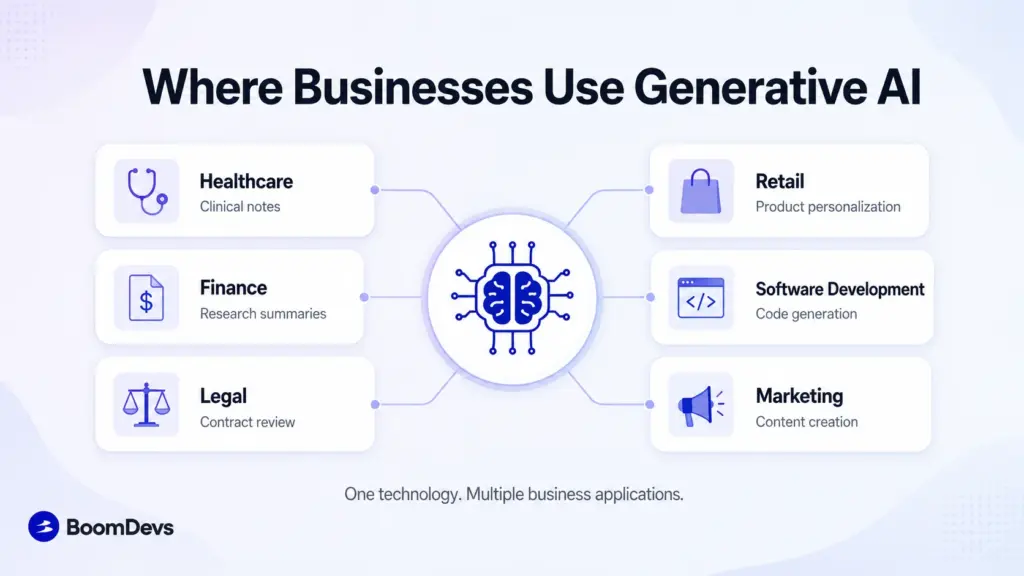
- 3. How Businesses Are Using Generative AI Today
- 4. 25+ Generative AI Use Cases at a Glance
- 5. What Does It Actually Cost to Implement?
- 6. Top Generative AI Use Cases by Business Function
- 7. The Hidden Engine: Why Your Data Foundation Determines Success
- 8. Where Generative AI Is Headed: The Rise of Agentic AI
- 9. How to Implement Generative AI in Your Organization
- 10. What Are the Risks and Challenges of Generative AI?
- 11. Frequently Asked Questions
- What are some real-world examples of generative AI?
- What is the difference between traditional AI and generative AI?
- Is generative AI going to replace human jobs?
- Is ChatGPT a generative AI?
- What are the main types of AI?
- What are the most common AI use cases today?
- What are the top generative AI tools right now?
- What are the benefits of using AI?
Summarize with
Generative AI use cases now touch almost every department in a modern business, from drafting a marketing email to reviewing a legal contract. Morgan Stanley uses it to help 16,000 financial advisors search for research reports. A London law firm uses it to cut document review time from days to hours. This guide walks through what generative AI actually does, where it delivers real value today, and how to start using it without wasting a budget cycle on a pilot that goes nowhere.
Generative AI use cases are applications where AI creates new text, images, code, or analysis from a prompt, rather than just classifying or predicting from existing data. The highest-value use cases today cluster in six areas: customer service (AI agents resolving tickets end to end), software engineering (AI pair programming), knowledge work (research and document review in banking and legal), marketing content, internal knowledge management, and manufacturing predictive maintenance. Every example below is a live, named deployment, not a pilot or a demo.
Key takeaways:
- Generative AI creates new text, images, code, or audio, while traditional AI mostly classifies or predicts from existing data.
- McKinsey estimates the technology could add $2.6 trillion to $4.4 trillion in value annually across 63 business use cases.
- The biggest wins so far cluster in customer service, software engineering, marketing, and knowledge work such as legal review and financial research.
- Most pilots stall not because the model is weak, but because the underlying data is messy, disconnected, or ungoverned.
- A short pilot on one low-risk workflow beats a company-wide rollout every time.
What Is Generative AI?
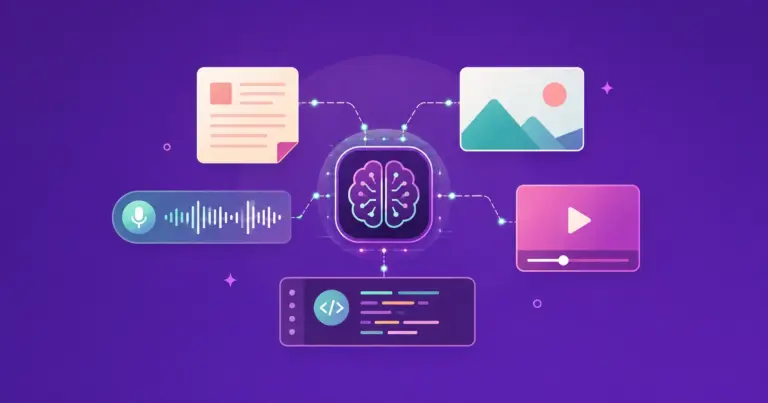
Ask ChatGPT to write a birthday poem or ask Midjourney to paint a dragon, and you’re watching generative AI at work. Rather than sorting data into categories, these systems study huge volumes of text, images, or code and then produce something new that follows the patterns they learned. That’s the core distinction: older AI mostly tells you what something is, generative AI makes something that didn’t exist a moment ago.
Yes, ChatGPT is a generative AI tool, and so are Gemini, Claude, Midjourney, and GitHub Copilot. Each one is built on a large language model or a similar architecture trained on massive datasets, then fine-tuned to respond to a prompt with new content rather than a lookup result.
Generative AI vs. Traditional AI: What Is the Difference?
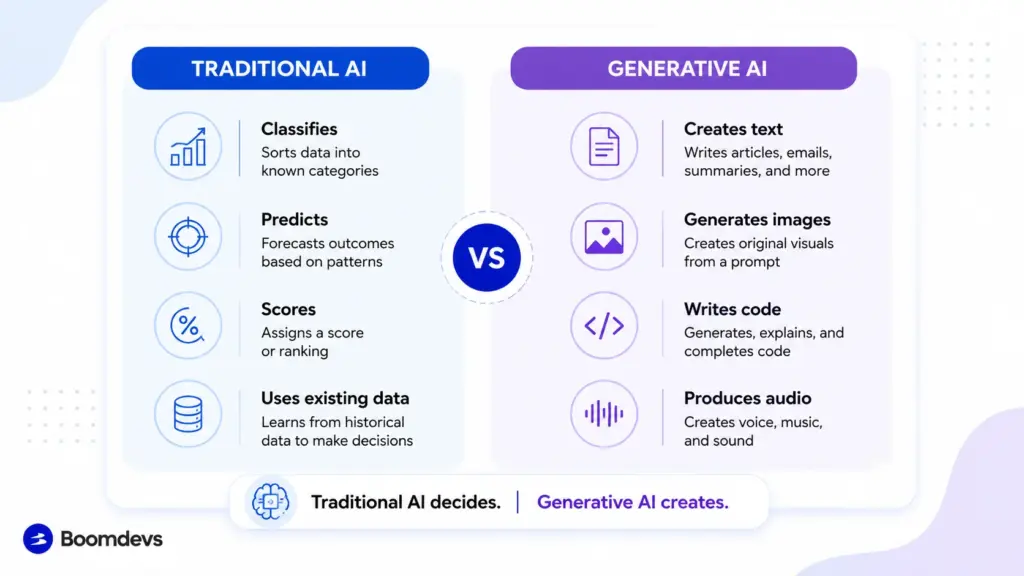
Traditional AI is a sorter. Feed it years of sensor readings from a factory floor, and it will flag which machine is likely to fail next week. It classifies, scores, and predicts, but it doesn’t produce anything new on its own.
Generative AI is a maker. Give it the same factory data plus a prompt, and it can draft the full maintenance report, write the parts order, and summarize the findings for a manager who has never touched the raw numbers.
| Traditional AI | Generative AI | |
| Core function | Classifies, scores, predicts | Creates new text, images, code, and audio |
| Typical output | A number, label, or ranking | A document, image, conversation, or program |
| Example | Fraud-detection scoring model | A drafted fraud investigation summary |
| Training goal | Accuracy on a known outcome | Fluent, relevant, novel output |
Here’s the part most comparison articles skip: the two are rarely used alone in production. A bank might use a traditional model to flag a suspicious transaction, then hand that flag to a generative model that writes the investigator’s case notes. The pairing, not either technology in isolation, is what shows up in a lot of enterprise rollouts today.
How Businesses Are Using Generative AI Today
The use cases below aren’t hypothetical. Each is running in production at a named company right now, which matters more than a demo video ever could.
Generative AI in Healthcare and Pharmaceuticals
Drug discovery teams use generative models to simulate how a candidate molecule might bind to a target protein, cutting months off the early screening process. On the clinical side, hospitals are piloting tools that draft patient notes and visit summaries directly from a recorded conversation, giving physicians back time that used to go into typing. Radiology teams are also testing generative image tools that highlight subtle patterns in scans that a first pass might miss, though a radiologist still signs off on every read.
Generative AI in Banking and Financial Services
Morgan Stanley rolled out an internal assistant built on GPT-4 that lets financial advisors search a library of roughly 100,000 research reports in plain English instead of keywords. Document retrieval jumped from about 20% to 80% of the time advisors could actually find what they needed, and 98% of advisor teams now use the tool daily. That’s not a pilot number. That’s a firm betting its day-to-day workflow on the technology.
Fraud teams use a similar pattern on the defensive side: generative models simulate thousands of plausible fraud scenarios to train detection systems that would otherwise only learn from fraud that already happened.
Generative AI in Legal Services
Law firms were slower to adopt AI than most industries, but then Macfarlanes proved the caution wasn’t necessary. The London firm rolled out Harvey, a legal-specific generative AI tool, firm-wide back in 2023, and today more than 80% of its lawyers use it regularly for contract review, diligence, and legal research. One partner described using it to review hundreds of financial instruments fast enough to give a client same-week investment guidance instead of a same-month one.
Generative AI in Retail and E-Commerce
Sephora’s Virtual Artist lets shoppers try on makeup shades through their phone camera before buying, a computer-vision and AI-personalization tool that helped cut product returns and pushed customers three times closer to completing a purchase. On the generative side, retailers increasingly lean on the same to power search that understands “warm-weather running shoes for flat feet” instead of just matching keywords.
Generative AI in Software Development
Few use cases have harder numbers behind them than coding. In a controlled study run with Microsoft Research, developers using GitHub Copilot completed a coding task 55% faster than a control group working without it. Copilot now writes close to half of the code its active users ship, higher still in verbose languages like Java. It won’t replace a senior engineer’s judgment, but it clearly replaces a lot of boilerplate typing.
Healthcare, banking, legal, retail, and software are the five most documented deployments right now, each backed by a named company and a real number. But they’re only the headline cases. Zoom out across every function a business runs, and the list gets a lot longer.
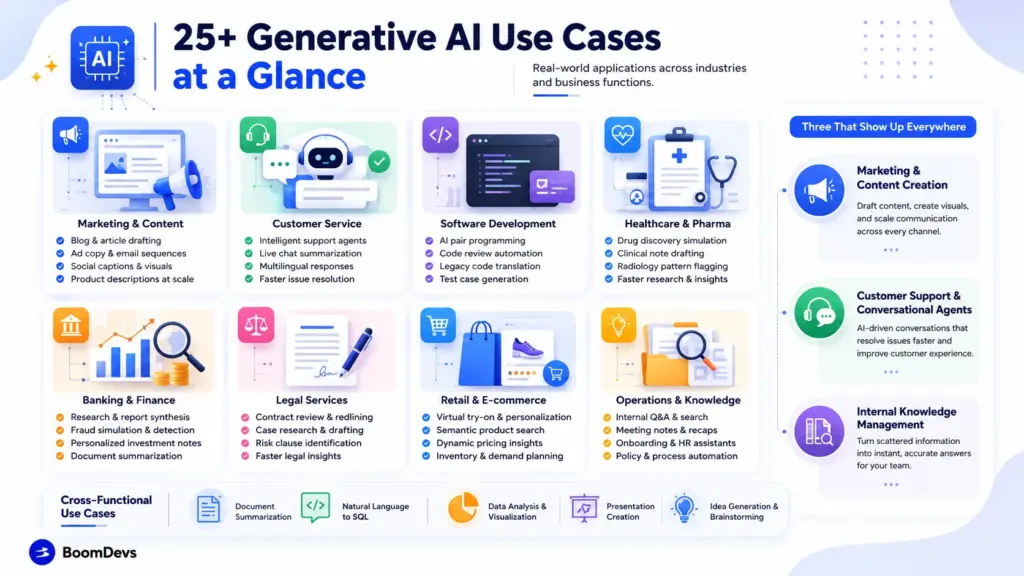
25+ Generative AI Use Cases at a Glance
Here’s the fuller spread in one scannable reference, grouped by the same industries above plus the functions that cut across all of them. Each line opens with a one-line answer, then a bit more context on how it actually plays out.
Marketing and Content
Content teams were among the earliest adopters, mostly because a rough draft is low-risk and easy for a human editor to fix.
- Blog and article drafting: A tool turns an outline or a few bullet points into a full first-pass article. Writers still add real reporting and fact-check the draft, but the blank-page problem mostly disappears.
- Ad copy and email sequences: One prompt generates a dozen headline and subject-line variants ready for A/B testing. Teams that used to test three variants a week can now test dozens without adding headcount.
- Social captions and campaign copy: Captions for Instagram, LinkedIn, and X get drafted in one pass, with tone adjusted per platform. Feeding in a brand voice guide keeps the output from sounding generic.
- Product descriptions at scale: Retailers with thousands of SKUs get unique descriptions written overnight instead of leaving product pages blank. It also keeps tone consistent across categories that used to be written by different people.
- Storyboards and campaign visuals: Midjourney or DALL-E concepts give a creative director something concrete to react to before a shoot is booked. The final campaign assets still go through a real photographer or designer.
Customer Service
Support was one of the first functions to show measurable ROI, since ticket volume and resolution time are easy to compare before and after.
- End-to-end support agents: These pull order history and account details to actually resolve a return or billing question, not just answer a FAQ. Escalation to a human still happens, just for a smaller share of tickets than before.
- Live chat summarization: While a conversation is still live, the tool recaps the issue and suggests next steps in the agent’s sidebar. New hires ramp up faster because they aren’t starting each ticket from zero context.
- Multilingual response drafting: A reply drafted in English gets localized into a dozen languages without a separate translation vendor. Tone and idiom still need a native speaker’s review on anything high-stakes.
Software Development
Coding is the use case with the hardest data behind it, mostly because developer output is unusually easy to measure.
- AI pair programming: Tools like GitHub Copilot suggest whole functions as a developer types, not just single-line autocomplete. The 55% speed gain cited earlier in this guide comes from exactly this kind of assisted coding.
- Automated code review: Bots flag style violations, obvious bugs, and missing test coverage before a human reviewer opens the pull request. That cuts down the back-and-forth that used to eat up a reviewer’s afternoon.
- Legacy code translation: Old COBOL or outdated Java gets converted into a modern language, with the AI handling the repetitive syntax work. A senior engineer still has to verify that the business logic survived the jump.
Healthcare and Pharma
Healthcare moves more cautiously than most industries here, for good reason, but the early wins are already measurable.
- Drug discovery simulation: Models simulate how a candidate molecule might bind to a target protein long before a physical lab test happens. That narrows the list of candidates worth the cost of real-world testing.
- Clinical note drafting: With patient consent, an ambient tool listens to a visit and drafts the clinical note automatically. Physicians spend fewer evenings finishing paperwork and more time actually seeing patients.
- Radiology pattern flagging: Generative and computer-vision models highlight subtle patterns in a scan that a first pass might miss. A radiologist still makes the final call, just with a second set of eyes on every image.
Banking and Finance
Financial services moved fast here, largely because faster research has an easy-to-quantify payoff.
- Research synthesis: Morgan Stanley’s assistant lets advisors search roughly 100,000 research reports in plain English instead of digging through PDFs by keyword. What used to take an afternoon of searching now takes a few minutes.
- Fraud scenario simulation: Generative models create synthetic fraud patterns to train detection systems, since real fraud data is naturally limited and skewed. That gives security teams a far bigger training set to work from than fraud cases alone provide.
- Personalized investment notes: A draft summary tailored to a client’s actual portfolio and risk profile gets generated automatically. An advisor still edits and personalizes it, but starts from a draft instead of a blank document.
Legal Services
Legal work is dense, repetitive, and text-heavy, which happens to be exactly what generative models handle well.
- Contract review and redlining: Harvey flags risk clauses across hundreds of pages of contracts or financial instruments in a fraction of the time a junior associate would need. Macfarlanes reports this kind of review now happens fast enough to give clients guidance the same week instead of the same month.
- Case research and brief drafting: A first-pass draft pulls relevant precedent and sketches an initial brief structure. A lawyer still builds the actual legal strategy, but starts from a draft instead of a blank page.
Retail and E-Commerce
Retail blends two different uses of the technology: visual personalization for shoppers and generative content for the business side.
- Virtual try-on: Sephora’s Virtual Artist lets shoppers preview makeup shades through a phone camera before buying, cutting returns and pushing more shoppers to complete a purchase. It’s a computer-vision tool more than a purely generative one, but it’s the clearest personalization win in retail.
- Semantic product search: Search understands “warm-weather running shoes for flat feet” instead of matching only the literal words typed in. That cuts down the dead-end searches that used to send a shopper to a competitor’s site.
- Dynamic pricing summaries: Instead of a raw spreadsheet of demand signals, a manager gets a plain-language summary of what’s driving a price change. Decisions that used to need a data analyst’s interpretation move a lot faster.
Operations and Knowledge Management
This is the least glamorous category on this list, and also one of the highest-value ones.
- Internal Q&A tools: A new hire asks a plain-language question about a travel policy or a benefits detail and gets a synthesized answer instead of a stale wiki link. It only works well if the underlying documents are current, which is the RAG point covered later in this guide.
- Meeting transcription and recaps: Action items get pulled automatically from a recorded call and dropped straight into a task tracker. Nobody has to volunteer as the designated note-taker anymore.
- Onboarding and HR assistants: Routine policy questions get answered without opening an HR ticket. That frees the HR team to spend time on the cases that genuinely need a human judgment call.
Data and Analytics
These two use cases sit a layer below the customer-facing ones, but they quietly support a lot of the others on this list.
- Natural-language-to-SQL: A business analyst types a plain-English question and gets back a working database query, no SQL syntax required. That shrinks the backlog of requests waiting on an already-stretched data engineering team.
- Synthetic data generation: When real customer data is too sensitive or too limited to use for training or testing, generative models create realistic synthetic data instead. It also works as a privacy safeguard when rules restrict how real customer records can be used.
Three of those functions (marketing, customer service, and knowledge management) show up in almost every company that adopts generative AI, regardless of industry. They’re worth a closer look.
What Does It Actually Cost to Implement?
Most use-case lists stop at “what it does.” The question that actually determines whether a project gets approved is “what does it cost, and what do we get back?” Costs vary widely by scope, but a few patterns hold across most deployments:
| Implementation type | Typical scope | Rough cost driver |
| Off-the-shelf tool subscription (e.g., Copilot, an AI writing assistant) | Per-seat licensing, minimal setup | Predictable, scales linearly with headcount |
| RAG-based internal assistant (e.g., an internal Q&A or research tool) | Custom retrieval pipeline, vector database, integration with existing document stores | Driven mainly by data cleanup and integration engineering, not the model itself |
| Fine-tuned or agentic workflow (e.g., an end-to-end support agent) | Custom orchestration, tool integrations, evaluation framework, ongoing monitoring | Driven by engineering time, evaluation/testing cycles, and inference volume at scale |
The single biggest cost variable isn’t the AI model — it’s data readiness. A company with clean, centralized, well-governed documentation can stand up a RAG assistant in weeks. A company with scattered wikis, outdated policy PDFs, and no single source of truth will spend most of the budget on data cleanup before the model ever gets to prove itself. This is usually the first thing a proper AI and generative AI consulting engagement should assess before any model gets chosen, and it’s the subject of our companion guide, How Much Does AI Consulting Cost in 2026? (link once that post is published).
Common mistakes that inflate cost or sink the project entirely:
- Skipping a data-readiness audit and finding out mid-project that the source documents are outdated or contradictory.
- Building for a company-wide rollout before validating the workflow on one team.
- Treating the model choice as the hard part, when the harder and more expensive part is usually retrieval, evaluation, and integration.
- No human-in-the-loop review step, which turns a fluent-sounding error into a costly one.
- Committing to a long vendor contract before agentic capabilities (see below) makes the current tool category look outdated within a year.
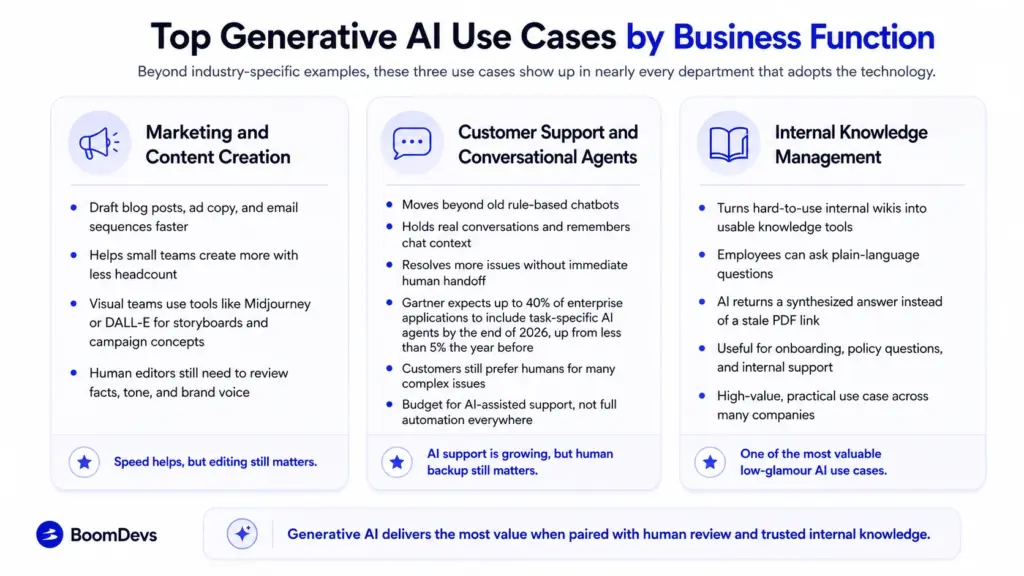
Top Generative AI Use Cases by Business Function
Beyond industry-specific examples, these three use cases show up in nearly every department that adopts the technology.
Marketing and Content Creation
Marketing teams use generative tools to draft blog posts, ad copy, and email sequences at a pace that would have required a much bigger headcount two years ago. Visual teams pair that with image generators like Midjourney or DALL-E for storyboards and campaign concepts before a photographer or designer ever gets involved. The catch: content produced this way still needs a human editor to check facts, tone, and brand voice, or the speed advantage turns into a cleanup job.
Customer Support and Conversational Agents
The old chatbot was a decision tree with a fixed script. Today’s generative agents hold a real conversation, remember context from earlier in the chat, and resolve issues that used to require a human handoff. Gartner has predicted that up to 40% of enterprise applications will integrate task-specific AI agents by the end of 2026, up from less than 5% the year before According to Gartner, this represents a faster adoption curve in enterprise software generally than in customer service specifically, where Gartner’s own research shows adoption is real but far from universal, and where a meaningful share of customers say they’d still rather reach a human for complex issues. The practical takeaway: budget for AI-assisted support, but don’t assume full automation is the end state.
Internal Knowledge Management
Every company has a graveyard of internal wikis nobody reads. Generative tools connected to that same content let a new hire ask a plain-language question, such as “what’s our travel reimbursement policy for international trips,” and get a synthesized answer instead of a stale PDF link. That single change is quietly one of the highest-value, lowest-glamour use cases in this whole list.
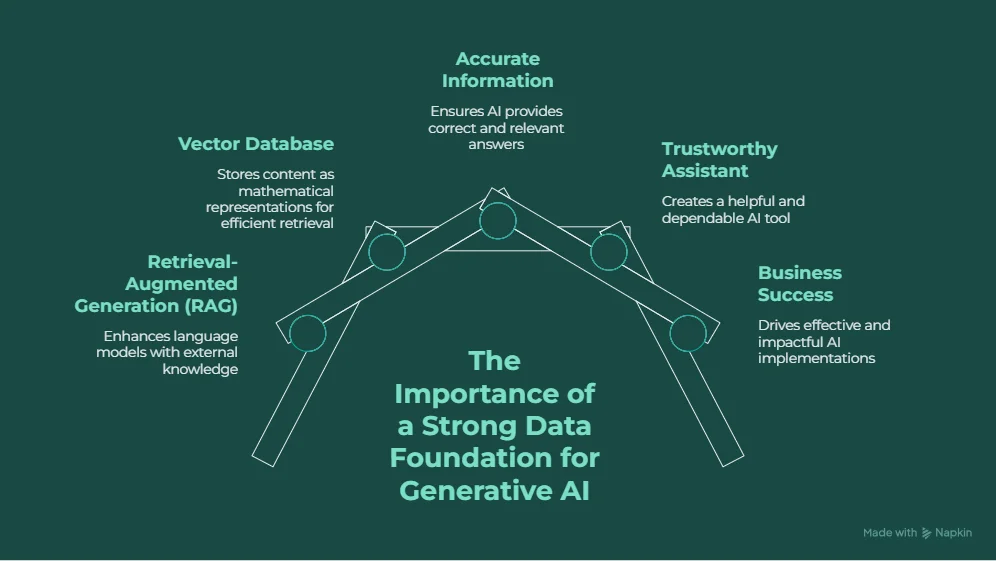
The Hidden Engine: Why Your Data Foundation Determines Success
Most articles on this topic stop at the use case list. That’s a mistake, because a generative model is only as useful as the data it can actually see.
This is where retrieval-augmented generation, or RAG, comes in. Google Cloud describes RAG as pairing a language model with an external knowledge base, so instead of relying purely on what it memorized during training, the model pulls in your company’s current documents before answering. A vector database sits underneath this process, storing your content as mathematical representations so the system can find the passage that actually matches a question, not just the one that shares a few keywords.
Skip this step, and you get a fluent-sounding assistant that confidently invents policy details that don’t exist. Get it right, and the same assistant cites the actual internal document it pulled the answer from. The difference between a genuinely useful deployment and an embarrassing one usually comes down to this unglamorous plumbing, not the choice of language model.
Where Generative AI Is Headed: The Rise of Agentic AI
If 2023 and 2024 were about chatbots that answered questions, 2026 is shaping up to be about agents that complete multi-step tasks on their own. An agentic system doesn’t just draft a reply. It can look up a customer’s order history, check a return policy, issue a refund, and send the confirmation, chaining several actions together without a person clicking through each step.
This shift matters for anyone planning a generative AI rollout right now. A tool bought purely as a chat interface may already be behind what a well-built agent can do for the same workflow a year from now. Worth keeping in mind before locking into a long contract.
How to Implement Generative AI in Your Organization
Skipping straight to a company-wide rollout is the single most common way these projects fail. A tighter, staged approach the same one our consulting team walks clients through works better.
- Identify one low-risk, high-reward use case. Marketing drafts and internal Q&A tools are safer starting points than anything touching customer money or medical decisions.
- Assess your data readiness. Messy, scattered, or ungoverned data will sink even the best model, so clean and consolidate the sources the tool will actually pull from first.
- Run a small pilot. Test on a single team or workflow for a few weeks before anyone talks about scaling it.
- Keep a human in the loop. Every output needs a review step until the tool has earned enough track record to loosen that oversight.
- Scale based on measured ROI, not enthusiasm. Expand to the next department only once the first pilot shows a number worth repeating.
What Are the Risks and Challenges of Generative AI?
None of the upside above comes free. Three risks show up in nearly every deployment.
AI Hallucinations
These models are probabilistic, which means they will sometimes state something false with the same confident tone as something true. A grounded RAG setup reduces this, but it doesn’t eliminate it, so a review step still matters for anything client-facing.
Data Privacy and Security
Feeding sensitive internal or customer data into a public model is one of the fastest ways to create a compliance headache. Enterprise deployments typically need contractual guarantees around data retention and training use before any sensitive input goes near the tool.
Bias and Ethical Concerns
A model trained on human-generated data inherits human patterns, including the unflattering ones. Left unchecked, that can mean skewed hiring recommendations or uneven customer service quality across demographic groups, so bias testing belongs in the rollout plan, not as an afterthought.
Frequently Asked Questions
What are some real-world examples of generative AI?
Morgan Stanley uses a GPT-4-based assistant, so financial advisors can search 100,000 research reports in plain English. Macfarlanes, a London law firm, uses Harvey to review contracts and financial instruments. GitHub Copilot writes close to half the code its active developers ship. These aren’t demos. They’re daily production tools inside real companies.
What is the difference between traditional AI and generative AI?
Traditional AI classifies, scores, or predicts based on patterns in existing data, like flagging a fraudulent transaction. Generative AI creates new output, such as text, images, code, or audio, that didn’t exist before the prompt. Many companies now chain the two together rather than choosing one over the other.
Is generative AI going to replace human jobs?
Right now, it behaves more like a co-pilot than a replacement. It handles repetitive tasks, like drafting a first pass of an email or generating boilerplate code, which frees people up for judgment calls, client relationships, and complex problem-solving that the technology still can’t reliably do alone.
Is ChatGPT a generative AI?
Yes. ChatGPT, along with Gemini, Claude, and Midjourney, is built on models trained to generate new content in response to a prompt rather than simply retrieve or classify existing information.
What are the main types of AI?
There are two common ways to slice this. By capability, AI is grouped into narrow AI (task-specific, everything in use today), general AI (human-level flexibility, still theoretical), and super AI (beyond human intelligence, purely hypothetical). By function, IBM groups systems into reactive machines, limited-memory systems, theory-of-mind AI, and self-aware AI, the last two of which don’t exist yet. Combine both schemes and you get the “seven types” some articles list.
What are the most common AI use cases today?
Beyond generative applications like content drafting and coding, AI shows up in recommendation engines, fraud detection, predictive maintenance, image recognition, and voice assistants. Most large organizations now run a mix of traditional and generative models side by side rather than picking one category exclusively.
What are the top generative AI tools right now?
By worldwide web traffic in mid-2026, ChatGPT led with roughly 54% share, followed by Gemini at about 28% and Claude at around 9%. For specialized tasks, Midjourney and DALL-E dominate image generation, while GitHub Copilot leads AI-assisted coding. Which one is “best” depends heavily on the task, not just the popularity ranking.
What are the benefits of using AI?
The recurring benefits are efficiency at scale, round-the-clock availability, personalization that would be too costly to do manually, faster first drafts of documents and code, and better-informed decisions pulled from data no single person could review alone. None of that shows up automatically. It depends on clean data and a workflow actually built around the tool.
Ready to move past the pilot stage? Talk to Boomdevs’ AI and generative AI consulting team and turn one of the use cases above into a working project this quarter.