- 1. Key Takeaways
- 2. How to Build Your First AI Agent
- Agent or Just Automation? Check This First
- What You Need Before You Start
- Step 1: Pick One Task and Write a Definition of Done
- Step 2: Choose Your Build Path
- Step 3: Write the System Prompt
- Step 4: Give It Tools (and Memory, If It Needs Any)
- Step 5: Set Guardrails and a Stop Condition
- Step 6: Test It Against Real Examples Before You Trust It
- 3. Which Build Path Is Best for a Beginner?
- 4. What It Actually Costs to Run Your First Agent
- 5. Common Mistakes That Sink First AI Agent Projects
- 6. What You Should Never Hand to an Agent
- 7. Frequently Asked Questions
- 8. How Boomdevs Helps When You’re Ready to Scale
Summarize with
You saw an AI agent being demonstrated online and thought it could be useful, but when you opened a new document, you had no idea where to start.
The difference between watching and taking action is where most initial attempts stall. When creating your first AI agent, you don’t need to become an expert in a framework; instead, select one small task and follow six clear steps.
This step-by-step guide on how to build your first AI agent will show you exactly how to do it even if you have no previous experience in coding.
Key Takeaways
- It takes a basic first agent about an afternoon to build and around two weeks to earn trust.
- The basic process is straightforward: follow the instructions, use the tools, refer to memory if the task requires it, and stop when the stopping condition is met.
- Begin with a single narrow and repetitive task that you can check in under a minute, not one that automates your entire job.
- You can build a working agent with no-code tools such as n8n, Make, Zapier, or a custom GPT without writing any code.
- Gartner predicts that more than 40 percent of agentic AI projects will be cancelled by the end of 2027, mainly because of scope creep rather than inadequate models.
How to Build Your First AI Agent
Agent or Just Automation? Check This First
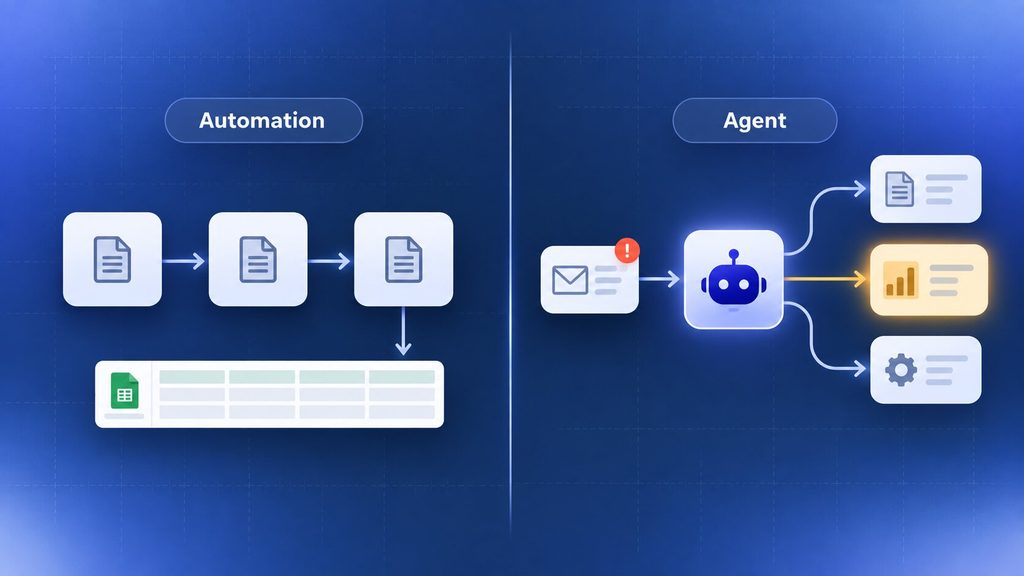
Not every repetitive task needs an agent. Some just need a rule.
An automation carries out the steps that you have previously written. It has no need to think; if a new order always ends up in the same row of the spreadsheet, then what you have is automation, not an agent.
When the agent is in operation, it has to make a judgment. It looks at some messy material, for example, an email or a support ticket, and then decides what action to take. Since it’s not possible to write in advance all possible versions of that message as an if-then rule, the model makes the decision.
Anthropic also draws a distinction at the architecture level: in workflows, the code determines what happens at each stage; with agents, the model directs its own process and controls how it reaches a given outcome. Verify this distinction before you start developing.
Run your task through a quick filter:
- What is the rule when the input and output are fixed? You don’t need a model to establish that.
- Does it have variable input requiring a judgment? Yes, that’s typical of an agent.
- Can’t you get it right unless you have some relationship history? Then keep it with that person for the moment. Neither tool is ready for that yet.
If your task is on the middle line, keep reading.
What You Need Before You Start
Before you learn how to build your first AI agent, you don’t need to write code, but you do need a few things ready.
- One task, written out in full. A single sentence stating what goes in and what should come out.
- Gather 15 to 20 real past examples, such as old emails, old transcripts, and old tickets, and test against them before taking any action on a live system.
- A model or platform account; this could be a ChatGPT Plus subscription, an API key, or a login to a no-code platform, depending on the choice you make in step 2.
- A place where the output can be stored; for example, a spreadsheet, a draft folder, or a private Slack channel. It’s not something customers can access yet.
Step 1: Pick One Task and Write a Definition of Done
Begin with the result, not the steps.
Whether it is worth the effort depends on two factors: how often you do the task and how quickly you can tell the result is wrong. A task you perform only once a month is unlikely to warrant the time it takes to set up, and one where poor output could go unnoticed for days is even worse, since errors won’t become apparent until after they have already cost you.
Define done in a single sentence: not ‘sort my support emails’, but ‘every new email must have a category, a priority, and a one-line summary entered into this sheet, with anything urgent marked within five minutes’; if you can’t visualize the finished product, then the agent will likewise be unable to tell when it has been completed.
Step 2: Choose Your Build Path
There are three ways to build a working agent: using a no-code platform, using an agent framework, or writing custom code. In each case, you trade speed for control.
When you’re working with your first agent, choose one that already uses the tools you use daily. If your task fits within spreadsheets, forms, and email, a no-code platform will get you to your goal fastest.
But if the situation requires logic your current apps can’t handle, a framework or a few hundred lines of code will give you more control.
The account below examines the trade-offs. At this stage, note which category applies; this will affect the way you carry out the next two steps.
Step 3: Write the System Prompt
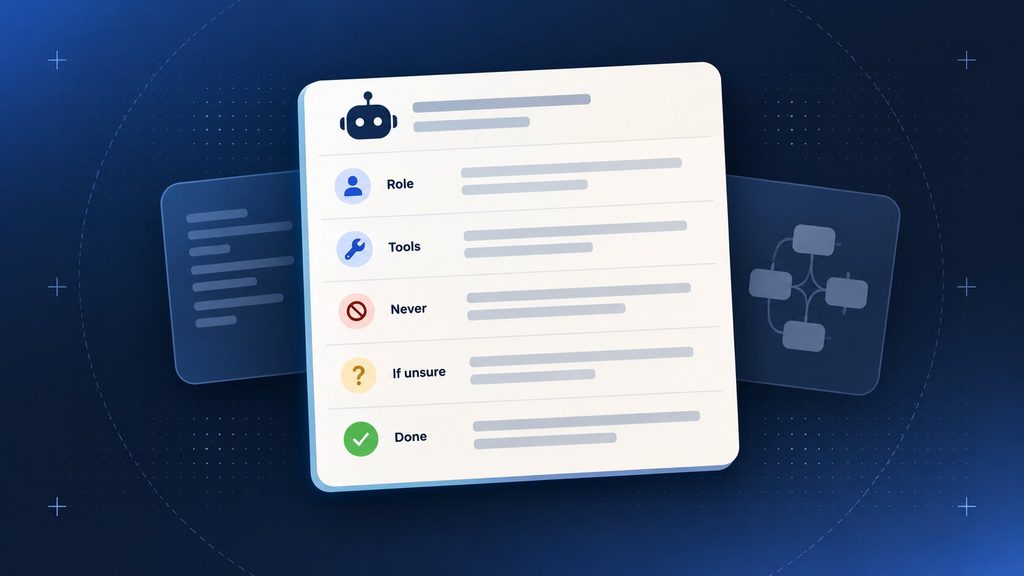
Think of it as a job description you’d provide for a new employee, not as a single line of instruction.
A working instruction block covers five things:
- The role and scope of the agent – that is, what it is intended for and what lies clearly outside its responsibilities.
- The rules regarding the use of tools are as follows: when it can call upon each one and when it cannot.
- It must never take irreversible actions, guess when data is missing, or carry out any task outside its scope.
- When dealing with uncertainty, it is better to ask a specific question or pause and flag the issue than to guess.
- The condition that constitutes the definition of done is the one that means that the task is finished.
Write this in plain English, then read it back as if you were the model with no other context. If a rule only makes sense because you know what you meant, rewrite it. For the conversational side of that instruction block specifically, Boomdevs’ guide to conversation design for AI chatbots goes deeper into tone and phrasing, and most of it carries straight over to an agent’s replies.
Step 4: Give It Tools (and Memory, If It Needs Any)
An agent can’t do anything without tools; without them, it can only discuss a task, not do it.
On your first build, keep the toolset small:
- The number should be between two and four, no higher than that. Each extra tool introduces a decision which the model has to get right.
- When reading rather than writing, using a tool to look something up poses little risk; but when it comes to altering a record, you need greater care, and you should address this in the next step.
- Assign one job to each tool; if a tool is meant to search, it should search, and summarising should not be included in the same request.
Unless the task requires remembering something from one session to another, for example, a customer’s preferences when they return, most first-time agents can do without memory.
If you do decide to include memory, then stick to short and long-lasting facts instead of keeping a full transcript. Having a large memory store has the effect of slowing down the model and causing it to hesitate and doubt itself.
Step 5: Set Guardrails and a Stop Condition
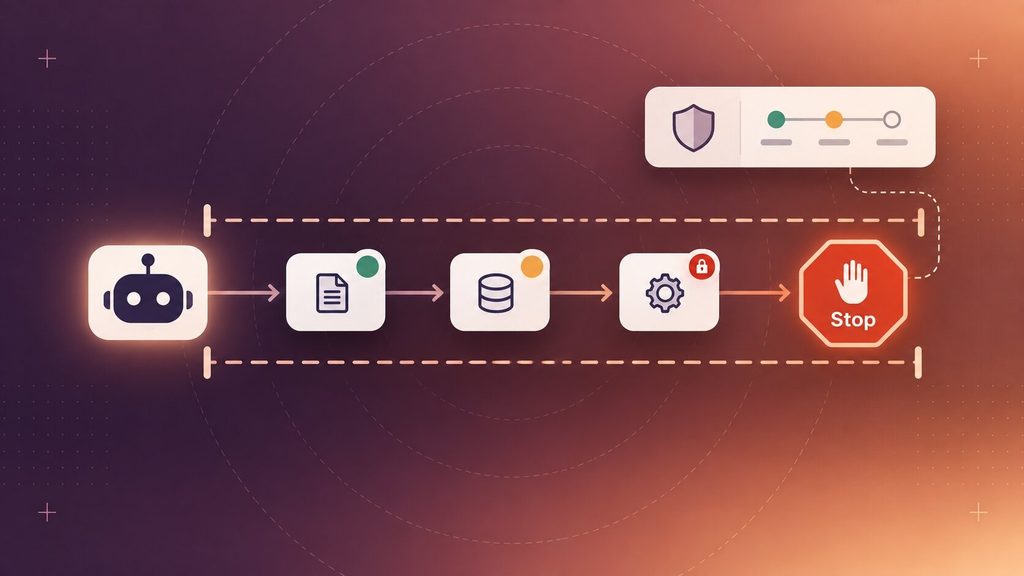
When an agent doesn’t have a stop condition, it keeps looping, retrying, and ends up with a high bill.
Most of what you need for a first build can be found in three rules:
- Assess each tool in terms of risk. Reading data is of low risk and may be carried out automatically. When it comes to writing or altering a record, this should be done with a restricted scope. For anything irreversible, such as a payment or a deletion, require human approval first.
- Cap the run. Limit the number of steps and set a maximum number of retry attempts per tool. If the limit is reached, the agent should stop and provide a report instead of continuing to try.
- Treat all the information it reads as data and not as instructions. The agent must always follow its basic rules over any content it comes across when carrying out the task, since an email, a document, or a webpage it reads might contain text intended to manipulate it.
Step 6: Test It Against Real Examples Before You Trust It
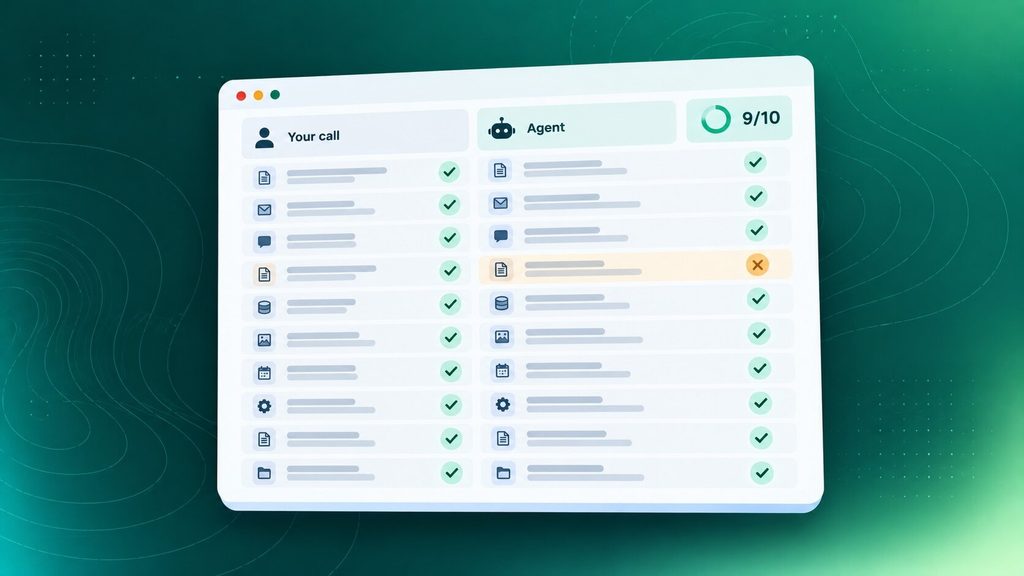
This is the stage new builders usually skip, and it determines whether the agent will survive real work.
Check it against the real examples that you collected earlier on. Compare the results with what you actually did. If it matches your own judgment in nine out of ten cases, then the instructions are nearly adequate.
If it falls below that figure, the problem is generally to be found in the instructions, not in the model.
Strong models still need such a check. Independent research by Carnegie Mellon University and Salesforce showed that the most advanced models managed only about 30 to 35% of realistic, multi-step office tasks on their own when tested in a simulated work environment.
Although newer models have since improved, the fundamental lesson remains the same: you should check against real situations before handing over the keys.
Leave it to run alongside your usual process for one or two weeks and check its outputs against yours every day. This stage identifies problems that no test set ever will, for example, a form field that is always empty on mobile or a particular case that occurs only once a month.
Which Build Path Is Best for a Beginner?
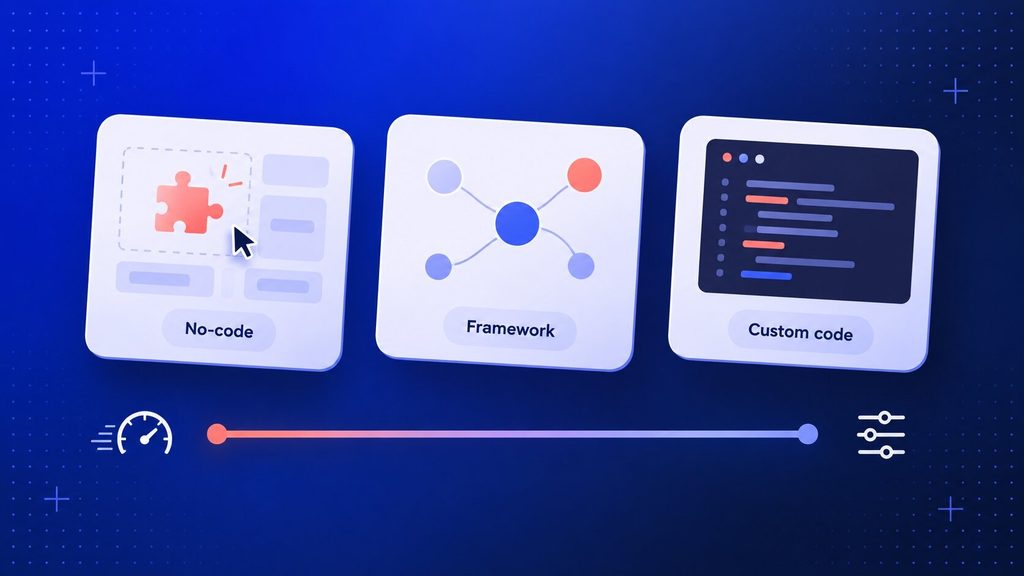
Part of learning how to build your first AI agent is picking the right build path. In each build path, there is a compromise between speed of setup and long-term control, and the most frequent early mistake is to make your choice according to current trends rather than based on what your task really requires.
| Path | Best For | Setup Time | Control Over Behavior |
| No-code platform | Non-developers connecting apps they already use | An afternoon | Low to moderate |
| Agent framework | Builders who want structure without starting from zero | A few days | Moderate to high |
| Custom code | Regulated data, deep integrations, strict permissions | Weeks | Full |
Choose the row that corresponds to the highest level of your task, not the lowest one. A task that remains simple indefinitely doesn’t require the extra overhead of a framework. But a task that will eventually handle customer data at scale will exceed the limits of a no-code platform.
No-Code Platforms
If what you need to do mainly involves passing information between apps you already use, a no-code platform can get you an operating agent within a day. Platforms such as n8n, Make, and Zapier all offer agent-style steps, whereby a model reads some content and then decides what should happen next, not just following fixed if-then rules.
A custom GPT can also be used in the case where the job consists simply of reading documents and answering questions and involves nothing else being connected to it.
n8n targets technical users who want to self-host and maintain control over their data; to offer a more user-friendly interface and a steeper learning curve, Make and Zapier give up some of that control.
Agent Frameworks
If you are comfortable with writing some code and would like greater control over the way the agent reasons, then there is a framework available which lies between the no-code approach and building everything from scratch.
Frameworks such as LangChain with its LangGraph extension, CrewAI, and AutoGen (or its successor, the Microsoft Agent Framework) include tool-calling, memory, and retry facilities by default, so you don’t have to set them up with direct API calls.
When a single agent calls only one or two tools, the OpenAI Agents SDK or the Claude Agent SDK is generally the faster choice, since these official SDKs include tool use, memory, and tracing without adding an extra layer of framework overhead.
Likewise, Anthropic’s own engineering team makes a similar observation: while a framework does help with speeding up the prototyping process, the abstraction it introduces can make it more difficult to see precisely what the model is doing when a problem occurs, and therefore it’s advisable to only add that level of complexity after you’ve established that you actually need it.
Custom Code
Custom code makes sense when compliance, deep integrations, or strict permission rules don’t work. Agents should also use it when they have to coordinate with several other agents, each with a narrow job, reporting to someone who manages them.
That’s a lot of setup for a first agent. Save it for the second or third build, after you know what the first one needed. In case you’re thinking about hiring outside help at that point, Boomdevs’ guide to choosing an AI consultancy walks through what to ask before you sign anything.
What It Actually Costs to Run Your First Agent
The budget for a first agent handling a small-business volume is more in the range of a streaming subscription than that of enterprise software.
| Platform | Entry Price (Billed Annually) | What It Buys |
| Make | $9/month | 10,000 credits on the Core plan |
| n8n | Around $20/month | 2,500 workflow executions on Starter; free if you self-host |
| Zapier | $19.99/month | 750 tasks on Starter, the widest app library |
| ChatGPT Plus (custom GPT) | $20/month | Reading documents and answering questions, no app connections |
These are the entry-tier prices published on each platform’s own pricing page: n8n, Make, Zapier, and ChatGPT Plus. They shift often, so treat the table as a starting point and confirm the current rate before you commit.
In addition to the platform fee, model usage adds a few extra dollars each month unless the agent is continuously reading long documents. Consultants who have developed such agents for small businesses state that a simple sorting-and-drafting agent which handles a few hundred items a month generally ends up within a comparable range when all the costs are taken into account, typically being well below one hundred dollars in total.
The figure given on the pricing page is most often not the complete story; be on the lookout for:
- Billing based on tasks during multi-step processes. When a single agent run is carried out, it can use up several billed actions at the same time on platforms that charge per step.
- Retries on a flaky connection. The process involves retrying on an unreliable connection, and each attempt is billed even if the first failed for no reason on the agent’s part.
- A test loop will be left running since it is easy to forget that a scheduled test has still been running over the weekend.
- Setup time is entirely up to you, and the biggest actual expense during the first month is never shown on any pricing page.
Common Mistakes That Sink First AI Agent Projects
Gartner has projected that more than 40 per cent of agentic AI projects will be cancelled by the end of 2027, the reasons given being increasing costs, unclear value, and inadequate risk controls, not poor models; most of these problems can be avoided at the first-agent stage.
The mistakes that show up most often:
- Trying to have a single agent carry out all tasks – for example, a support agent that is also responsible for sales and billing has no defined area of responsibility, and its behaviour becomes less predictable the more tasks it has to perform.
- Add tools only after the main task works. Each additional tool means another decision that the model has to get right. First verify the simplest version before expanding.
- Rewriting the prompt to fix a structural problem. If the agent keeps looping or guessing, the fix is usually a missing rule or a missing stop condition, not a longer paragraph of instructions.
- Ignoring the stop condition. An agent with no maximum number of steps or retry limit won’t fail silently; it will keep running and keep costing money.
- Expanding trust before testing is done. An agent that looks stable in a demo can still fail on messy, real-world input it hasn’t seen yet.
What You Should Never Hand to an Agent
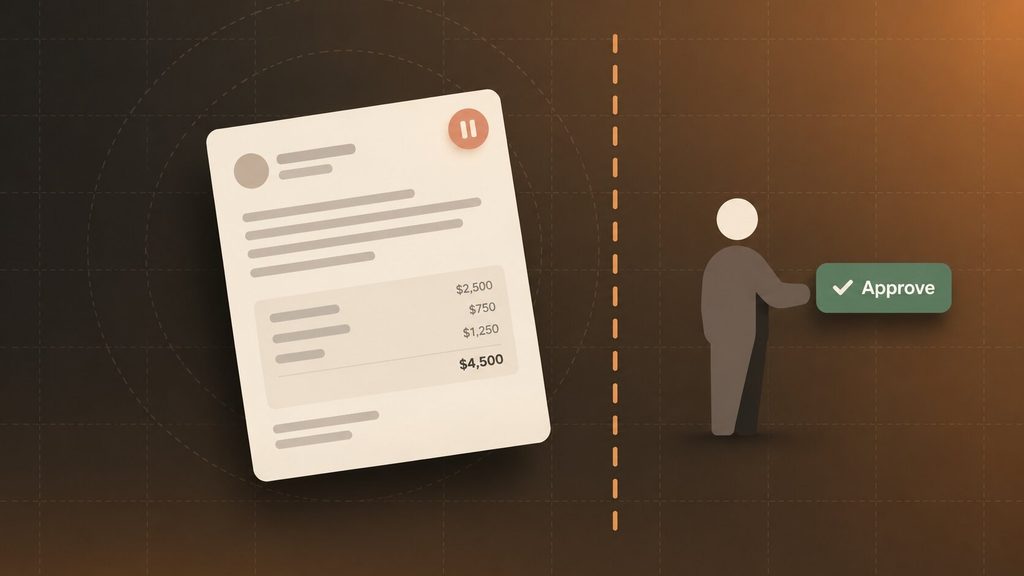
If a person is to be kept in front of anything that a customer would regard as a promise or anything that is difficult to undo.
- Any kind of money movement – the quickest way to turn a helpful agent into an expensive mistake is to approve a payment or invoice without a second person checking it.
- The agent drafting the figure should have a firm price the customer can read. Still, the person has to send it.
- When responding to a dissatisfied customer – whether in reply to a review or a complaint the communication should be given a human-tone check before it is sent.
- Changes to stored records that are irreversible should go through an approval step, not the agent’s default permissions.
- When you write down what you promise, even when it’s helpful, it becomes a commitment.
- Advice that is regulated: since health, legal, and financial advice has consequences, a novice building agent is not in a position to take on that responsibility.
The drafting stage is essentially the safer option in most of these situations. If an agent prepares the response to the complaint and then leaves it for you to approve, that takes only fifteen seconds to read; but if the agent sends it on its own, it can cost you a customer.
Frequently Asked Questions
How does an AI agent differ from an AI chatbot?
Chatbots answer what you type and stop. When an agent decides what to do next, he or she calls tools for information or takes action, and keeps going until the task is actually done. If what you need is a smarter FAQ responder rather than something that takes action, Boomdevs’ rundown of AI chatbot builders covers that simpler category well.
Can I build an AI agent without coding?
This is a must for a first agent, especially if it needs to transfer information between apps or read documents. With no-code platforms like n8n, Make, Zapier, and a custom GPT, you can make agent-style decisions without writing a single line of code. For more complex, judgment-intensive tasks, a framework or custom build is often better.
How much does it cost to build an AI agent?
As for the platform, most no-code tools charge between $9 and $20 per month at the entry level. When you also add the cost of using the model, this is usually a few dollars unless the agent is constantly handling long documents. On average, the first agent ends up costing less than $100 per month.
Why do most AI agent projects fail?
The problem is escalating costs, unclear business value, and weak risk controls, not weak models. Usually, that means the agent was pointed at a job that was too broad or judgment-heavy for a first build, without a way to check whether it was working.
How Boomdevs Helps When You’re Ready to Scale
Now that you know how to build your first AI agent, building it yourself is the right way to learn what the technology can actually do. Scaling it past a personal experiment is a different job, and it’s usually where the Gartner cancellation numbers above come from.
Boomdevs’ AI agent development work picks up from there: agent architecture, tool integration, and the guardrails that keep an agent in its lane once real customers are on the other end.
The team has shipped software for clients across fintech, healthcare, and e-commerce, backed by more than 10 years of building products that have to hold up in production, not just in a demo.
If you’re not sure whether your task needs a full build or just a sharper first attempt, Boomdevs’ AI consulting team can review what you’re trying to automate and tell you honestly which it is.